Piper Files
Create custom pipelines to extract more information than is available through the Default Clinical Pipeline. Special Analysis Engines are in various cTAKES modules. Analysis Engines can be removed or added to pipelines to obtain desired results.
There are four methods available to create custom pipelines.
- XML Descriptor files are the original method used to create pipelines in Apache UIMA™. Though self-descriptive, they are verbose and error-prone.
- Apache uimaFIT™ enables creation of pipelines through Java code. This greatly simplifies unit testing and experimentation.
- The PipelineBuilder class in ctakes-core is a simplified facade for uimaFIT™ factories and objects.
- Piper files are a modern equivalent of the XML descriptor files.
Piper files consist of basic commands and parameters in an easily readable flat format.
- Create an empty text file. The standard file extension for piper files is
.piper - Use reader to specify a collection reader for your pipeline. To set values to parameters used by the reader class, simply add one or more
name=valuepairs after the reader name.
reader my.components.MyReader my/input/dir
-
add annotation engines and output writers to your pipeline. To set values to parameters used by a component, simply add one or more
name=valuepairs after the component name.
add my.components.MyFirstAnnotator mySetting1=myValueA myDataDirSetting=my/data/dir
add my.components.MySecondAnnotator mySetting2=myValueB myDataDirSetting=my/data/dir
add my.components.MyThirdAnnotator mySetting3=myValueC myDataDirSetting=my/data/dir
- load other instructions and settings from another piper file. See Table 2 for piper files in cTAKES.
load my/pipelines/MySubPipeline
-
reader, load and the add* commands all take component names or file directories as their first parameter.
If the class is not in a standard cTAKES module's cr ae or cc package, or a piper file is not in a standard module's pipeline/ directory then the package or path must be specified for that component or file. - Use package to simplify adding multiple pipeline components from a package not standard to cTAKES.
// Command cTAKES to search the package my.components for pipeline components.
package my.components
reader MyReader my/input/dir
add MyFirstAnnotator mySetting1=myValueA myDataDirSetting=my/data/dir
add MySecondAnnotator mySetting2=myValueB myDataDirSetting=my/data/dir
add MyThirdAnnotator mySetting3=myValueC myDataDirSetting=my/data/dir/XYZ

// Command cTAKES to search the directory my/pipelines for files.
package my/pipelines
load MySubPipeline
- Use set to assign a value to a parameter used by following components.
// Command cTAKES to search the package my.components for pipeline components.
package my.components
reader MyReader my/input/dir

// Command cTAKES to use a value for a named setting for all following instances not otherwise specified.
set myDataDirSetting=my/data/dir
add MyFirstAnnotator mySetting1=myValueA
add MySecondAnnotator mySetting2=myValueB
add MyThirdAnnotator mySetting3=myValueC myDataDirSetting=my/data/dir/XYZ

// Command cTAKES to search the directory my/pipelines for files.
package my/pipelines
load MySubPipeline
\*A `name=value` pair on a component line will, for that component, override a **set** parameter value.
-
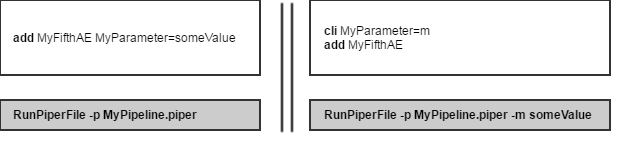
cli is a special type of set that sets a parameter to some value entered by the User on a command line.
* cli can only be used with the PiperFileRunner class, the bin/runPiperFile script or the Piper File Submitter GUI.
* Reserved parameters unavailable for cli are listed in Table 3. -
addDescription is a special type of add that utilizes a component's static
addDescription(..)method.* Use with care as not all components have such a method.
-
Use addLogged to ensure a component's start and finish time are logged. This is useful for debugging and profiling some components.
-
Use addLast to ensure that a component, such as a writer, executes at the end of a pipeline. Multiple components can be added with addLast.
* writeXmis is a convenience command. "**writeXmis** my/output" is equivalent to "**add** FileTreeXmiWriter OutputDirectory=my/output". -
name=valuepairs can accept comma-delimited arrays:ArrayParm=this,is,an,array
* Texts enclosed in quotes are not arrays:NotArrayParm="this,is,just,text" -
To run a piper file from the command line, execute the script
bin/runPiperFile -p path/to/piper -
To run a piper from code use the
main(..)method ofPiperFileRunnerin ctakes-core, or more directly use thePiperFileReaderclass in ctakes-core. -
There are examples of piper file use in the ctakes-examples module.
-
A piper file can also be loaded and run by the Simple Pipeline Fabricator GUI and the Piper File Submitter GUI.
This wiki contains a list of standard piper files distributed with cTAKES.
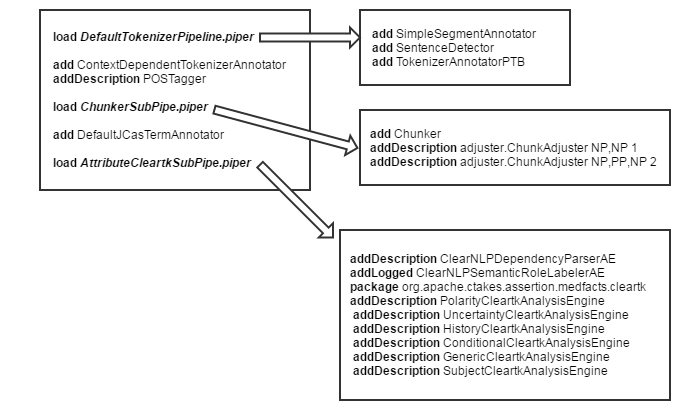
Diagram 1. Piper files used in the cTAKES Default Clinical Pipeline. Upper left is DefaultFastPipeline.piper
| cli | Equivalent Parameter Name | Description |
|---|---|---|
| -p | Piper | Location of a Piper file. |
| -i | InputDirectory | Directory for all input files. |
| -o | OutputDirectory | Directory for all output files. |
| -s | SubDirectory | Subdirectory for files. |
| -l | LookupXml | Path to fast dictionary lookup xml. |
| --key | umlsKey | UMLS user key. |
Table 3. Standard cli characters and their corresponding parameter names.
