Unexpected Behavior When Using The Checked Binder With Radio Inputs #41

Description

Issue Discussion
I've been using Tinybind for a small personal project and came across a documentation bug for the checked binder. The binder documentation states the following.
Checked
Checks the input when the value evaluates to true and unchecks the input when the value evaluates to false. This also sets the bound object's value to true/false when the user checks/unchecks the input (two-way).
Use this instead of value when binding to checkboxes or radio buttons.
Checkbox inputs using the checked binder work as expected, but radio inputs do not. Below is a description of the actual behavior and a minimal demo I put together.
Based on the documentation, I put together a data structure to bind to some radio inputs.
var DATA = {
    "radios": [
        {
            // Binds to the radio ID attribute.
            "id": "d1r1",

            // Binds to the radio value attribute.
            "value": "radio-1",

            // Used for the label associated with the radio.
            "label": "Radio 1",

            // Binds to the radio checked DOM value.
            "checked": true,


            // Helper variable to display the actual DOM value associated
	    // with the radio.
            "_value": undefined,

            // Helper variable to display the actual DOM checked state
            // associated with the radio.
            "_checked": undefined
        },
        {
            "id": "d1r2",
            "value": "radio-2",
            "label": "Radio 2",
            "checked": false,
            "_value": undefined,
            "_checked": undefined
        },
        {
            "id": "d1r3",
            "value": "radio-3",
            "label": "Radio 3",
            "checked": false,
            "_value": undefined,
            "_checked": undefined
        }
    ]
};
Here is the template code. The updateLabels function purely updates the label so I have omitted it here.
<div rv-each-rdata="radios">
    <input
        type="radio"
        name="demo-1"
        rv-id="rdata.id"
        rv-value="rdata.value"
        rv-checked="rdata.checked"
        rv-on-click="functions.updateLabels"
        >
    <label
        rv-for="rdata.id"
        >{ rdata.label } - DOM Value: { rdata._value } - DOM Checked: { rdata._checked } - Model Checked: { rdata.checked }</label>
</div>
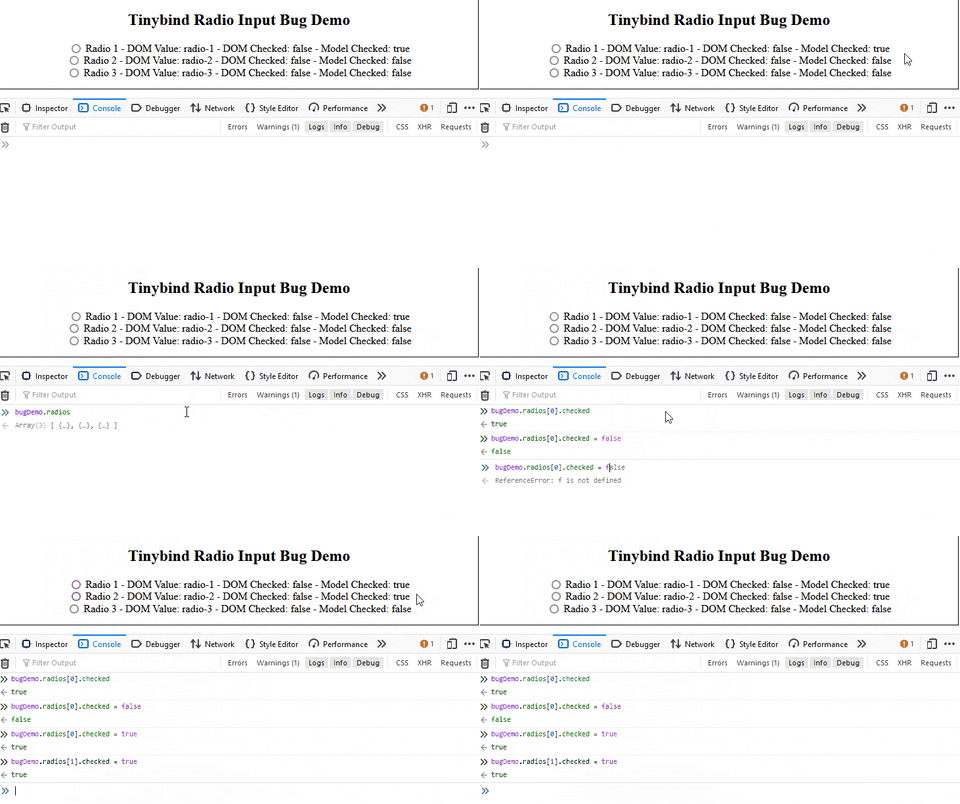
The first issue that arises is a failure to check radio input when the associated model datum is set to the boolean true. In the demo below, Radio 1 should be checked because the associated model datum is true, but you can see it is not. Even setting the model datum explicitly after the bind call does not update the DOM state for the radio inputs.
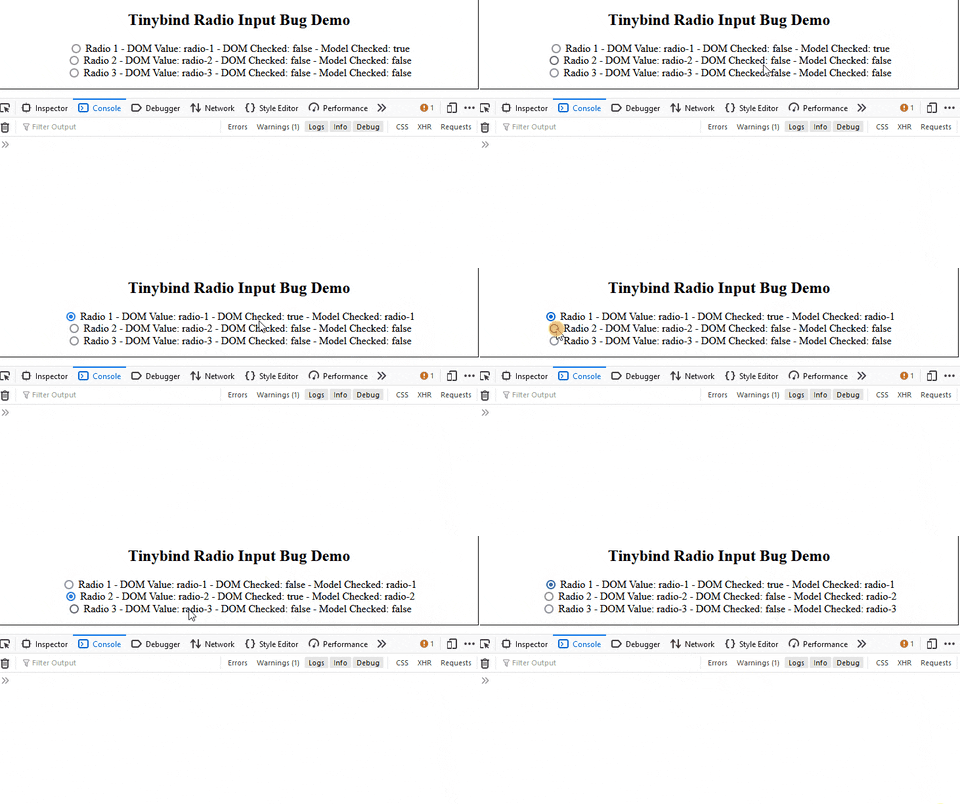
The second issue is an incorrect updating of the model datum when the DOM state is changed. When a user clicks any of the radio inputs, the model datum associated with that radio input is not set to true as stated in the documentation. It is instead set to the DOM value associated with the radio input. If no value is set, the value 'on' is used.
These bugs manifest with various configurations including inside a <fieldset> and even in the absence of the name and value attributes.
I initially attempted to generate a patch that honors the intent of the checked binder based on the documentation, but another issue arises. Radio inputs do not emit any DOM events when the are unchecked. This means there is no hook for the library to update the underlying model datum for a radio input that becomes unchecked.
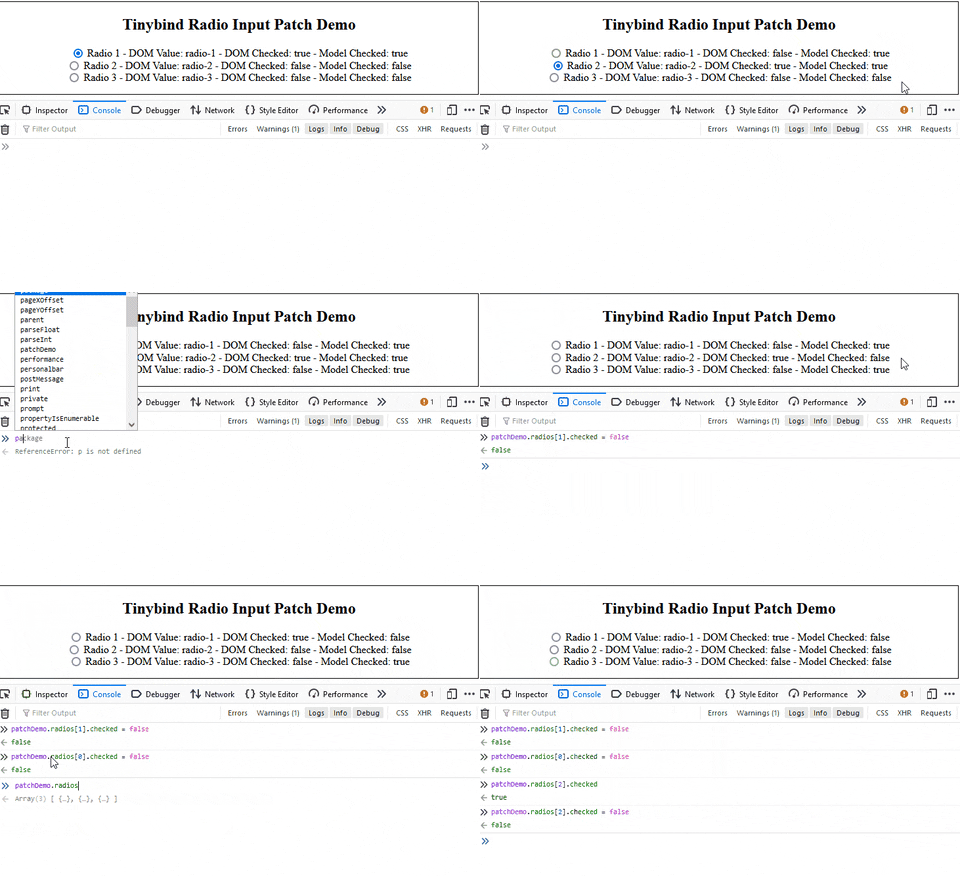
I don't fully understand the rational for the HTML standard to exclude radios from emitting events when unchecked, but that is separate conversation.
What does work is treating radio inputs the same way you would treat a select input. Another way to say this is treating the checked binding as a string result across a group of radio input instead of a boolean result on a single radio input.
New data structure.
var DATA = {
    // The single value that all radio inputs in the group
    // should bind to. Set to the string 'undefined' for
    // demo purposes.
    "selected-value": "undefined",
    "radios": [
        {
            "id": "d3r1",
            "value": "radio-1",
            "label": "Radio 1",
            "_value": undefined,
            "_checked": undefined
        },
        {
            "id": "d3r2",
            "value": "radio-2",
            "label": "Radio 2",
            "_value": undefined,
            "_checked": undefined
        },
        {
            "id": "d3r3",
            "value": "radio-3",
            "label": "Radio 3",
            "_value": undefined,
            "_checked": undefined
        }
    ]
};
New template code.
<label>Selected Value: {selected-value}</label>
<div rv-each-rdata="radios">
    <input
        type="radio"
        name="demo-3"
        rv-id="rdata.id"
        rv-value="rdata.value"
        rv-checked="selected-value"
        rv-on-click="functions.updateLabels"
        >
    <label
        rv-for="rdata.id"
        >{ rdata.label } - DOM Value: { rdata._value } - DOM Checked: { rdata._checked }</label>
</div>
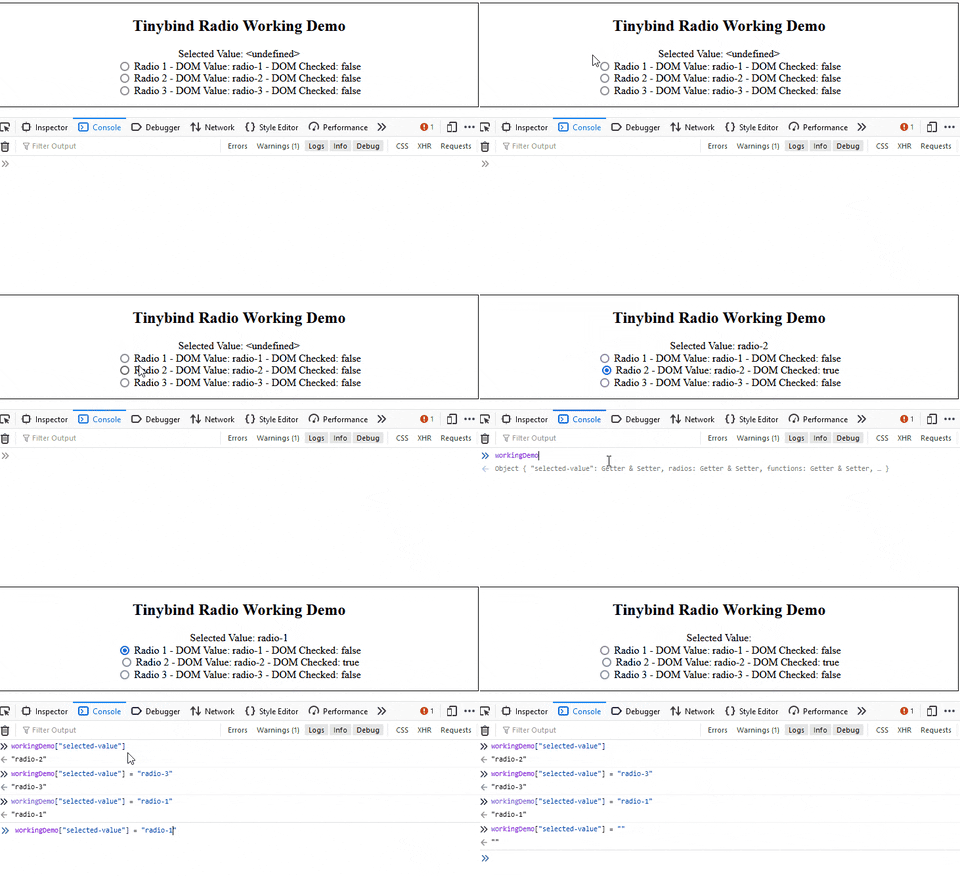
If this is the expected functionality, then the documentation needs to be updated to discuss how to properly use the checked binder with radio inputs.
Demo Code
<!doctype html>
<html lang="en">
    <head>
        <meta charset="utf-8">
        <meta name="viewport" content="width=device-width, initial-scale=1.0">
        <title>Tinybind Demo</title>
        <meta name="description" content="Demo for tinybind.">
        <meta name="author" content="Joey C. DiGiorgio">
    </head>
    <body>
        <script src="tinybind.js"></script>
        <script src="tinybindPatched.js"></script>
        <script>

        ////////////////////////////////
        //  Variables

        var g_pageStructureLoaded = false;
        var g_pageContentLoaded = false;

        ////////////////////////////////
        //  Functions

        function idToTitle(id)
        {
            var wordList = id.split("_");
            var capWordList = wordList.map(
                function(word)
                {
                    return word[0].toUpperCase() + word.substring(1);
                }
            );
            var title = capWordList.join(" ");
            return title;
        }

        function addExampleDiv(id)
        {
            var heading = idToTitle(id);

            var style = `
                <style>
                    .example
                    {
                        text-align: center;
                        border: 1px solid black;
                        margin-bottom: 1rem;
                        padding-bottom: 1rem;
                        padding-left: 1rem;
                        padding-right: 1rem;
                    };
                </style>
            `;

            var html = `
                <div id="${id}" class="example">
                    <h2>${heading}</h2>
                </div>
            `;

            var div = document.createElement("div");
            div.innerHTML = `${style}${html}`;
            document.body.append(div);

            return div.lastElementChild;
        }

        function bugDemo()
        {
            var exampleDiv = addExampleDiv("Tinybind Radio Input Bug Demo");

            var updateLabels = function(e, view)
            {
                var radioDomList = exampleDiv.querySelectorAll(`input[name=demo-1]`);
                var radioDataList = view["$parent"]["radios"]

                for(var i = 0; i < radioDomList.length; i++)
                {
                    var radioDom = radioDomList[i];
                    var radioData = radioDataList[i];
                    radioData._value = radioDom.value;
                    radioData._checked = radioDom.checked;
                }
            };

            var DATA = {
                "radios": [
                    {
                        "id": "d1r1",
                        "value": "radio-1",
                        "label": "Radio 1",
                        "checked": true,
                        "_value": undefined,
                        "_checked": undefined,
                    },
                    {
                        "id": "d1r2",
                        "value": "radio-2",
                        "label": "Radio 2",
                        "checked": false,
                        "_value": undefined,
                        "_checked": undefined,
                    },
                    {
                        "id": "d1r3",
                        "value": "radio-3",
                        "label": "Radio 3",
                        "checked": false,
                        "_value": undefined,
                        "_checked": undefined,
                    },
                ],
                "functions": {
                    "updateLabels": updateLabels,
                },
            };

            var HTML = `
                    <div rv-each-rdata="radios">
                        <input
                            type="radio"
                            name="demo-1"
                            rv-id="rdata.id"
                            rv-value="rdata.value"
                            rv-checked="rdata.checked"
                            rv-on-click="functions.updateLabels"
                            >
                        <label
                            rv-for="rdata.id"
                            >{ rdata.label } - DOM Value: { rdata._value } - DOM Checked: { rdata._checked } - Model Checked: { rdata.checked }</label>
                    </div>
            `;

            exampleDiv.innerHTML += HTML;
            tinybind.bind(exampleDiv, DATA);
            updateLabels(undefined, {"$parent": DATA});
            window.bugDemo = DATA;
        }

        function patchDemo()
        {
            var exampleDiv = addExampleDiv("Tinybind Radio Input Patch Demo");

            var updateLabels = function(e, view)
            {
                var radioDomList = exampleDiv.querySelectorAll(`input[name=demo-2]`);
                var radioDataList = view["$parent"]["radios"]

                for(var i = 0; i < radioDomList.length; i++)
                {
                    var radioDom = radioDomList[i];
                    var radioData = radioDataList[i];
                    radioData._value = radioDom.value;
                    radioData._checked = radioDom.checked;
                }
            };

            var DATA = {
                "radios": [
                    {
                        "id": "d2r1",
                        "value": "radio-1",
                        "label": "Radio 1",
                        "checked": true,
                        "_value": undefined,
                        "_checked": undefined,
                    },
                    {
                        "id": "d2r2",
                        "value": "radio-2",
                        "label": "Radio 2",
                        "checked": false,
                        "_value": undefined,
                        "_checked": undefined,
                    },
                    {
                        "id": "d2r3",
                        "value": "radio-3",
                        "label": "Radio 3",
                        "checked": false,
                        "_value": undefined,
                        "_checked": undefined,
                    },
                ],
                "functions": {
                    "updateLabels": updateLabels,
                },
            };

            var HTML = `
                    <div rv-each-rdata="radios">
                        <input
                            type="radio"
                            name="demo-2"
                            rv-id="rdata.id"
                            rv-value="rdata.value"
                            rv-checked="rdata.checked"
                            rv-on-click="functions.updateLabels"
                            >
                        <label
                            rv-for="rdata.id"
                            >{ rdata.label } - DOM Value: { rdata._value } - DOM Checked: { rdata._checked } - Model Checked: { rdata.checked }</label>
                    </div>
            `;

            exampleDiv.innerHTML += HTML;
            tinybindPatched.bind(exampleDiv, DATA);
            updateLabels(undefined, {"$parent": DATA});
            window.patchDemo = DATA;
        }

        function workingDemo()
        {
            var exampleDiv = addExampleDiv("Tinybind Radio Working Demo");

            var updateLabels = function(e, view)
            {
                var radioDomList = exampleDiv.querySelectorAll(`input[name=demo-3]`);
                var radioDataList = view["$parent"]["radios"]

                for(var i = 0; i < radioDomList.length; i++)
                {
                    var radioDom = radioDomList[i];
                    var radioData = radioDataList[i];
                    radioData._value = radioDom.value;
                    radioData._checked = radioDom.checked;
                }
            };

            var DATA = {
                "selected-value": "<undefined>",
                "radios": [
                    {
                        "id": "d3r1",
                        "value": "radio-1",
                        "label": "Radio 1",
                        "_value": undefined,
                        "_checked": undefined,
                    },
                    {
                        "id": "d3r2",
                        "value": "radio-2",
                        "label": "Radio 2",
                        "_value": undefined,
                        "_checked": undefined,
                    },
                    {
                        "id": "d3r3",
                        "value": "radio-3",
                        "label": "Radio 3",
                        "_value": undefined,
                        "_checked": undefined,
                    },
                ],
                "functions": {
                    "updateLabels": updateLabels,
                },
            };

            var HTML = `
                    <label>Selected Value: {selected-value}</label>
                    <div rv-each-rdata="radios">
                        <input
                            type="radio"
                            name="demo-3"
                            rv-id="rdata.id"
                            rv-value="rdata.value"
                            rv-checked="selected-value"
                            rv-on-click="functions.updateLabels"
                            >
                        <label
                            rv-for="rdata.id"
                            >{ rdata.label } - DOM Value: { rdata._value } - DOM Checked: { rdata._checked }</label>
                    </div>
            `;

            exampleDiv.innerHTML += HTML;
            tinybind.bind(exampleDiv, DATA);
            updateLabels(undefined, {"$parent": DATA});
            window.workingDemo = DATA;
        }

        function main()
        {
            // Wait for both the page structure and content to be loaded.
            if(!g_pageStructureLoaded || !g_pageContentLoaded)
            {
                return;
            }

            bugDemo();
            patchDemo();
            workingDemo();
        }

        function onPageContentLoaded()
        {
            g_pageContentLoaded = true;
            main();
        }

        function onPageStructureLoaded()
        {
            g_pageStructureLoaded = true;
            main();
        }

        ////////////////////////////////
        //   Script Entry Point

        document.addEventListener(
            "DOMContentLoaded",
            onPageStructureLoaded
            );

        window.addEventListener(
            "load",
            onPageContentLoaded
            );

        </script>
    </body>
</html>
Patch Code
diff --git a/src/binders.js b/src/binders.js
index 79d14b1..396cc7f 100644
--- a/src/binders.js
+++ b/src/binders.js
@@ -214,11 +214,7 @@ const binders = {
     },

     routine: function(el, value) {
-      if (el.type === 'radio') {
-        el.checked = getString(el.value) === getString(value)
-      } else {
-        el.checked = !!value
-      }
+        el.checked = value
     }
   },

diff --git a/src/bindings.js b/src/bindings.js
index afe9a9c..db35f54 100644
--- a/src/bindings.js
+++ b/src/bindings.js
@@ -2,7 +2,7 @@ import {parseType} from './parsers'
 import Observer from './observer'

 function getInputValue(el) {
-  if (el.type === 'checkbox') {
+  if (el.type === 'checkbox' || el.type === 'radio') {
     return el.checked
   } else if (el.type === 'select-multiple') {
     const results = []