Replace LDAP+AD with AAD #252

Description

Description
Short info
We have the possibility to use AAD, as all UPB AD details are migrated into Microsoft Azure Active Directory.
AAD can be seen as an upgrade for AD from Microsoft, which brings us closer to the latest technologies.
https://docs.microsoft.com/en-us/azure/active-directory/fundamentals/active-directory-whatis
https://docs.microsoft.com/en-us/azure/active-directory/fundamentals/active-directory-compare-azure-ad-to-ad
Thanks George for looking into the module that can be used for Python:
https://pypi.org/project/django-azure-ad-auth/
Prerequisites
A prerequisite for this would be to go to portal.azure.com, login with the upb account and create an app registration in the UPB tenant. Redirect URIs need to be configured for the local, dev, prod, etc environments. The redirect uri must be the root page of the application. Also default redirect URIs may exist, like: https://login.microsoftonline.com/common/oauth2/nativeclient.
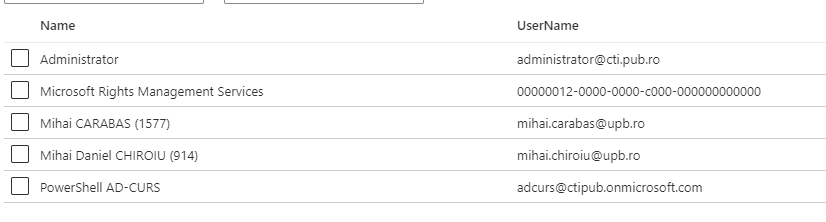
The API must have certain permissions in order to read the user and group details from AAD. Most of these permissions require admin consent from the administrators of the UPB Tenant ( the Global Administrator role ), meaning one of the users:
Additional: Security Groups for separation between student and TA w/ Microsoft Graph API
Also, Security Groups from AAD can be used for managing the app permisions on the user interface side using the Microsoft Graph API.
For example, when creating a class, let's say PC, a call to the graph api will be done to create a Security Group, for example: 'VMCK_SEC_GRP_0005_PC' with 5 being the identity of the class, or the equivalent unique identifier you use when storing the class. Subsequently, when you add TAs to the class, other calls can be done to add members to the Security Group. The Security Group can be then used to only allow TAs from that class to view TA stuff in the user interface.
Simplified:
if isInGroup(user, group)
// show download button
the method will call the checkMemberGroups API with the user ID and the group ID from AAD
Although I'd suggest to only do this once/view so you don't make too many calls to Graph API
If no modules exist for Python, Microsoft exposes the API via REST.
Group creation, with members:
https://docs.microsoft.com/en-us/graph/api/group-post-groups?view=graph-rest-1.0&tabs=http
Add members to Group:
https://docs.microsoft.com/en-us/graph/api/group-post-members?view=graph-rest-1.0&tabs=http
Remove members from Group:
https://docs.microsoft.com/en-us/graph/api/group-delete-members?view=graph-rest-1.0&tabs=http
Delete Group:
https://docs.microsoft.com/en-us/graph/api/group-delete?view=graph-rest-1.0&tabs=http
Check if user is in group:
https://docs.microsoft.com/en-us/graph/api/group-checkmembergroups?view=graph-rest-1.0&tabs=http
If you have any additional questions about AAD, let me know.
Is your feature request related to a problem?
No