Torch implementation for learning an image-to-image translation (i.e. pix2pix) without input-output pairs, for example:
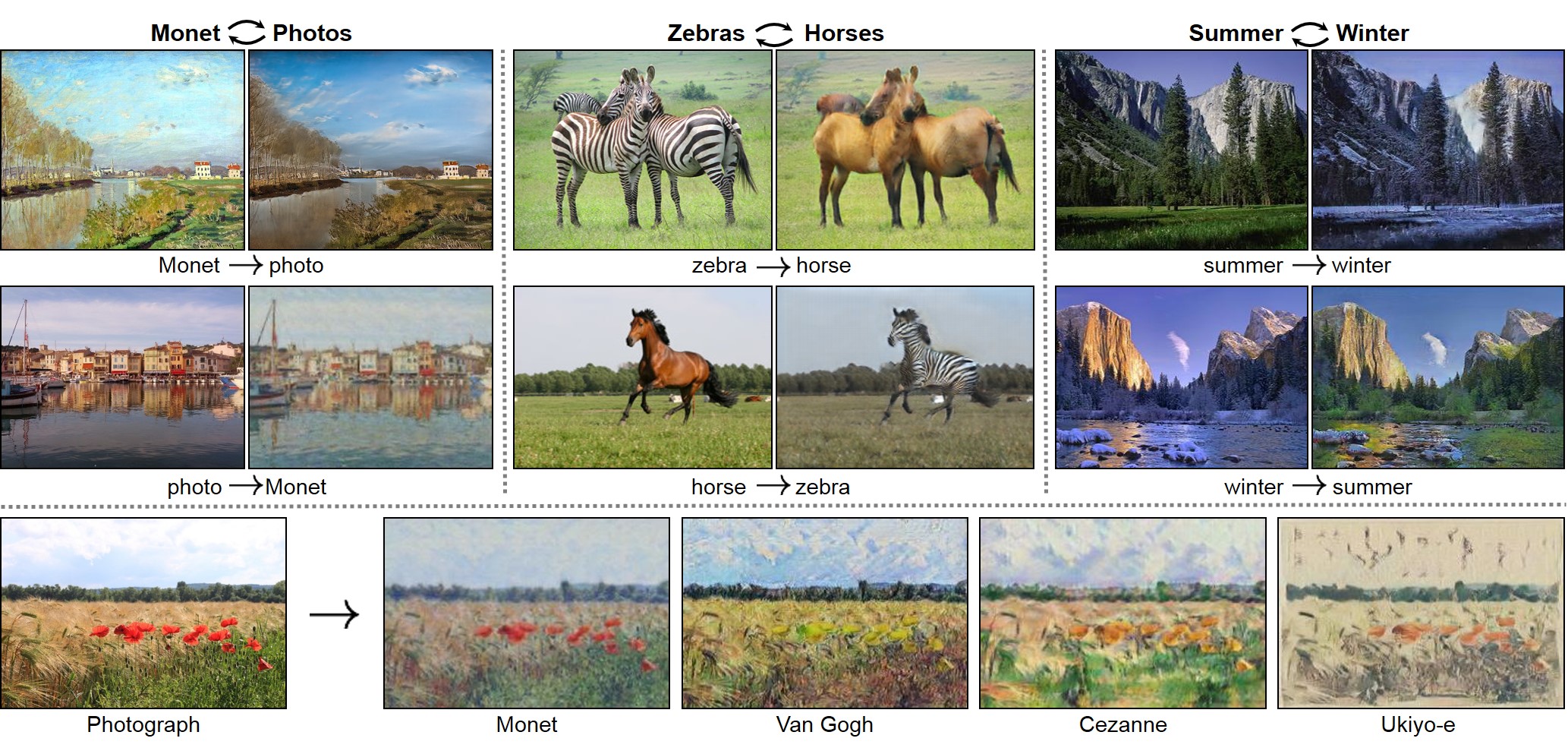
Unpaired Image-to-Image Translation using Cycle-Consistent Adversarial Networks
Jun-Yan Zhu*, Taesung Park*, Phillip Isola, Alexei A. Efros
Berkeley AI Research Lab, UC Berkeley
In arxiv, 2017. (* equal contributions)
This package includes CycleGAN, pix2pix, as well as other methods like BiGAN/ALI and Apple's paper S+U learning.
PyTorch version is coming soon (by April 7th).


- Linux or OSX
- NVIDIA GPU + CUDA CuDNN (CPU mode and CUDA without CuDNN may work with minimal modification, but untested)
- Install torch and dependencies from https://github.com/torch/distro
- Install torch packages
nngraph,class,display
luarocks install nngraph
luarocks install class
luarocks install https://raw.githubusercontent.com/szym/display/master/display-scm-0.rockspec- Clone this repo:
git clone https://github.com/junyanz/CycleGAN
cd CycleGAN- Download the dataset (e.g. zebra and horse images from ImageNet):
bash ./datasets/download_dataset.sh horse2zebra- Train the model
DATA_ROOT=./datasets/horse2zebra name=horse2zebra_model th train.lua- (CPU only) The same training command without using a GPU or CUDNN. Setting the environment variables
gpu=0 cudnn=0forces CPU only
DATA_ROOT=./datasets/horse2zebra name=horse2zebra_model gpu=0 cudnn=0 th train.lua- (Optionally) start the display server to view results as the model trains. (See Display UI for more details):
th -ldisplay.start 8000 0.0.0.0- Finally, test the model:
DATA_ROOT=./datasets/horse2zebra name=horse2zebra_model phase=test th test.luaThe test results will be saved to a html file here: ./results/horse2zebra_model/latest_test/index.html.
DATA_ROOT=/path/to/data/ name=expt_name th train.luaModels are saved to ./checkpoints/expt_name (can be changed by passing checkpoint_dir=your_dir in train.lua).
See opt_train in options.lua for additional training options.
DATA_ROOT=/path/to/data/ name=expt_name which_direction='AtoB' phase=test th test.luaThis will run the model named expt_name in both directions on all images in /path/to/data/testA and /path/to/data/testB.
If which_direction is 'BtoA', the two sets A and B of the datasets are flipped.
Result images, and a webpage to view them, are saved to ./results/expt_name (can be changed by passing results_dir=your_dir in test.lua).
See opt_test in options.lua for additional testing options.
Download the datasets using the following script:
bash ./datasets/download_dataset.sh dataset_namecityscapes: 2975 images from the Cityscapes training set.maps: 1096 training images scraped from Google Maps.horse2zebra: 939 horse images and 1177 zebra images downloaded from ImageNet using keywordswild horseandzebraapple2orange: 996 apple images and 1020 orange images downloaded from ImageNet using keywordsappleandnavel orange.summer2winter_yosemite: 1273 summer Yosemite images and 854 winter Yosemite images were downloaded using Flickr API. See more details in our paper.monet2photo,vangogh2photo,ukiyoe2photo,cezanne2photo: The art images were downloaded from Wikiart. The real photos are downloaded from Flickr using combination of tags landscape and landscapephotography. The training set size of each class is Monet:1074, Cezanne:584, Van Gogh:401, Ukiyo-e:1433, Photographs:6853.iphone2dslr_flower: both classe of images were downlaoded from Flickr. The training set size of each class is iPhone:1813, DSLR:3316. See more details in our paper.
Download the pre-trained models with the following script. You need to rename the model (e.g. orange2apple to /checkpoints/orange2apple/latest_net_G.t7) after the download has finished.
bash ./models/download_model.sh model_nameorange2apple(orange -> apple) andapple2orange: trained on the CMP Facades dataset.horse2zebra(horse -> zebra) andzebra2horse(zebra -> horse): trained on the CMP Facades dataset.style_monet(landscape photo -> Monet painting style),style_vangogh(landscape photo -> Van Gogh painting style),style_ukiyoe(landscape photo -> Ukiyo-e painting style),style_cezanne(landscape photo -> Cezanne painting style): trained on paintings and Flickr landscape photos.monet2photo(Monet paintings -> real landscape): trained on paintings and Flickr landscape photos.cityscapes_photo2label(street scene -> label) andcityscapes_label2photo(label -> street scene): trained on the Cityscapes dataset.map2sat(map -> aerial photo) andsat2map(aerial photo -> map): trained on Google maps.iphone2dslr_flower(iPhone photos of flower -> DSLR photos of flower): trained on Flickr photos.
For example, to generate Ukiyo-e style images using the pre-trained model,
bash ./datasets/download_dataset.ukiyoe2photo
bash ./models/download_model.sh style_ukiyoe
mkdir ./checkpoints/ukiyoe2photo_pretrained
mv ./models/style_ukiyoe.t7 ./checkpoints/ukiyoe2photo_pretrained/latest_net_G.t7
DATA_ROOT=./datasets/ukiyoe2photo name=ukiyoe2photo_pretrained which_direction='BtoA' model=one_direction_test phase=test th test.lua
Please pay attention to the direction. which_direction='BtoA' was used because the pretrained network transforms photos to Ukiyo-e-style images, but the dataset ukiyoe2photo is from Ukiyo-e paintings to photos. model=one_direction_test loads the code that generates outputs of the trained network in only one direction.
Optionally, for displaying images during training and test, use the display package.
- Install it with:
luarocks install https://raw.githubusercontent.com/szym/display/master/display-scm-0.rockspec - Then start the server with:
th -ldisplay.start - Open this URL in your browser: http://localhost:8000
By default, the server listens on localhost. Pass 0.0.0.0 to allow external connections on any interface:
th -ldisplay.start 8000 0.0.0.0Then open http://(hostname):(port)/ in your browser to load the remote desktop.
If you use this code for your research, please cite our paper:
@article{CycleGAN2017,
  title={Unpaired Image-to-Image Translation using Cycle-Consistent Adversarial Networkss},
  author={Zhu, Jun-Yan and Park, Taesung and Isola, Phillip and Efros, Alexei A},
  journal={arXiv preprint arXiv:1703.10593},
  year={2017}
}
pix2pix: Image-to-image translation using conditional adversarial nets
iGAN: Interactive Image Generation via Generative Adversarial Networks
If you love cats, and love reading cool graphics, vision, and learning papers, please check out the Cat Paper Collection:
[Github] [Webpage]
Code borrows from pix2pix and DCGAN. The data loader is modified from DCGAN and Context-Encoder. The generative network is adopted from neural-style with Instance Normalization.