
This is an open-source Python package for browsing video and audio time-synchronized to MEG/EEG data. It serves as an add-on for mne-qt-browser, which is part of MNE-Python, an open-source Python package for exploring, visualizing, and analyzing human neurophysiological data.
This project also complements Helsinki VideoMEG project by supporting video and audio files recorded with their software.
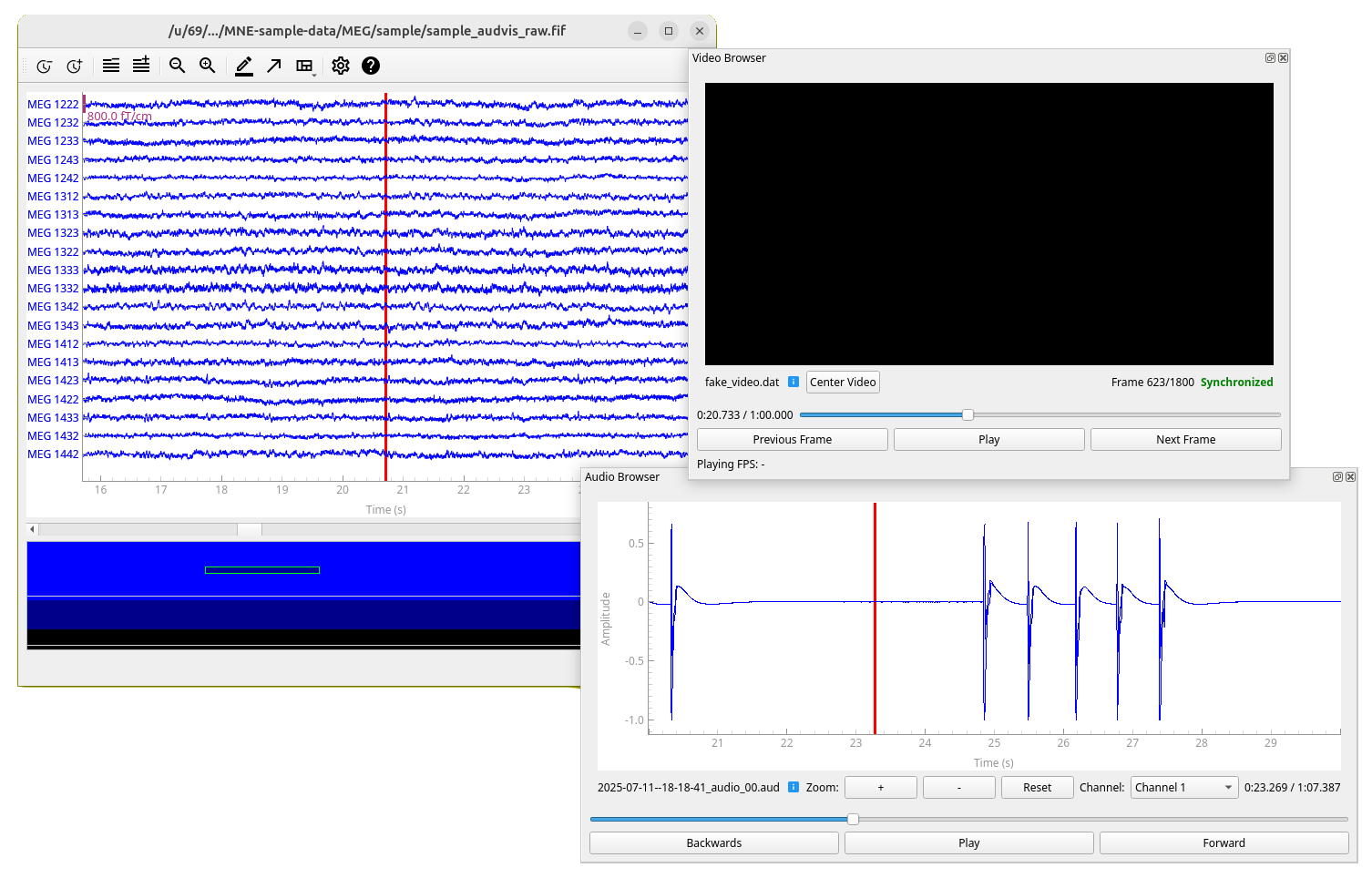 Screenshot of the browser extension showing a black video frame and a test audio file synchronized with MNE-Python's sample MEG data.
- Time-synchronized video browsing and playback with MEG/EEG data
- Time-synchronized audio browsing and playback with MEG/EEG data
- Support for multiple video and MEG files simultaneously (only one audio file with multiple channels at a time)
- Support for Helsinki VideoMEG project format files
- Standard video format support (MP4, AVI, etc.) via OpenCV (for audio only Helsinki VideoMEG format is currently supported)
Documentation contains installation instructions (same as below), public API reference, and some of the usage examples available in the GitHub. A bit of the code structure and implementation details are also documented.
In addition to MNE-Python, this project requires package OpenCV for standard video file (such as .mp4) reading
and sounddevice for audio playback. Recommended way to install MNE-Python is using
conda.
-
Create a new conda environment (named
mne-videobrowser) with MNE-Python installed.conda create --channel=conda-forge --strict-channel-priority --name=mne-videobrowser mne
-
Activate the environment:
conda activate mne-videobrowser
-
Install this package with rest of the dependencies:
pip install mne-videobrowser
-
Only on linux: If you do not have PortAudio library, which is dependency of
sounddeviceinstalled, install it. For example on Ubuntu/Debian:sudo apt install libportaudio2
-
Activate your desired Python environment (documentation for virtual environments).
-
Install this package, all dependencies will be installed automatically:
pip install mne-videobrowser
-
Only on linux: If you do not have PortAudio library, which is dependency of
sounddeviceinstalled, install it. For example on Ubuntu/Debian:sudo apt install libportaudio2
See usage examples in GitHub.
To install this package for development, follow the regular installation guide
(and maybe rename the conda environment to mne-videobrowser-dev or similar to distinguish it from the
stable version), but instead of pip install mne-videobrowser:
-
Clone this repository and navigate to project root.
-
Install the package in editable mode and with development dependencies.
pip install -e .[dev]
Editable mode ensures that changes in source code are reflected to the installed package. Development dependencies include
pytestfor running tests andsphinxfor building documentation.
Tests are located in directory tests/ and they run using package pytest (included in development dependencies).
You can run all the tests with:
pytestYou can also selectively run tests in a specific file/class/method. See pytest documentation for details.
Documentation source files are located in docs/source/ and built documentation in docs/build/.
Documentation is mostly automatically generated from the source code docstrings using sphinx.
To build the documentation:
cd docs
make html  # on Windows use 'make.bat html'
Then view the built html documentation by opening file docs/build/html/index.html in a web browser.