Releases: GeekInTheNorth/Stott.Optimizely.RobotsHandler
Releases · GeekInTheNorth/Stott.Optimizely.RobotsHandler
Stott Robots Handler 6.0.1

- #99
- Add Anti-forgery token to prevent errors in the CMS UI with the Optimizely Notifications service.
Stott Robots Handler 6.0.0
Stott Robots Handler 6.0.0
This release adds API support for headless builds and Opal Tools.
Features
- #89
- Added new APIs to support Opal Tools and Headless solutions
- Added a Discovery Endpoint that allows APIs to be registered as Opal Tools
- Added a Get Robots content Endpoint allowing a single configuration or multiple configurations to be retrieved
- Added a Save Robots content Endpoint for saving a single robots.txt configuration.
- Added a Get LLMS content Endpoint allowing a single configuration or multiple configurations to be retrieved
- Added a Save LLMS content Endpoint for saving a single llms.txt configuration.
- Added a new tab for managing API Tokens for the new APIS
- Added new APIs to support Opal Tools and Headless solutions
Documentation
Read more about this release in the following blogs:
Stott Robots Handler 5.0.0
Stott Robots Handler v5.0.0
This add-on introduces support for llms.txt files.
Features
- #90
- Added the ability to define LLMS.txt files at a site or host level
- LLMS content will be served on /llms.txt
- If LLMS content is not defined then a 404 response will be returned.
Stott Robots Handler 4.0.0
New Features
Due to new installation requirements to support new functionality within the module, the major version number has been incremented. If you are an existing user of Stott Robots Handler, then please checkout the updated installation instructions.
- #78
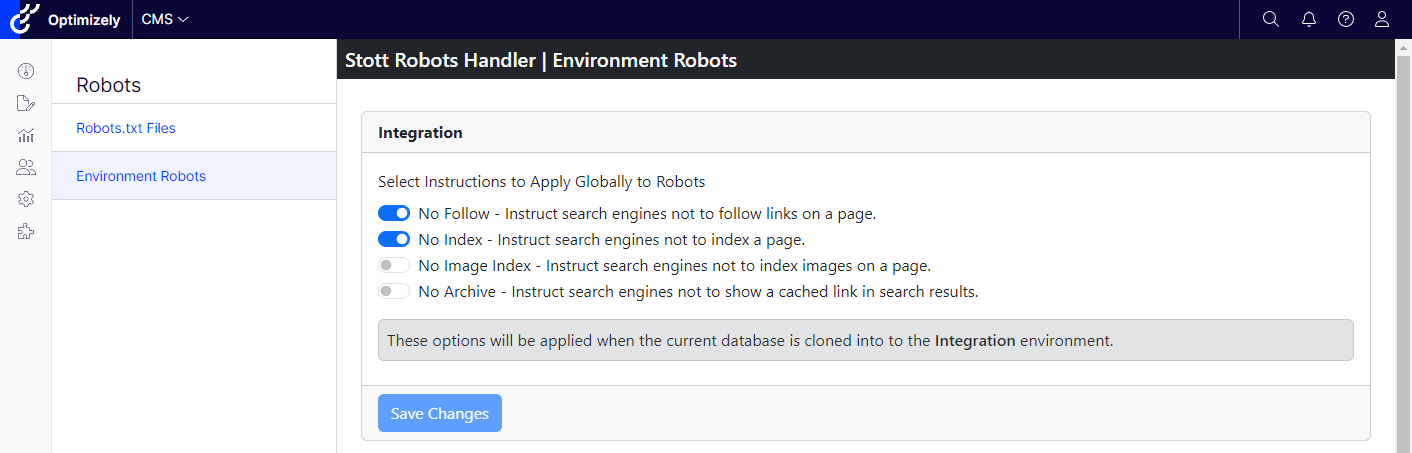
- Adds a new UI to set overriding Robots Meta Tags and Headers to be applied to the entire environment.
- To support maintaining settings when cloning data down through environments, options to set environment robots will be available for the following environments:
- Current Environment
- Integration
- Preproduction
- Production
- When an environment configuration is active:
- The meta robots element in the razor file will be updated to match the environment configuration. (See the readme.md for more details)
- A header of
X-Robots-Tagwill be returned containing this configuration.
- New installation requirements:
_ViewImports.cshtmlwill require a new entry of@addTagHelper *, Stott.Optimizely.RobotsHandler- The
Configure(...)method ofstartup.cswill need an entry ofapp.UseRobotsHandler();
Stott Robots Handler 3.0.1
What's Changed
- HF 3.0.1 Correct Landing Page Authorization by @GeekInTheNorth in #80
Full Changelog: v3.0.0...v3.0.1
Contributors

GeekInTheNorth
Assets 2
Stott Robots Handler 3.0.0
Release 3.0.0
Features
- #68
- Added the ability to define robots content on a host by host basis for any site within an Optimizely CMS instance.
- A robots.txt configuration with a Host of "Default" will apply it's content to any host if a host specific match is not found.
Bugs
- #67
- Prevented a 500 error when overriding Cache-Control headers for static files.
Stott Robots Handler 2.7.0
Version 2.7.0
This is a UI rebuild with the intent of serving compiled JS & CSS as part of the module assets and to make it easier to create a succinct content security policy for consuming websites.
- UI is now built using:
- Vite
- React
- React Bootstrap
- All API endpoints have moved from
/stott.robotshandler/to/stott.robotshandler/api/ - The razor file for the landing page has moved to
Views/RobotsLandingPage/Index.cshtml- This razor file is considerably more light weight since the UI is now primarily built in react.
- If you have previously overridden elements of the UI by providing an overridden razor file, then you may need to reimplement your changes.
- Script tags for the module will be rendered with a nonce value provided that the CMS
ICspNonceServiceprovides such a value.- This is to support nonce attributes in globally applied Content Security Policies
- Do checkout Stott Security if you do not yet have a security headers solution for your CMS.