All Cisco FW platforms have limits on number of ACL entries supported. Though this number is pretty high sometimes if access policies gets out of control the number can grow rapidly. Here is example of supported number of rules per platform in 2020
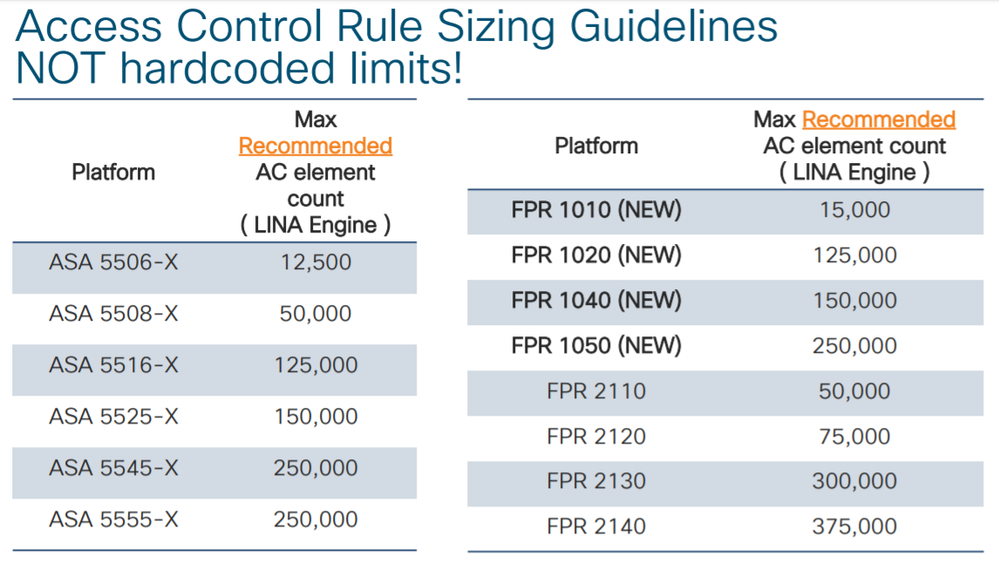
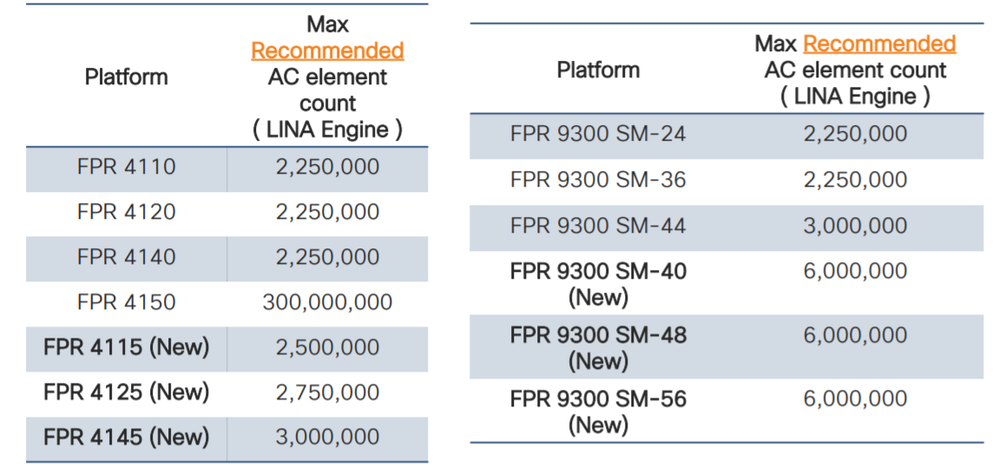
In 2025 those numbers are higher, but still not infinity. This tool intended to analyze policies configured on FTD and recommend actions to reduce number of ACE by cleaning up shadow items or merge items together.
If you are getting closer to the limit - don't panic ! It is time to start thinking how to optimize your policies. Policies might not be beautifully arranged into groups anymore, but you;ll get an idea of "how to" tackle the problem. Crossing the limit does NOT mean that your policy stop working or box will crash. You probably have runway for another 5-10%.
- Login to FTD CLI
- Collect 'show access-control-config`
ftd-acl-optimizer --file collected_output.txt get acp capacityto get the current number of lines (should be close tosh ip access-list element-count) and possible number of optimized linesftd-acl-optimizer --file collected_output.txt get top-k by-optimizationto get top 5 rules with the most possible optimizationsftd-acl-optimizer --file collected_output.txt get rule analysis <RULE NAME>to explanation of what must be done to optimize a particular rule
CDO (Cisco Defense Orchestrator) can analyze policy and produce report. Integrate FMC with CDO then navigate to Policy insight
If you don't have access to either of these products - keep reading.
- Use
show access-list element-count - Use
show access-list
Underneath math is pretty simple. Let's assume in a single rule we have
- Two source subnets
- Three destination subnets
- Four source TCP non-consecutive ports
- Five destomatopm TCP non-consecutive ports
The total size will be 2 * 3 * 4 * 5 = 120 ACEs
Then sum ACE across all rules and this will be a final number.
What it would take to overflow 5% (300,000 ACE) of the biggest platform (SM-56) for large enterprise.
If enterprise has a single app that spread between two on-prem highly available Data Centers and three major Cloud Providers (Azure, AWS, GCP). It has multiple source and destination networks to controk as well as ports.
- 2 x On-prem Data Centers, with each DC having 10 subnets
- 3 x CSPs, with 10 subnets in each CSP (for example during long migration)
- 20 source TCP/UDP ports
- 25 destination TCP/UDP ports
- no multicast
(2 x 10 On-prem) x (3 x 10 CSP) x 20 src ports x 25 dst ports = 300,000 ACE
- IP range optimized to subnets inside network objects and groups.
For example:
192.168.0.0 - 192.168.0.5
Will be optimized to two subnets:192.168.0.0/30and192.168.0.4/31 - Adjacent/overlap/shadow/etc ... layer 4 ports (TCP and UDP)
For example:
SSH TCP 22andFTP TCP 21
Will be optimized to a contiguous range:TCP 21-22
Due to port optimizations are done automatically, app only optimizes Adjacent/Overlap/Shadow subnets inside rules (not across the whole access policy).
IMPORTANT: Optimizations across rules are outside of the project scope.
Example: RULE my_app
- Source subnets
192.168.168.0/25192.168.168.128/25
- Destination subnets
10.11.12.0/2410.11.13.0/24
- Source ports
ephemeralFTP
- Destination ports
HTTPSFTP
Source subnets will be optimized to a single: 192.168.168.0/24
Destination subnets will be optimized to a single: 10.11.12.0/23
Destination ports will be optimized by FTD-code
Number of ACE before optimization: 2 (src subnets) * 2 (dst subnets) * 2 (src ports) * 2 (dest ports) = 16
Number of ACE after optimization: 1 (src subnets) * 1 (dst subnets) * 2 (src ports) * 2 (dest ports) = 4
Optimization factor: 16 / 4 = 4
- Shadow - Example:
192.168.168.0/24shadows by192.168.0.0/16(factor 2) - Overlap - Example: IP range
192.168.168.0-254overlaps with192.168.168.1-255should be optimized to a single subnet192.168.168.0/24(factor 64) - Adjacency - Example:
192.168.168.0/25and192.168.168.128/25optimizes to192.168.168.0/24(factor 2)