Plugin module for MMM-CalendarExt and MMM-CalendarExt2, to display schedule plan
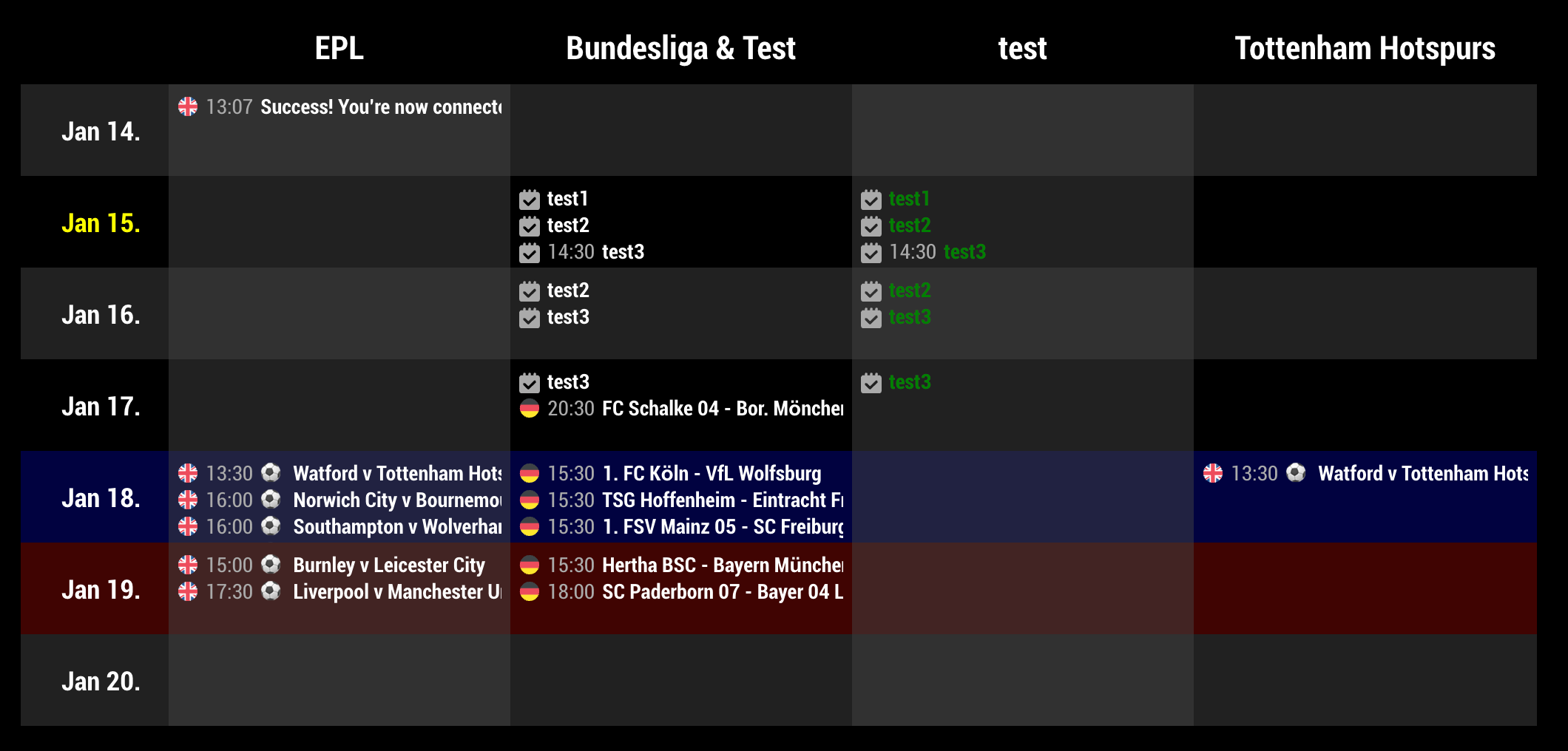
This module needs MMM-CalendarExt or MMM-CalendarExt2 as source of events. (I recommend to use MMM-CalendarExt2)
cd <YOUR_MAGIC_MIRROR_DIRECTORY>/modules
git clone https://github.com/eouia/MMM-CalendarExtPlanDefault values.
{
  module: "MMM-CalendarExtPlan",
  position: "bottom_bar",
  config: {
    maxItems: 100,
    refreshInterval: 60*60*1000, // millisec.
    dateFormat: "MMM D.",
    eventTimeFormat: "HH:mm",
    dayCount: 5,
    fromNow: 0,
    source: "CALEXT2", // or "CALEXT"
    criteria: [],
  }
}maxItems: The number of events to load. Set it as enough for your environment.refreshInterval: Interval for rendering.dateFormat: Format of date header in table. Seeformat()ofmomentJs.eventTimeFormat: Format of start/end time of the event. Seeformat()ofmomentJs.dayCount: How many day cells will be displayed.fromNow: If you want to display from Yesterday, set it to-1. Today will be0, Tomorrow will be1, and so on.source:CALEXTorCALEXT2. (I recommendMMM-CalendarExt2thanMMM-CalendarExt. it is more improved.)criteria: Array of criterion to show.
Example of criteria
criteria: [
  {
    title: "EPL",
    calendars: ["epl"],
  },
  {
    title: "Bundesliga & Test",
    calendars: ["bundesliga", "test"],
  },
  {
    title: "test",
    calendars: ["test"],
    className: "testClass",
  },
  {
    title: "Tottenham Hotspurs",
    calendars: [],
    filter: (ev)=>{
      if (ev.title.search("Tottenham") > -1) {
        return true
      }
      return false
    },
  }
],
Assuming there are already 3 calendars in MMM-CalendarExt2.
title: Title of criterion to showcalendars: REQUIRED Array of calendars.[]will be all calendars.className: If you want you can setclassof CSS for this criterion. In avobe example, this criterion will havetestClassas class of CSS.filter: You can filter events to show more precisely with this callback function. In above example,filtermakes to show only events which hasTottenhamas its title.
You can use these properties for filter callback.
events from MMM-CalendarExt2
calendarId:0
calendarName:"epl"
className:""
description:"Germany Broadcasters ..."
duration:7200
endDate:"1579449600"
endDateJ:"2020-01-19T16:00:00.000Z"
icon:"emojione-flag-for-flag-united-kingdom"
isFullday:false
isMoment:false
isOneday:true
isPassed:false
location:"Turf Moor, Burnley"
ms_busystatus:"BUSY"
startDate:"1579442400"
startDateJ:"2020-01-19T14:00:00.000Z"
styleName:""
title:"⚽️ Burnley v Leicester City"
uid:"0:1579442400:1579449600:5d01f5f61ac243b8e0e58017"
events from MMM-CalendarExt
calendarName:"epl"
className:""
description:"Germany Broadcasters ..."
endDate:1579449600
fullDayEvent:0
geo:null
isFullday:false
location:"Turf Moor, Burnley"
name:"epl"
startDate:1579442400
styleName:""
symbol:""
title:"⚽️ Burnley v Leicester City"
MMM-CalendarExt2is more advanced module thanMMM-CalendarExt. So, I recommend you to useMMM-CalendarExt2for full features. By example, events fromMMM-CalendarExtcannot useiconorsymbol.
See MMM-CalendarExtPlan.css then override what you need in css/custom.css
- custom class (
className)
.CXP .testClass .event .eventTitle {
  color: Green;
}- To display time of end
.CXP .event .eventTime .end.endHere {
  display:inline-block
}- To change height of day cell
.CXP {
  --cell-height: 100px;
}- To adjust height for full events. (Not recommended)
.CXP {
  --cell-height: null
}- Not to hide overflowed title. (Not recommended)
.CXP .event {
  overflow: none;
  white-space: normal;
}

