
Longdo Spell Checker is a VSCode extension for Thai spell checking. It highlights errors and suggests corrections, helping you write accurate Thai text effortlessly. 🚀
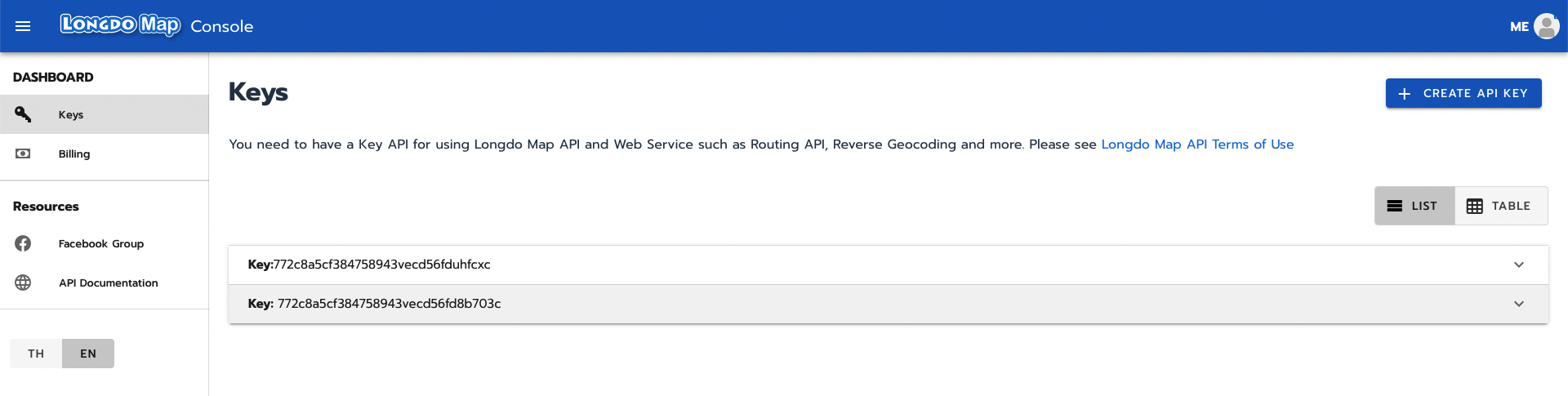
To use Longdo Spell Checker, you need an API key, which allows up to 100,000 free requests per month.
🔗 Register for free at Longdo Account.
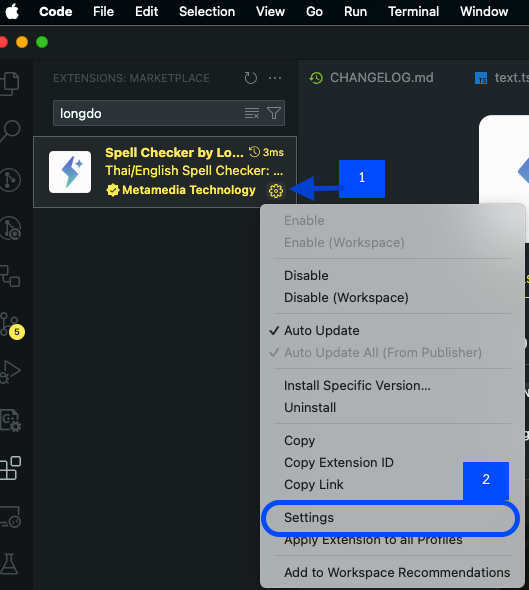
Choose one of the following methods:
- Open VS Code Settings
- Windows/Linux:
File > Preferences > Settings - MacOS:
Code > Preferences > Settings
- Windows/Linux:
- Search for "Longdo Spell Checker"
- Enter your API Key
- Open settings.json
- Windows/Linux:
File > Preferences > Settings> Click{}(top right) - MacOS:
Code > Preferences > Settings> Click{}(top right)
- Windows/Linux:
- Add the following configuration:
"longdo-spell-checker.apiKey": "YOUR_API_KEY"
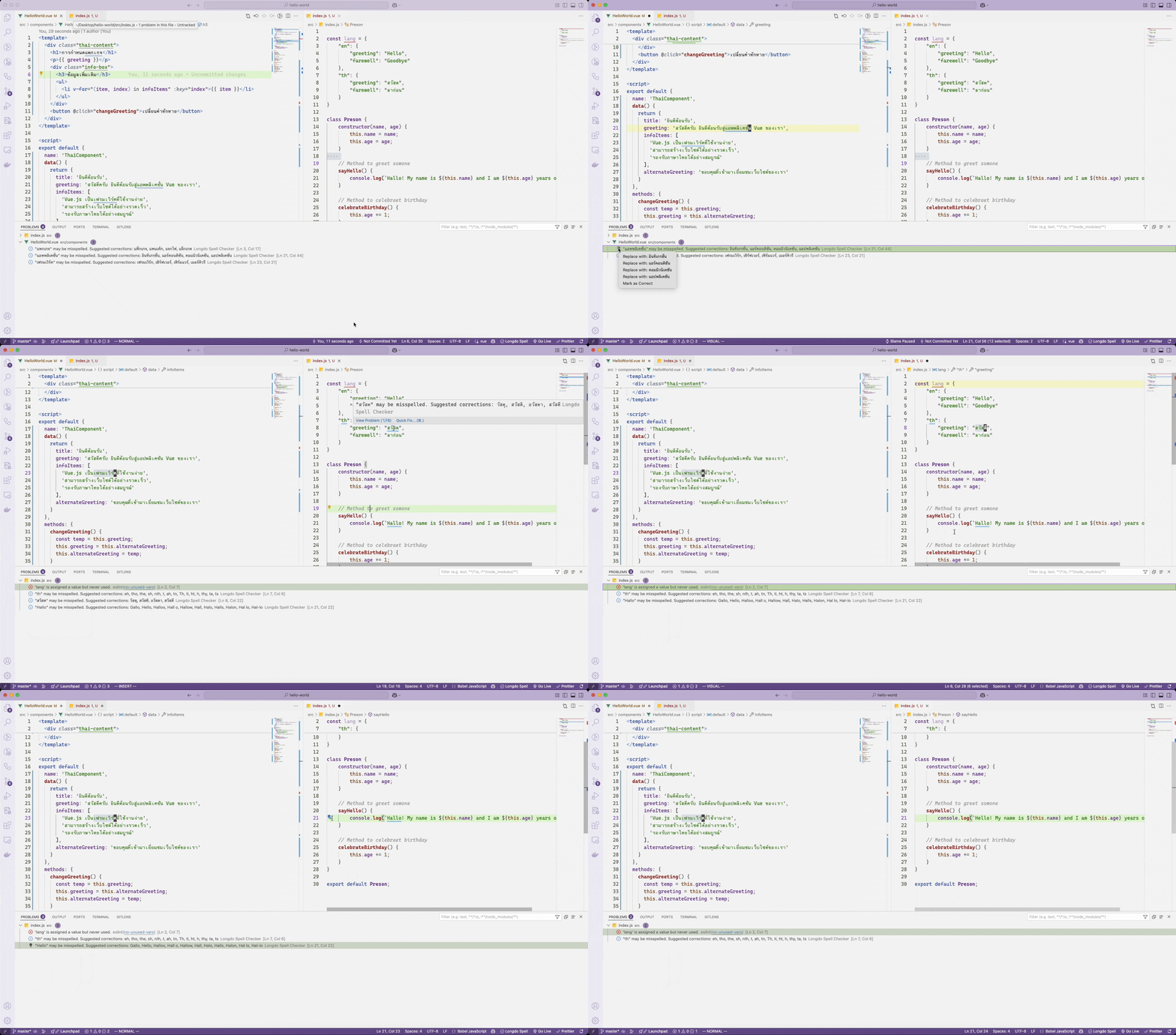
Once installed, you'll see Longdo Spell in the status bar (bottom right).
- Click on it to access options such as Check Spelling (Current Tab) or Clear All Errors (Current Tab).
- Open the Command Palette:
- Windows/Linux:
Ctrl + Shift + P - MacOS:
Cmd + Shift + P
- Windows/Linux:
- Type and select:
Longdo Spell Checker: Check Spelling (Current Tab)→ Check spellingClear All Errors (Current Tab)→ Clear suggestions
✅ Thai spell checking with suggestions
✅ Quick fix for spelling errors
✅ Supports multiple file types
✅ Customizable settings
✅ Add dictionary
| Language | Support Level |
|---|---|
| 🇹🇭 Thai | Full Support |
| 🇬🇧 English | JSON, Markdown, JavaScript |
The extension requires an API key because spell checking is processed on a server.
- Free Tier: 100,000 requests/month
- Text Limit: If your text exceeds 1,024 characters, it will be split into multiple requests.
📌 Example:
- A 1,025-character text = 2 requests
- A 5,000-character text = 5 requests
- All text checking is processed on Longdo servers
- We do not store your text content permanently
- Text is only used for spell checking purposes
- We collect anonymous usage statistics to improve the service
- This includes:
- Number of requests
- Size of content checked
- Types of errors detected
- All data is transmitted securely through HTTPS
- API keys are used only to authenticate requests
- No personal information is required beyond the API key
🔗 Register for an API Key: Longdo Console (It's free!)
เพื่อใช้งาน Longdo Spell Checker คุณจำเป็นต้องมี API Key ซึ่งจะให้สิทธิ์ใช้งานฟรีสูงสุด 100,000 ครั้งต่อเดือน
🔗 สมัครใช้งานฟรี ได้ที่ Longdo Account
โดยปกติแล้วหากไม่ตั้งค่า API KEY ท่านสามารถใช้งานได้ฟรี โดยจะนับการใช้งานรวมกับบุคคลอื่น
เลือกวิธีใดวิธีหนึ่งในการตั้งค่าต่อไปนี้:
- เปิด VS Code Settings
- Windows/Linux:
File > Preferences > Settings - MacOS:
Code > Preferences > Settings
- Windows/Linux:
- ค้นหาคำว่า "Longdo Spell Checker"
- กรอก API Key ของคุณ
- เปิดไฟล์ settings.json
- Windows/Linux:
File > Preferences > Settings> คลิกที่ปุ่ม{}มุมขวาบน - MacOS:
Code > Preferences > Settings> คลิกที่ปุ่ม{}มุมขวาบน
- Windows/Linux:
- เพิ่มค่าดังนี้ลงไปในไฟล์:
"longdo-spell-checker.apiKey": "YOUR_API_KEY"
หลังติดตั้งแล้ว จะมี Longdo Spell แสดงอยู่ที่ แถบสถานะด้านล่างขวา
- คลิกเพื่อเลือกตัวเลือก เช่น ตรวจคำสะกดในแท็บปัจจุบัน หรือ ล้างข้อผิดพลาดทั้งหมด
- เปิด Command Palette
- Windows/Linux:
Ctrl + Shift + P - MacOS:
Cmd + Shift + P
- Windows/Linux:
- พิมพ์และเลือกคำสั่งต่อไปนี้:
Longdo Spell Checker: Check Spelling (Current Tab)→ ตรวจคำสะกดClear All Errors (Current Tab)→ ล้างข้อเสนอแนะทั้งหมด
✅ ตรวจคำสะกดภาษาไทย พร้อมคำแนะนำ
✅ แก้ไขคำผิดแบบรวดเร็ว (Quick fix)
✅ รองรับหลายประเภทไฟล์
| ภาษา | ระดับการรองรับ |
|---|---|
| 🇹🇭 ภาษาไทย | รองรับทุกนามสกุลไฟล์ |
| 🇬🇧 ภาษาอังกฤษ | JSON, Markdown, JavaScript |
ส่วนขยายนี้ จำเป็นต้องใช้ API Key เพราะการตรวจคำสะกดจะดำเนินการบนเซิร์ฟเวอร์
- ฟรี: ใช้งานได้ 100,000 ครั้ง/เดือน
- ข้อจำกัดของข้อความ: ถ้าข้อความเกิน 1,024 ตัวอักษร จะถูกแบ่งเป็นหลายคำขอ (request)
📌 ตัวอย่าง:
- ข้อความยาว 1,025 ตัวอักษร = 2 คำขอ
- ข้อความยาว 5,000 ตัวอักษร = 5 คำขอ
🔗 สมัครขอ API Key: Longdo Console (ฟรี!)
- การตรวจสอบข้อความทั้งหมดดำเนินการบนเซิร์ฟเวอร์ของ Longdo
- ในการตรวจสอบคำผิดในชุดคำสั่งจะไม่เก็บเนื้อหาข้อความไว้
- ข้อความจะถูกใช้เพื่อวัตถุประสงค์ในการตรวจสอบการสะกดเท่านั้น
- เก็บสถิติการใช้งานแบบไม่ระบุตัวตนเพื่อปรับปรุงบริการ
- ข้อมูลนี้รวมถึง:
- จำนวนคำขอ
- ขนาดของเนื้อหาที่ตรวจสอบ
- ข้อมูลทั้งหมดถูกส่งผ่าน HTTPS ซึ่งมีความปลอดภัย
- API key ใช้เพื่อยืนยันคำขอเท่านั้น
- ไม่มีนโยบายหรือเก็บหรือต้องใช้ข้อมูลส่วนบุคคลใด ๆ นอกเหนือจาก API key