



| Before rename | After Rename |
|---|---|
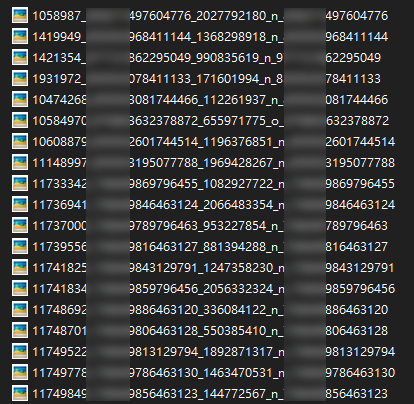 |
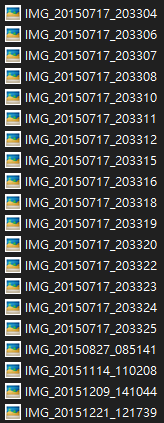 |
- Rename photos to date time format, e.g.
IMG_20220101_081823 - Automatically solve duplicate file names by adding one second
- Automatically backup original photos before rename (Python)
- Print messages with timestamp and senders name
- Count total messages

Loop through JSON file to get every message, if the message type is a photo, find it and rename it with the message timestamp.

It's a little complicated, but it can save you time when there are 4400+ photos.
e.g. I have almost 200,000 messages and 4400+ photos with my ONE friend

-
Go to
Settings & privacy->Settings
-
Choose
Your Facebook Information->Download Your Information

-
Under
Select file options, selectJSONformat withHighquality. UnderSelect information to download, selectMessages.
-
Request a download


-
After extraction you will get a folder named
messages, most of your chat records are inside theinboxfolder.
-
Find the person you are interested in
-
Copy all files under the
USER_NAMEfolder and paste them to thetargetfolder inside this project.


-
Open
main.goin any text editor, e.g. VS Code -
Most of time you just need to change the const
messageFileName, this refers to the specific file you want to view or rename from.If you want to rename all the photos, just uncomment feature 5 and run it, no need to change anything.
const baseFolderPath string = "target/"
const photosFolderPath string = "photos/"
const messageFileName string = "message_1.json"
-
Uncomment the action you want to perform, hit save.
-
Run it and wait for the magic happened
# Run it
cd ./PATH_TO_THIS_PROJECT
go run .
-
Thanks me later.
Not decided yet.

