
Manage installed extensions in Arduino IDE 2.x - enable, disable, install, and uninstall extensions directly from the IDE.
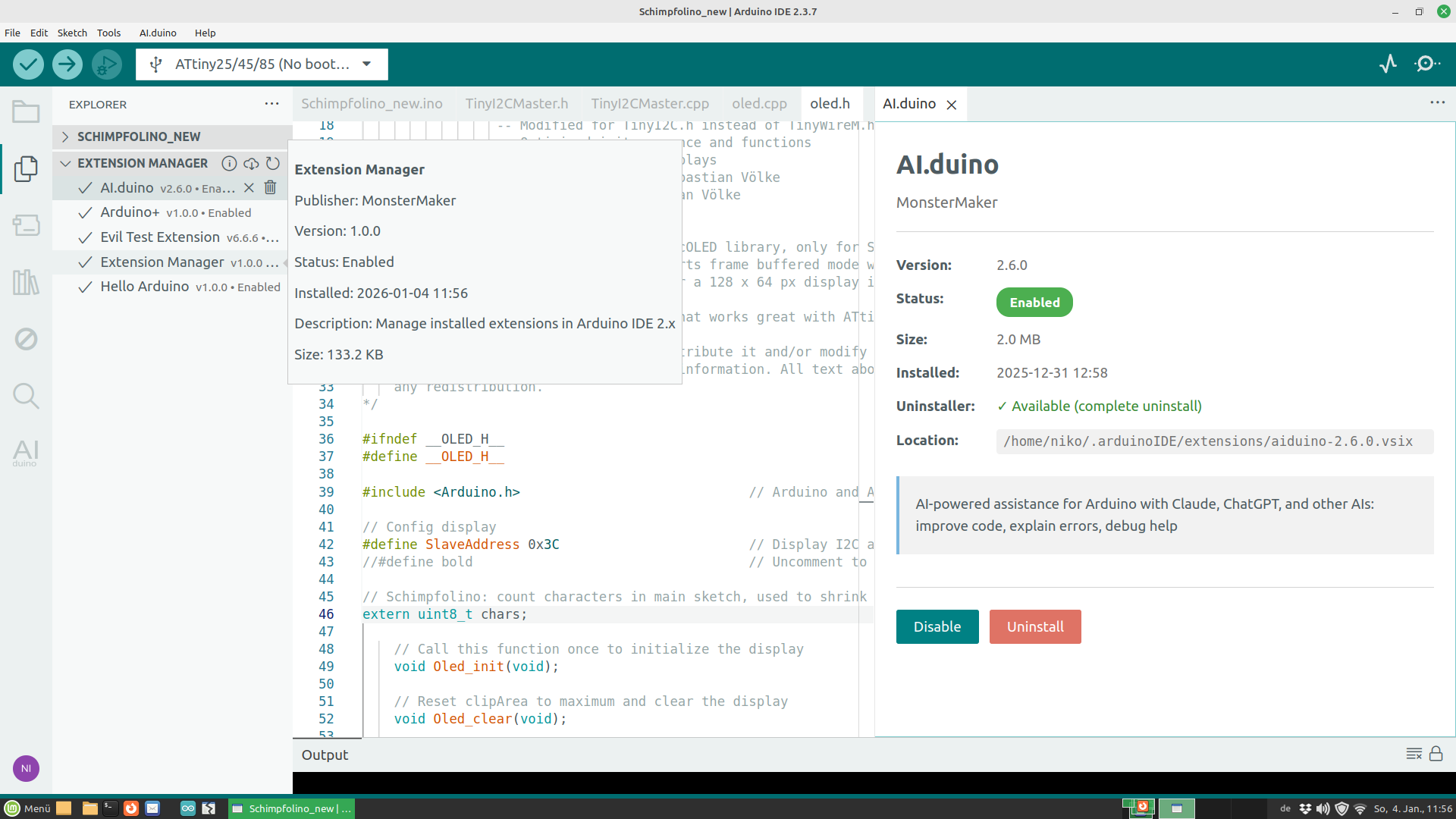
- 📦 View all installed extensions with status (enabled/disabled)
- ✅ Enable/Disable extensions - moves extensions between active and disabled state
- 🗑️ Uninstall extensions completely (removes .vsix files and all data)
- 📥 Install extensions from .vsix files with automatic upgrade detection
- 🔒 Security scanning - analyzes extensions before installation for suspicious code patterns
- ℹ️ Extension details - view version, publisher, size, and location in a dedicated panel
- 🌍 Automatic language detection based on IDE settings. Support are: en, es, de, fr, it.
- 🎯 Clean interface - integrated into Explorer sidebar, no cluttered Activity Bar
You need the VSIX file extension-manager-X.X.X.vsix in the same folder with the installer. The installer will install the plugin in your home folder.
Run install_arduinoplus_windows.bat as administrator
chmod +x install_arduinoplus_linux.sh
./install_arduinoplus_install_linux.sh
chmod +x install_arduinoplus_macos.sh
./install_arduinoplus_Install_macos.sh
- Open the Explorer view (Files icon in left sidebar, or Ctrl+Shift+E)
- Find Extension Manager section below your sketch files
- View all installed extensions with their status (✓ enabled / ⊘ disabled)
- Click on any extension to:
- Enable/Disable (moves .vsix files accordingly)
- View detailed information
- Uninstall completely
- Use the toolbar buttons:
- 🔄 Refresh extension list
- 📥 Install new extensions from .vsix files
- ℹ️ About Extension Manager
- When installing a .vsix file, Extension Manager scans it for security issues (eval usage, file access, network requests, etc.)
- The security scan shows severity levels (🚨 Critical |
⚠️ High | ⚡ Medium | ℹ️ Low) and details about permissions the extension requires - If you install a .vsix file that already exists, you'll be asked if you want to replace it
- The extension is installed to
~/.arduinoIDE/extensions/ - Restart the IDE to activate newly installed extensions
- Disable: Moves the extension from
deployedPlugins/to.extensionmanager/disabled/ - Enable: Moves it back to make it active again
- The .vsix file is also moved to prevent automatic re-deployment
- Requires IDE restart to take effect
- Changes require an IDE restart to take effect
- On first run, Extension Manager automatically opens the Explorer view to make itself visible
Extension Manager supports declarative uninstall configurations. Extensions can include an uninstall.json file to define what should be deleted during uninstallation:
- Configuration directories (e.g.,
~/.myextension) - Settings files
- VS Code configuration keys
- Global state entries
When an extension includes uninstall.json, Extension Manager shows "Uninstaller: ✓ Available" in the extension details and performs a complete cleanup on uninstall.
For extension developers: See UNINSTALLER.md for the full specification.
Use the About panel (ℹ️ button in toolbar) and click the "Uninstall" button in the Danger Zone. This will:
- Remove Extension Manager itself
- Delete all settings and data in
~/.extensionmanager/ - Clean up all related files
- Restart the IDE to complete uninstallation
- Arduino+ - Essential IDE helpers for Arduino development.
Bug reports and feature requests are welcome! Please use the GitHub Issues page.
Extension Manager is free and open source. If it saved your day, consider buying me a coffee! ☕


Every contribution helps keep this project alive! 🚀