
The Winlink Form Viewer (fv) is a web-based program to display a Winlink "view" file in a browser, without having the Winlink Express software installed on your computer.
- runs on Windows, MacOs, Linux platforms
- software is web-based. The server can be running on the local desktop, the local network, or anywhere on the Internet. This means that fv can be used by users who aren't Amateur Radio or SHARES operators
- configurable text, server settings, error messages, web pages, logging, etc. to support user and organizational needs
- unzip anywhere
- from the unzipped, install directory, start the server by typing: bin/fv-server
- save the Winlink "view" file attachment that you receive from a regular (SMTP) email
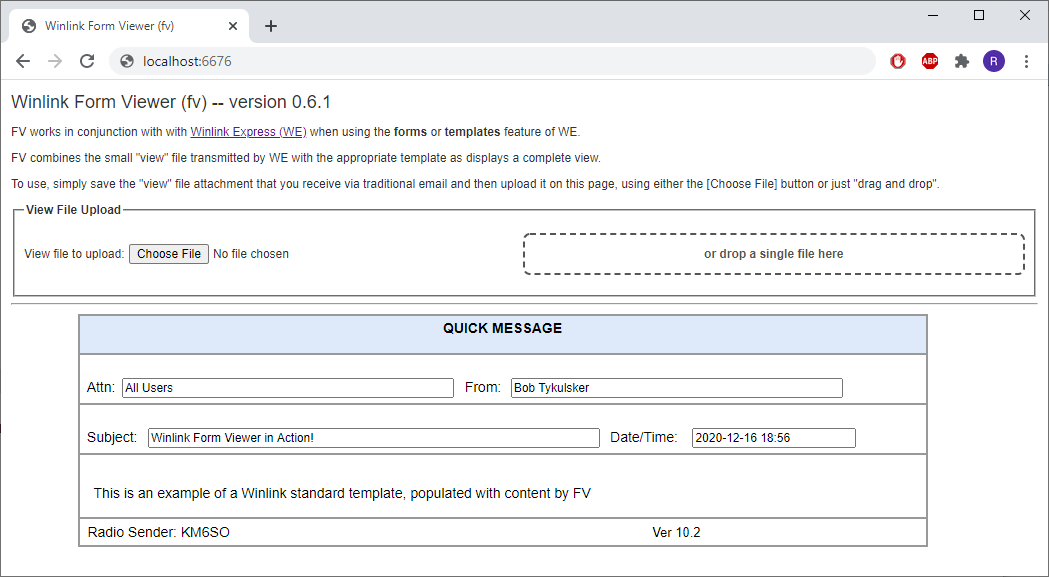
- with your favorite browser, browse to http://localhost:6676
- on the web page, select the view file, either with the [Choose file] button, or dragging and dropping onto the drop zone
- the "view" file is automatically uploaded, matched with the corresponding Standard Template and the resulting form is displayed below the input box
Just remove the installation directory
A configuration file is required to run. The supplied configuration file, conf/fv.conf, has reasonable values and need not be modified.
Details of each configuration parameter is available in a separate Configuration.md document
Logging is provided by the SL4J framework and Logback implementation. The logging configuration file is located at conf/logback.xml
Two scripts are provided in the bin directory:
- bin/fv-server: for running the fv program.
- bin/fv-update: for checking the installed version of the Standard Templates against the most current version available from the Winlink.org web site
These scripts use the configuration file found at conf/fv.conf, but you can override this by specifying: --config-file path-to-non-standard-configuration-file on the command line to bin/fv-server and bin/fv-update
NOTE WELL: All file paths in the default conf/fv.conf file are relative to the installation directory. This means that your should do one of the following:
- cd to the install directory before running bin/fv-server or bin/fv-update
- edit the configuration file in conf/fv.conf to provide an absolute path to every file
- run the wrapper scripts, bin/fv-server, bin/fv-update with a --config-file that has absolute file paths
- modify the wrapper scripts bin/launch-fv-server, bin/launch-fv-update to set the installation directory
- set an environment variable $FV_HOME before using the bin/launch-fv-server, etc scripts
As mentioned above, there is a script that will check and download the latest version from the Winlink website. I consider this process somewhat brittle, since it relies on undocumented and unsupported features from the Winlink website.
If your are running on the Windows platform and Winlink Express is already installed, you can change the configuration file to point to the Standard Templates directory as maintained by the Winlink Express program itself. Typically, this will be on C:\RMS Express\Standard Templates.
The fv program requires Java 15 or later. You can download the latest, free version of Java here: Java Download
Vadim Volk, N7PIX, made invaluable suggestions to improve the usability of fv.
This project wouldn't exist without the efforts of the volunteers of the Amateur Radio Safety Foundation and the Winlink Development Team. Their efforts have led to the robust messaging system using radio pathways when the Internet is not present. Winlink is the de-facto standard for radio-based EmComm messaging.
This project was built with many components from the Java ecosystem. I would like to acknowledge the following projects -args4j: https://args4j.kohsuke.org/ -logback: http://logback.qos.ch/ -jsoup: https://jsoup.org/ -junit: https://junit.org/junit4/ -sparkjava: http://sparkjava.com/ -zip4j: https://github.com/srikanth-lingala/zip4j -maven: http://www.apache.org/ -eclispe: https://www.eclipse.org/ -java: https://openjdk.java.net/