Software Design Document
Prepared by Robert Kleffner, Tao Zhang and Jordan Leithart
Version 1.0
- Change Log
- Introduction
- Purpose
- Scope
- Glossary
- Overview
- References
- Architectural Design
- Overview
- Interface Design
- Tools
- Navigation
- System Features
- Appendix A: Reference
| Date | Person | Change |
|---|---|---|
| 2013-09-20 | Jordan Leithart | Adding Document Outline |
| 2013-12-10 | Jordan Leithart | Sprucing up for turn-in |
| 2014-02-27 | Jordan Leithart | Second semester additions |
###Purpose
This Software Design Document provides the design details of Red Card Dev's application, KickShot for Android. The expected audience is children ages 5 and up, as well as any user who wishes to understand the design aspects of the application.
###Scope
This document contains a complete description of the design of KickShot for Android. The basic architecture is an application based on the board game KickShot Junior which is the most basic rule set for the board game. The application will be written in Java. The user will be able to roll dice to advance or shoot the ball on offense, to attempt to intercept or block the ball on defense. The application will keep track of score, wins, and achievements.
In addition, the second semester will see Red Card Dev start designing and developing the second level of KickShot the board game. This will be called KickShot Warm Up. The user will be able to play cards to advance or shoot the ball on offense, or to intercept or block the ball while on defense.
###Overview
The remaining sections of this document are as follows:
- References: provides hyper-links to other documents pertinent to this project.
- Architectural Design: provides an explanation of how the application works with it's component parts.
- Interface Design: provides visual representation of the layout of the application and how user navigation works.
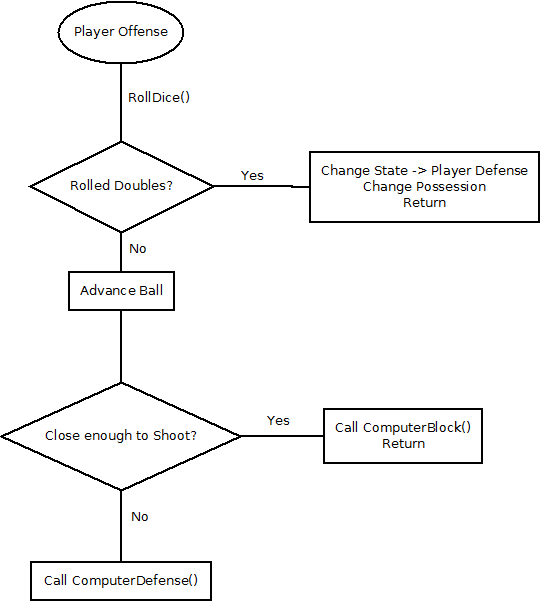
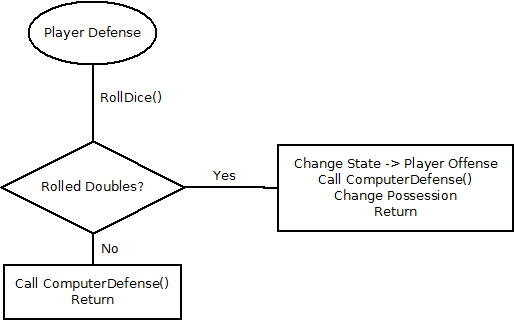
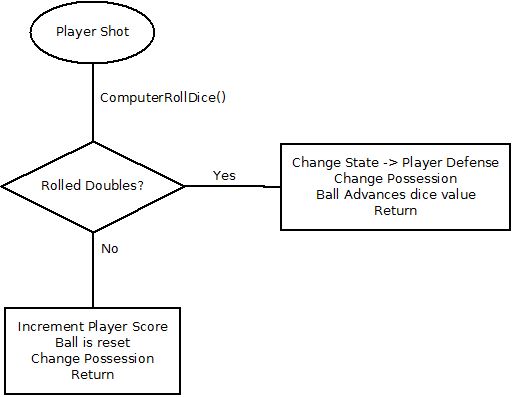
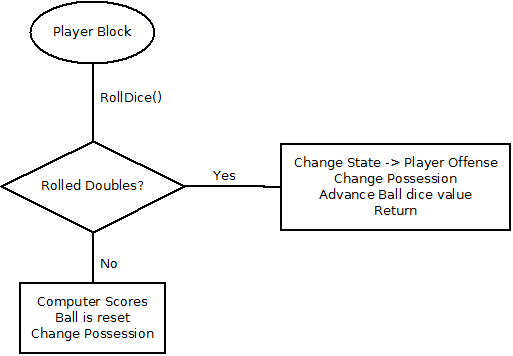
- Program Flow: provides a visual representation of how the game state changes.
- Tools: provides an explanation of the third party tools required to develop the application.
###References
###Overview The application has two main components and five sub-components:
- Activities:
- Rules: The set of rules for the current game selected.
- Actions: The set of actions that occur when different things happen during the course of the game.
- Each action will have animation from the VTD group currently working on the project
- Game: The main loop that controls the game logic.
- Views:
- Board: The background of the viewport. This can be touched to cause events to occur.
- Dice: Dice that change based on a roll dice function.
KickShot Warm Up will have to have additions to the above:
- Activities:
- Cards: The action chosen to be performed by the user. Click and drag functionality
- Views:
- Hand: The set of cards to be played at any given time.
###Navigation
- The application will use buttons that the user can click to navigate between menus.
- Dropdown menu for difficulty specific navigation options
- The application will utilize the Android touch based interface for button clicking.
This section further explains game states in the application:
###Player Offense
This section lists the third party tools we will use to develop the application:
- Android Studio (Gridle)