"Stop struggling with file uploads"
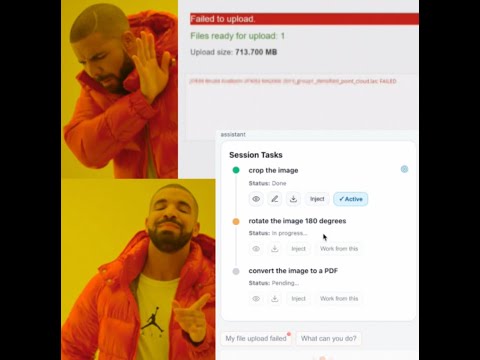
EasyUpload is a conversational Chrome extension that automatically prepares your files before uploading them.
It can convert, compress, and edit your media directly in the browser — no external tools or websites required.
Everything runs locally, powered by Chrome’s built-in AI model.
No files are ever sent to external servers.
- 🤖 An assistant that edits your files for you using:
- 🔁 Reinjection of the processed file directly into the web page’s upload form
- 💾 Edit your local file — everything runs in your browser
- ⚡ Powered by Google Chrome built-in AI model
The assistant receives the user’s request in natural language (for example: “convert my image to PDF and reduce its size”).
It first determines whether the request is an editing request.
If that’s the case, the model decomposes the goal into multiple subtasks and assigns each one to a specific tool.
Example:
user request: "My image isn’t the right size and it’s too large",
model output: [
  { "tool_name": "ui_image_editor", "i_want": "open an interface to crop or resize the image" },
  { "tool_name": "imagemagick", "i_want": "compress the image to reduce its file size" }
]
For each subtask, the system searches for the most relevant command in a local database dedicated to that tool.
The search is performed by MiniSearch and is based on the similarity between the i_want intent and the predefined intent description of each command.
Example extract from the ImageMagick command database:
[
  {
    "command": "-adaptive-sharpen geometry",
    "intent": "I want to make the image sharper by emphasizing edges without boosting smooth regions."
  },
  {
    "command": "input -quality 80 -strip -background white -flatten output",
    "intent": "I want to compress the image to make its file size smaller without changing its format."
  }
]
The four most probable commands are selected, and the model is asked to choose the one that best matches the user’s goal (i_want).
The offscreen document receives the i_want instruction along with information about the selected command and a real-world usage example.
It uses that example to generate the final command, which is then executed in the offscreen context.
The resulting file is stored locally so that it can be reused by another tool, or reinjected directly into the page’s upload form.
- Unzip the ZIP file inside the
releasefolder of the repository. - Open chrome://extensions/ in your browser.
- Enable Developer mode (top right corner).
- Click Load Unpacked, and select the extracted folder inside the
releasedirectory. - Make sure you have Chrome’s local AI model installed — you can find instructions here:
👉 Install Chrome's built-in AI model
- Install dependencies:
   pnpm install
pnpm run dev- Same as step 2, 3 and 4 but select the
distfolder.
pnpm vitest run youtube
pnpm vitest run -t "test big_prompt_shorter youtube thumbnail"