T-Bar Engine is a 0.7.3 Psych Engine fork that originally aimed to be a Psych Engine fork with 3D support & to have my own Psych preferences, but now has expanded into a fork with multiple fixes, improvements, quality-of-life features, personal tweaks, etc.
T-Bar Engine adds content from not only newer Psych Engine versions, but from Codename Engine and even some originals. This fork is intented to be used for not only hardcoding, but for softcoding too!
The big one: 3D model support! Using haxe scripting and/or runHaxeCode, you can add your own 3D models into the game, which is fully compatible with the mods folder,
so you can make your modpack have 3D environments.
All of the 3D classes are stored in the away3d package and all flixel3d classes are stored in the flixel.flx3d package.
You can now use haxe scripts as an alternative to lua scripting. Haxe scripts use the same callback names as Psych (example: onCreate, onUpdate, goodNoteHit, etc) while also adding some functionalities from Codename scripting, newer Psych versions, and original ones all together. Haxe scripts also have more uses than base lua scripts, like creating new menus!
Tip
Check out the T-Bar Engine Documentation Site for plenty more documentation, features, and tips on the fork. You can also check out Psych Engine's Lua API for information on base Psych Engine Lua.
Using haxe scripting, you can modify existing menus and even create your own menus for your modpacks using the states folder in your modpack.
The same goes for substates too!
Lua Scripts have a few more functions added, some from future Psych versions and some original ones.
Example:
browserLoad("https://www.youtube.com/watch?v=pg2-n6gECwY")
getDataFromURL('https://www.youtube.com')
doTweenNumber('coolTween', 1, 45, 3, 'sineInOut')

makeLuaBackdrop("coolBackdrop", "funkay", 10, 10, 'x', 0, 0)
addLuaBackdrop("coolBackdrop", true)
There are even hardcoded versions of Ghostutil functions!
Example:
setWindowProperty('borderless', true)
windowAlert("Hi, I'm a message paragraph", "I am the title")
windowTweenY('windowGoBurY', 100, 7, 'linear')
The new crash handler will no longer close the game (unless it's an uncaught error). Instead, it will reset to the main menu.
You can press F2 on the crash handler to create an error log in your application folder like the original Psych crash handler.
The crash menu is also able to be edited using haxe scripts.
T-Bar Engine now uses hxvlc, making it possible to make unskippable cutscenes, mid-song cutscenes, and even play videos from bytes or a url. Videos are way more higher quality too!
(You must have the components to compile Psych 0.7.3, a list of haxelibs can be found here)
Note
Haxe 4.2.5 was used to make compile/test this fork, but you can also use a newer Haxe version too.
Some of the libraries use codename forks, so install them using:
haxelib git hscript-improved-dev https://github.com/CodenameCrew/hscript-improved codename-dev
haxelib git hxdiscord_rpc https://github.com/CodenameCrew/hxdiscord_rpc
haxelib git away3d https://github.com/CodenameCrew/away3d
For videos, run:
haxelib install hxvlc 1.9.2You can also look into the setup folder & run one of the bat files to automatically setup things like haxelibs or MSVS for Windows compiling.
As of version 0.2.0, these are the current targets that you can compile to:
- Windows
- Hashlink
- Linux
- MacOS
- IOS
- Android (Planned in the future)
- HTML5 (You can compile to HTML5 on versions below 0.2.0, like 0.1.5h)
Future plans are to (hopefully) add Linux & MacOS support from newer Psych versions.
Please note that Hashlink support has a small bug, specifically in a song where the camera will not respond to must hit sections. Tracing onSectionHit shows that all of the future sections get played immediately on song start. If you have any ideas on how to fix this, please make a pull request!
Pull requests are encouraged to make this fork the best it can be. Some of the following things that are on the to-do list are:
- Fixing memory leaks
- Hashlink section bug (see Supported Targets)
- General Optimization
You are freely allowed to use this fork for modpacks or hardcoded mods, as long as you give proper credits to this fork ^^.
(Also, modpacks that use this fork should state that they are made for this fork to avoid confusion)
- T-Bar - Main Programmer / Creator
- Ghostglowdev: Support / Owner of Ghost's Tweaked Psych & Ghost Utilities
- Swagaruney: Playtesting
- Shadow Mario/Psych Crew - Creating Psych Engine
- Codename Crew - Improved classes, code, and some fixes
- Redar13 - Forked hscript-improved with advanced preprocessors and other fixes
Engine originally used on Mind Games Mod, intended to be a fix for the vanilla version's many issues while keeping the casual play aspect of it. Also aiming to be an easier alternative to newbie coders.
You must have the most up-to-date version of Haxe, seriously, stop using 4.1.5, it misses some stuff.
open up a Command Prompt/PowerShell or Terminal, type haxelib install hmm
after it finishes, simply type haxelib run hmm install in order to install all the needed libraries for Psych Engine!
if you wish to disable things like Lua Scripts or Video Cutscenes, you can read over to Project.xml
inside Project.xml, you will find several variables to customize Psych Engine to your liking
to start you off, disabling Videos should be simple, simply Delete the line "VIDEOS_ALLOWED" or comment it out by wrapping the line in XML-like comments, like this <!-- YOUR_LINE_HERE -->
same goes for Lua Scripts, comment out or delete the line with LUA_ALLOWED, this and other customization options are all available within the Project.xml file
- Shadow Mario - Main Programmer and Head of Psych Engine.
- Riveren - Main Artist/Animator of Psych Engine.
- bbpanzu - Ex-Team Member (Programmer).
- crowplexus - HScript Iris, Input System v3, and Other PRs.
- Kamizeta - Creator of Pessy, Psych Engine's mascot.
- MaxNeton - Loading Screen Easter Egg Artist/Animator.
- Keoiki - Note Splash Animations and Latin Alphabet.
- SqirraRNG - Crash Handler and Base code for Chart Editor's Waveform.
- EliteMasterEric - Runtime Shaders support and Other PRs.
- MAJigsaw77 - .MP4 Video Loader Library (hxvlc).
- iFlicky - Composer of Psync, Tea Time and some sound effects.
- KadeDev - Fixed some issues on Chart Editor and Other PRs.
- superpowers04 - LUA JIT Fork.
- CheemsAndFriends - Creator of FlxAnimate.
- Ezhalt - Pessy's Easter Egg Jingle.
- MaliciousBunny - Video for the Final Update.
- Probably one of the main points of this engine, you can code in .lua files outside of the source code, making your own weeks without even messing with the source!
- Comes with a Mod Organizing/Disabling Menu.
- New Dad Left sing sprite
- Unused stage lights are now used
- Both BF and Skid & Pump does "Hey!" animations
- Thunders does a quick light flash and zooms the camera in slightly
- Added a quick transition/cutscene to Monster
- BF does "Hey!" during Philly Nice
- Blammed has a cool new colors flash during that sick part of the song
- Better hair physics for Mom/Boyfriend (Maybe even slightly better than Week 7's 👀)
- Henchmen die during all songs. Yeah :(
- Bottom Boppers and GF does "Hey!" animations during Cocoa and Eggnog
- On Winter Horrorland, GF bops her head slower in some parts of the song.
- On Thorns, the HUD is hidden during the cutscene
- Also there's the Background girls being spooky during the "Hey!" parts of the Instrumental
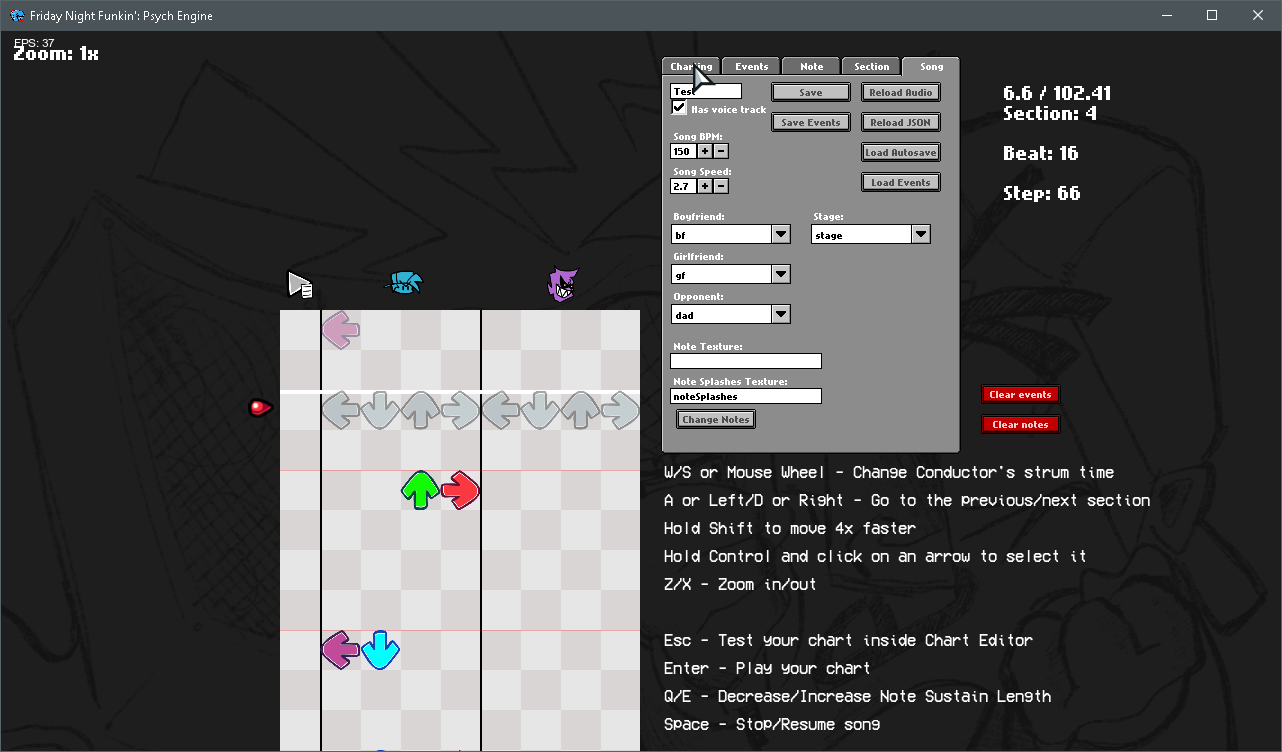
- You can now chart "Event" notes, which are bookmarks that trigger specific actions that usually were hardcoded on the vanilla version of the game.
- Your song's BPM can now have decimal values
- You can manually adjust a Note's strum time if you're really going for milisecond precision
- You can change a note's type on the Editor, it comes with two example types:
- Alt Animation: Forces an alt animation to play, useful for songs like Ugh/Stress
- Hey: Forces a "Hey" animation instead of the base Sing animation, if Boyfriend hits this note, Girlfriend will do a "Hey!" too.

- Working both for Source code modding and Downloaded builds!

- Added a different BG to every song (less Tutorial)
- All menu characters are now in individual spritesheets, makes modding it easier.

- You can add a head icon, name, description and a Redirect link for when the player presses Enter while the item is currently selected.
- The engine comes with 16 example achievements that you can mess with and learn how it works (Check Achievements.hx and search for "checkForAchievement" on PlayState.hx)
- You can change Note colors, Delay and Combo Offset, Controls and Preferences there.
- On Preferences you can toggle Downscroll, Middlescroll, Anti-Aliasing, Framerate, Low Quality, Note Splashes, Flashing Lights, etc.
- When the enemy hits a note, their strum note also glows.
- Lag doesn't impact the camera movement and player icon scaling anymore.
- Some stuff based on Week 7's changes has been put in (Background colors on Freeplay, Note splashes)
- You can reset your Score on Freeplay/Story Mode by pressing Reset button.
- You can listen to a song or adjust Scroll Speed/Damage taken/etc. on Freeplay by pressing Space or CTRL respectively.