A sleek and customizable loot notification addon for Turtle WoW that displays fading notifications with real item icons when you loot items or coins.
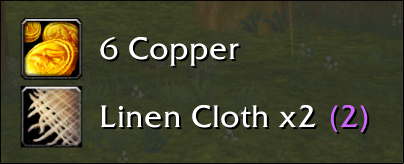


- Real-time Loot Detection - Automatically detects when you loot items or coins
- Authentic Item Icons - Shows actual game icons by searching your bags
- Coin Support - Displays copper, silver, and gold coins with proper icons
- Smart Stacking - Multiple identical items show as "Item Name x3"
- Fallback Icons - Intelligent icon system for items not found in bags
- Smooth Animations - Fade in → Display → Fade out with scaling effects
- Quality Colors - Items display in their proper quality colors
- Compact Design - Clean, non-intrusive notifications
- Customizable Positioning - Drag and drop to reposition anywhere on screen
- Settings Panel - Easy-to-use GUI for all options
- Timing Controls - Adjust fade in, display, and fade out times
- Scale Options - Resize notifications from 50% to 200%
- Toggle On/Off - Quick enable/disable functionality
- Download the latest release from GitHub
- Extract the
LootMonitorfolder to yourInterface/AddOns/directory - Restart WoW or reload UI (
/reload)
- Clone or download this repository
- Copy the
LootMonitorfolder to:World of Warcraft/Interface/AddOns/LootMonitor/ - Ensure the folder structure looks like:
Interface/AddOns/LootMonitor/
├── LootMonitor.lua
└── LootMonitor.toc
- Type
/lmto open the settings panel - Click "Test" to see a sample notification
- Click "Move" to reposition notifications
- Adjust timing and scale to your preference
| Command | Description |
|---|---|
/lm or /lootmonitor |
Open settings panel |
/lm toggle |
Toggle notifications on/off |
/lm clear |
Clear active notifications |
/lm test |
Create test notification |
/lm move |
Enter move mode to reposition |
/lm settings |
Open settings panel |
/lm help |
Show all commands |
Access via /lm to customize:
- Enable/Disable - Toggle notifications
- Scale (0.5x - 2.0x) - Resize notifications
- Fade In Time (0.1s - 2.0s) - Animation speed
- Display Time (1.0s - 10.0s) - How long notifications stay
- Fade Out Time (0.5s - 3.0s) - Fade out speed
- WoW Version: Turtle WoW
- Dependencies: None
CHAT_MSG_LOOT- Item loot detectionCHAT_MSG_MONEY- Coin loot detectionADDON_LOADED- Initialization
- Lightweight and efficient
- Asynchronous bag searching (0.1s delay)
- Automatic cleanup of old notifications
- Minimal memory footprint
This addon was inspired by the LootDisplay WeakAura but built for Turtle WoW compatibility.
- None currently reported
Contributions are welcome! Please feel free to:
- Report bugs via GitHub Issues
- Suggest new features
- Submit pull requests
- Improve documentation
This project is licensed under the MIT License - see the LICENSE file for details.
- GitHub Issues: Report bugs or request features
- Turtle WoW Forums: Post in the forum post
- Discord: Find me on the Turtle WoW Discord
Enjoy your enhanced looting experience! 🎉