

Here’s a BMI (Body Mass Index) chart for both males and females. BMI is calculated based on weight (kg) and height (m²) and is the same for males and females, although body composition can differ. The categories for BMI interpretation are the same for both genders.

Check All Screenshots Here
Download on


- when the app is opened it asks for weight and height
- enter weight and height then click on check button to show your BMI
-
- your BMI 1 to 18.4 its show Under Weight
- 18.5 to 24.9 its show Normal Weight (Healthy Weight)
- 25 to 29.9 its show Over Weight
- 30 to 39.9 its show Obesity
- your BMI 40 above its show Severe Obesity
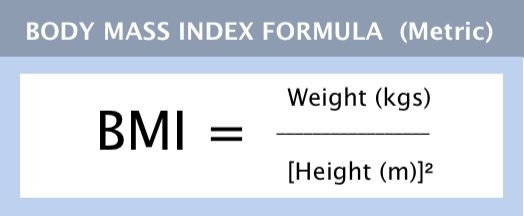
sample table for heights and weights with BMI values:
| Height (cm) | Weight (kg) | BMI | Category |
|---|---|---|---|
| 150 | 40 | 17.8 | Underweight |
| 160 | 50 | 19.5 | Normal weight |
| 170 | 65 | 22.5 | Normal weight |
| 180 | 80 | 24.7 | Normal weight |
| 190 | 95 | 26.3 | Overweight |
| 200 | 120 | 30.0 | Obesity Class 1 |
Use this command to create the initial Shorebird release (base version): Note : use which one flutter version you are using in your project same as you are using in shorebird command otherwise it will give error ( example : your project is using flutter 3.10.0 use this Cmd : shorebird release android --flutter-version=3.10.0 )
shorebird release android --flutter-version=3.35.4Use this command to push Dart-only updates (UI, logic, text fixes) without uploading to the Play Store:
shorebird patch --platforms=android --release-version=1.0.7+7