
A conlang word generator
Download the latest from the Releases section on the right
Tutorial Video:
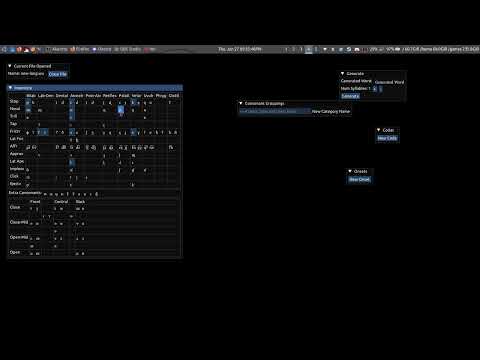
There are six tabs:
- File Menu
- Close the current file and go back to the open file menu
- Inventory
- Displays an interactive IPA table
- Select the sounds for your language
- Consonant Categories
- Create custom groupings of consonants for use in defining syllable structure (∅ and C are automatically created for you)
- Example: Group "N" for Nasals contains just /m n etc/ from your inventory
- Onset Maker
- Select from the consonant groupings to create options for onsets of syllables
- Coda Maker
- Select from the consonant groupings to create options for codas of syllables
- Generate
- Select the number of syllables to generate
- Use the data from the previous tabs to generate a new word
NOTE: You don't need to build! You can download a release!!! Linux users need only install SFML and Windows users can use the release directly!
Dependencies:
- gcc
- make (mingw32-make on Windows)
- OpenGL
- pkg-config (Linux Only)
- SFML < 3.0
- Windows users have to download the source bc of the lack of package manager and annoyance of building from source
- Download and extract the root folder (the one with
lib/,bin/, andinclude/) into an "SFML/" folder (i.e. there should be an SFML/include/ folder in the repo root directory) - Copy all the
.dlls from SFML/bin/ to the root repo directory - Build like normal
- Download and extract the root folder (the one with
- Windows users have to download the source bc of the lack of package manager and annoyance of building from source
Update the submodules: git submodule update --init --recursive
Run make -j<num cpu processors> (or mingw32-make on Windows)
docker build --no-cache -t nonnixos-build nonnixos-build
docker run --rm -v $(pwd):/output nonnixos-build