


This is a simple DICOM image de-identifier. Its primary function is to receive a DICOM file, extract its payload (one or more images), apply image detection to each corresponding image and then remove the corresponding detected areas from that image.
Execute in a terminal
python3 -m pip install -r requirements.txt
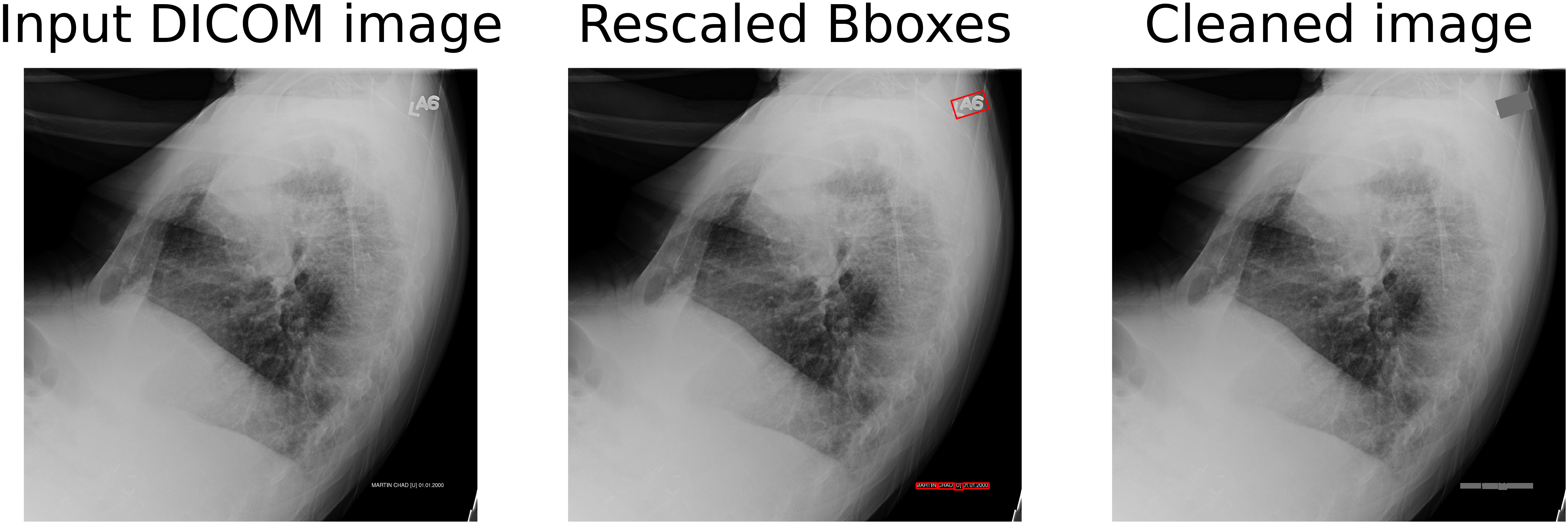
Resulting text detection and removal of text from respective bounding boxes based on the CRAFT detector of Keras OCR.
To select an image text removal pipeline, open main.py, in the line
PIPELINE = <PIPELINE_FUNCTION>
replace <PIPELINE_FUNCTION> with one of the functions within the lines
## ! Pipelines: Begin

...

## ! Pipelines: End
that can be found inside dcm_img_text_remover.py.
For one file conversion you can use
presidio_dicom_image_text_remover
pytesseract_dicom_image_text_remover
keras_ocr_dicom_image_text_remover
For multiple file conversions you can use
MassConversion
To select one input DICOM file (with name e.g. pos2.dcm), first place it inside ../dataset/raw and specify its path through the parameter IN_PATH at main.py, e.g.
IN_PATH = 'pos2.dcm'
For multiple DICOM conversions simply paste your directory path (e.g. ../dataset/raw/direc) and specify its path through the parameter IN_PATH at main.py by placing this line at the beginning of the pipeline's function inside dcm_img_text_remover.py, e.g.
IN_PATH = '../dataset/raw/direc'
You can find the cleaned DICOM file along with its prediction plot on the path ./dataset/clean with the corresponding filename as its input. If the plot is unwanted, it can be disabled by commenting out the lines
vis_obj = visuals.DetectionVisuals(...)
vis_obj.build_plt(...)
rw_obj.store_fig(...)
from the associated pipeline function inside dcm_img_text_remover.py.
To execute navigate inside ./src and apply
python3 main.py -p <input_directory_path> --gpu
To avoid using GPU, one may remove the --gpu argument.

A high abstraction of the dicom image text removal pipeline based on keras-ocr. In this demonstrative example, the DICOM file contains exactly one image defined as