Hi everyone! My name is Sahana, and I’m here to teach you about React! React is one of the most used libraries out there, along with Next.js, a framework using React.
You can see my project at https://haxmas-example.sahana.dev/ :)
Prize: $7.50 USD Domain Grant + 1 Snowflake
The following section assumes you have Node.js and npm installed on your computer. If you don't have them installed, please visit the Node.js official website to download and install the latest LTS version.
This project uses npm@11.7.0, TypeScript, React 18, Tailwind CSS, and Next.js 13. You can create a new Next.js project with TypeScript by running the following command in your terminal:
npx --yes create-next-app@latest christmas-clicker-game <DIRECTORY NAME HERE!!!> --tsIt'll describe some settings to you, this is what I selected:
✔ Which linter would you like to use? › ESLint
✔ Would you like to use React Compiler? … No / Yes
✔ Would you like to use Tailwind CSS? … No / Yes
✔ Would you like your code inside a `src/` directory? … No / Yes
✔ Would you like to use App Router? (recommended) … No / Yes
✔ Would you like to customize the import alias (`@/*` by default)? … No / Yes
If you know what you're doing, feel free to select your own options!
First, we're gonna want to create our actual website. When designing a clicker game, there are 2 main things you need:
- The Clicker (duh)
- The Counter (also duh)
We'll want to create the main layout of our site first. If you'd like, you can use my template code (attached at the end) as an example, but I reccommend you follow along!
First, let's take this boiling old boiler plate and throw it in the TRASH. We are gonna make our site jolly! Go to https://fonts.google.com/, and just look for some fonts you like. I like Ballet and Delius, but you can choose whatever you want.
Next, go to src/app/layout.tsx, and follow this template:
const myFont = MyFont({ // make sure to import from "next/font/google"!
	subsets: ["latin"],
	weight: "variable", // some fonts aren't variable, so you'll need to figure out what
  // weight to use. Google Fonts can tell you this, usually.
	variable: "--font-my-font", // for css
})
Make sure to replace the my-font parts, or this won't work.
Get into src/app/globals.css and customize it all you want! I used Ballet as a header font, and Delius as a normal text one. Make sure you make it festive!
Next, let's work on the clicker. We'll put it all together later. You can leave the page as is, or delete the main body! Your choice :)
The basics of React are hooks and components. Components are simple: They act like functions in regular code, reusable pieces of UI that can take arguments. In fact, components are defined with functions! Let's define our first component, our clicker:
// src/components/JollyOrpheusClick.tsx
import Image from "next/image";

type JollyOrpheusClickProps = {
	onClick: () => void;
};

export default function JollyOrpheusClick({ onClick }: JollyOrpheusClickProps) {
	return (
		<button onClick={onClick}>
			<Image src="/jollyorph.png" width={512} height={512} alt="Jolly Orpheus"/>
		</button>
	)
}
(psst! the // i/am/a/file at beginning of code snippets means "hey! i go in this file of code!!" You don't have src/components/JollyOrpheusClick.tsx yet, so create it.)
So what the hell does any of this mean?
Here's the same code, but annotated:
import Image from "next/image";

type JollyOrpheusClickProps = {
	onClick: () => void; // setting the type of onClick to a function
};

export default function JollyOrpheusClick({ onClick }: JollyOrpheusClickProps) {
	return (
		<button onClick={onClick}>
			<Image src="/jollyorph.png" width={512} height={512} alt="Jolly Orpheus"/> //jollyorph.png is located in public/!!!!
		</button>
	)
}
Let's put this in the page:
"use client";
import Image from "next/image";
import JollyOrpheusClick from "@/components/JollyOrpheusClick";

export default function Home() {
  return (
    <div className="">
      <main className="">
        <div className="flex flex-col items-center gap-6 text-center sm:items-start sm:text-left">
          <h1 className={"text-6xl self-center my-10"}>Haxmas Day 1</h1>
          <JollyOrpheusClick onClick={() => {console.log("boop!")}} />
        </div>
      </main>
    </div>
  );
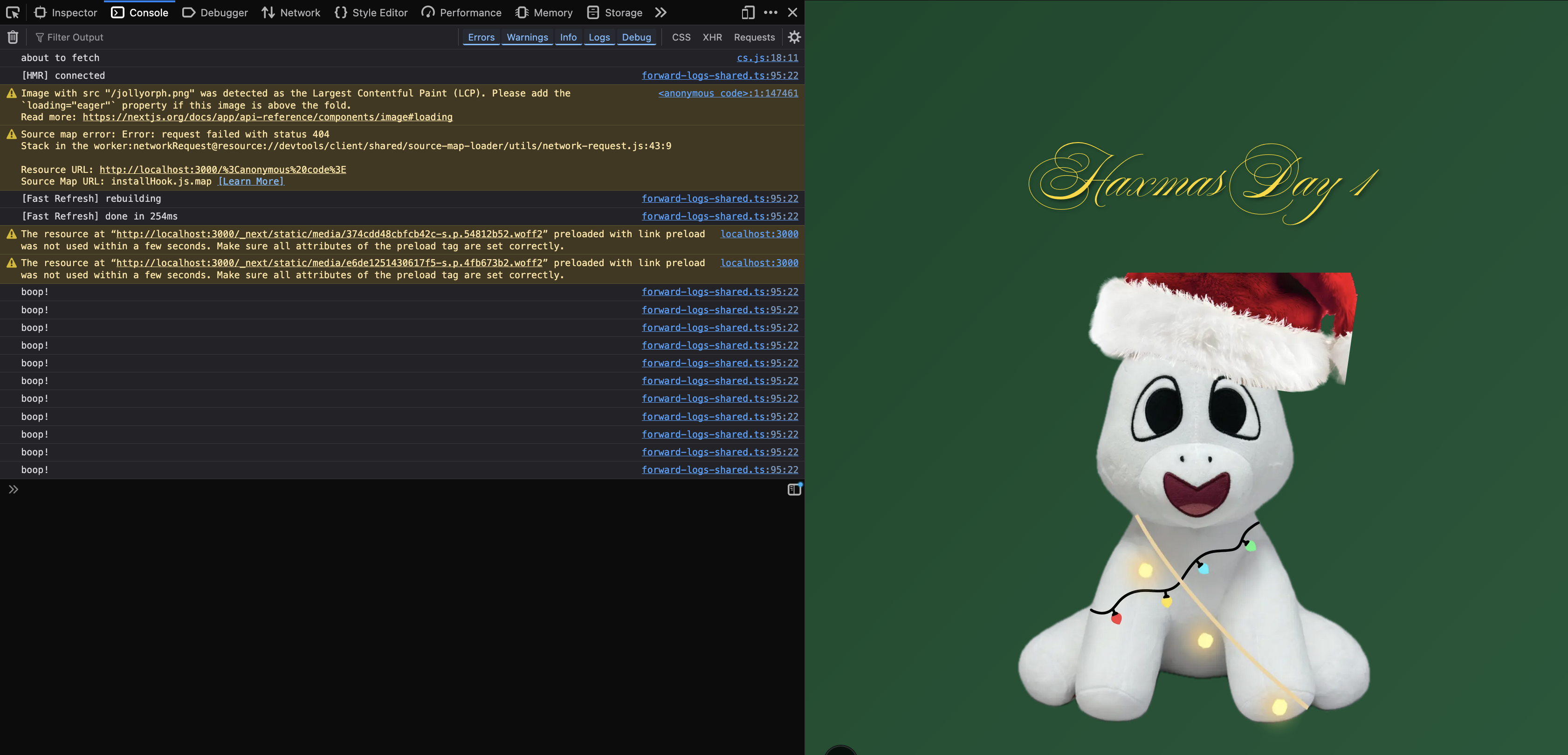
}
Remember when I said that there are 2 main parts of React: Hooks and Components? We're gonna use hooks now.
There are 2 hooks we need:
useState: This is a variable that we can update using React that automatically updates on the clientuseEffect: a React hook that runs a function after a component loads, as well in special cases, such as:- after every render (no dependency array)
- on mount (empty array)
- whenever a variable updates (filled dependency array)
You use useState as so:
const [name, setName] = useState<type>(defaultValue);and you use useEffect as so:
// Runs after every render
useEffect(() => {});

// on mount
useEffect(() => {}, []);

// Whenever count changes
useEffect(() => {}, [count]);
We're gonna use useState for our Counter.
"use client";
import Image from "next/image";
import JollyOrpheusClick from "@/components/JollyOrpheusClick";
import {useState} from "react";

export default function Home() {
  const [count, setCount] = useState(0); // useState!
  return (
    <div className="min-h-screen bg-linear-to-br from-[#0f472a] to-[#1a5a3a] flex flex-col">
      <main className="flex min-h-screen flex-col items-center justify-between py-32 px-16 bg-linear-to-br from-[#0f472a] to-[#1a5a3a]">
        <div className="flex flex-col items-center gap-6 text-center">
          <h1 className={"text-6xl self-center my-10"}>Haxmas Day 1</h1>
          <p className={"text-3xl font-bold"}>Count: {count}</p> // this is how you use state variables
          <JollyOrpheusClick onClick={() => {setCount(count + 1)}} />
        </div>
      </main>
    </div>
  );
}
If you have questions, dm @hna on Slack!
Submit at https://forms.hackclub.com/haxmas-day-1