



How It Works • Installation • Configuration • Advanced Features • Limitations





The promise of AI-assisted development is profound: write more code, ship features faster. But there is a hidden cost. AI agents write code quickly, but they struggle to stay in sync with their humans.
The hard part isn't generating code, it's maintaining the shared mental model of why that code exists. When you rely on ephemeral chat windows, friction piles up:
-
You constantly re-brief the AI on the same context.
-
Hidden assumptions creep in (e.g., "Why did it use Axios instead of fetch?").
-
You spend more time reviewing and "babysitting" the AI than building.
The bottleneck isn't output velocity. It's maintaining alignment between human and AI at scale.
iloom stops the "Context Window Tetris." It treats context as a first-class concern, persisting your AI's reasoning in issue comments rather than temporary chats.
-
Stop Babysitting, Start Collaborating: Instead of arguing with Claude in a chat, you review structured analysis plans in your issue tracker before a single line of code is written.
-
Scale Understanding: Because every loom holds its own isolated environment (Git worktree, DB branch, local server), you can switch between 5 complex features without losing your place or your AI's context.
-
Visible Reasoning: The AI's decisions are documented publicly. Your team sees the plan, and "future you" knows exactly why a decision was made.
-
Automatic Session Summaries: When you finish a loom, iloom captures key insights, decisions, and lessons learned from your Claude session and posts them to the issue. These summaries become institutional knowledge that informs future tasks.
iloom is not just a tool for managing git worktrees - it's a control plane for maintaining alignment between you and your AI assistant.
iloom uses your existing Claude subscription to build a shared mental model of your task.
 # 1. Install iloom
 npm install -g @iloom/cli

 # 2. Authenticate (iloom uses the GitHub CLI)
 gh auth login

 # 3. Start a Loom
 # Spins up an isolated environment (Git worktree, DB branch, unique port).
 # Analyzes the issue, plans the work, and documents the plan in issue comments.
 il start 25

 # ... You, the iloom agents and Claude build the feature together in the isolated environment ...

 # 4. Finish & Merge  # Validates code, generates session summary, merges, and cleans up.
 il finish
The iloom Difference: il start doesn't just create a branch. It launches a multi-agent workflow that surfaces assumptions and creates a structured plan in your issue tracker before you even need to look at your IDE.
→ Want to know how you'll benefit from iloom?
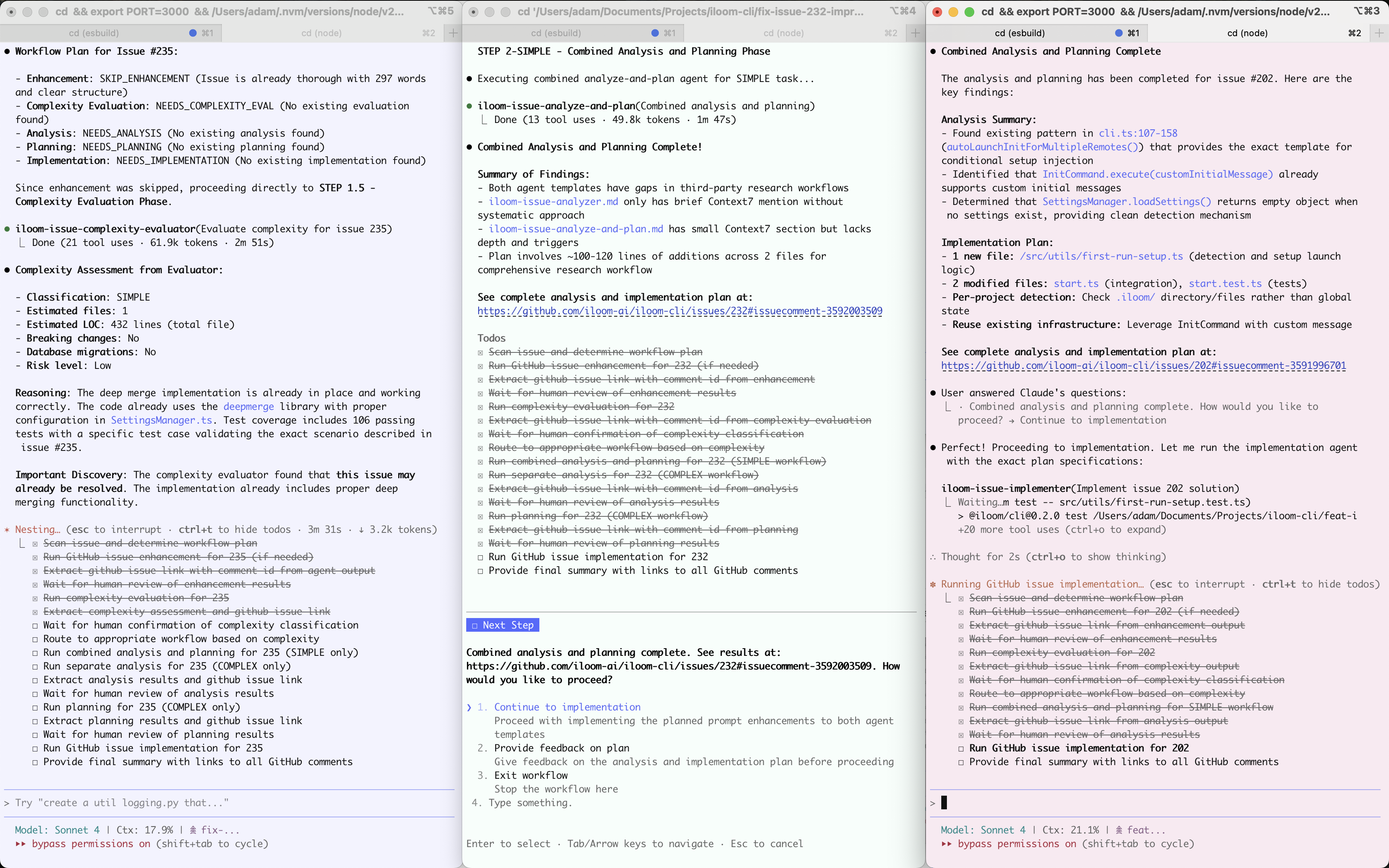
When you run il start, iloom orchestrates specialized AI agents. Each has a specific role and writes structured output to issue comments, creating permanent project knowledge.
Instead of a single generic prompt, iloom uses a pipeline of agents:
-
Enhancer (iloom-issue-enhancer): Expands brief one-liners into detailed requirements.
-
Evaluator (iloom-issue-complexity-evaluator): Determines the workflow approach:
-
Simple: Combines analysis and planning into one step for efficiency.
-
Complex: Separates deep root-cause analysis from detailed implementation planning.
-
-
Implementer: Executes the plan using the context established in the previous steps.
You are in the loop at every stage. You can review the AI's analysis, edit the plan in GitHub/Linear, and adjust course before implementation begins.
-
Default Mode: You approve each phase (Enhance → Plan → Implement).
-
--one-shot Mode: Feeling lucky? Automate the entire pipeline from start to finish without prompts.
Each loom is a fully isolated container for your work:
-
Git Worktree: A separate filesystem at ~/project-looms/issue-25/. No stashing, no branch switching overhead.
-
Database Branch: (Neon support) Schema changes in this loom are isolated—they won't break your main environment or your other active looms.
-
Environment Variables: Each loom has its own environment files (
.env,.env.local,.env.development,.env.development.local). Usesdevelopmentby default, override withDOTENV_FLOW_NODE_ENV. See Secret Storage Limitations for frameworks with encrypted credentials. -
Unique Runtime:
-
Web Apps: Runs on a deterministic port (e.g., base port 3000 + issue #25 = 3025).
-
CLI Tools: Creates an isolated binary copy (e.g., my-tool-25). You can run issue #25's version of your CLI alongside issue #99's version without conflicts. (Fun fact: iloom was built with iloom using this feature).
-
-
Context Persistence: All reasoning is stored in issue comments. This makes the "why" behind the code visible to your teammates and your future self.
| Command | Alias | Description |
|---|---|---|
il start |
new |
Create loom, run analysis agents, and launch IDE. |
il finish |
dn |
Validate tests/lint, commit, handle conflicts, and merge/PR. |
il cleanup |
remove |
Safely remove a loom and its database branch without merging. |
il list |
Show active looms and paths. | |
il projects |
List configured projects (JSON output). | |
il spin |
Launch Claude inside the current loom with context auto-detected. | |
il open |
run |
Open loom in browser (web) or run your CLI tool. |
il dev-server |
dev |
Start dev server in foreground for a workspace. |
il build |
Run the build script for a workspace. | |
il lint |
Run the lint script for a workspace. | |
il test |
Run the test script for a workspace. | |
il compile |
typecheck |
Run the compile or typecheck script for a workspace. |
il add-issue |
a |
Create and AI-enhance a new issue without starting work yet. |
il init |
config |
Interactive configuration wizard. |
il feedback |
f |
Submit bug reports/feedback directly from the CLI. |
il update |
Update iloom CLI to the latest version. |
For detailed documentation including all command options, flags, and examples, see the Complete Command Reference.
The easiest way to configure iloom is the interactive wizard. It guides you through setting up your environment (GitHub/Linear, Neon, IDE).
You can even use natural language to jump-start the process:
# Standard wizard
il init

# Natural language wizard
il init "set my IDE to windsurf and help me configure linear"Settings are loaded in this order (highest priority first):
-
CLI Flags: il start --permissionMode=acceptEdits
-
Local Overrides: .iloom/settings.local.json (gitignored; for API keys & local preferences)
-
Project Settings: .iloom/settings.json (committed; for shared team defaults)
-
Global Settings: ~/.config/iloom-ai/settings.json (for user-specific defaults)
This example shows how to configure a project-wide default (e.g., GitHub remote) while keeping sensitive keys (Linear API token) or personal preferences (IDE choice) local.
.iloom/settings.json (Committed)
{
  "mainBranch": "main",
  "issueManagement": {
    "provider": "github"
  },
  "capabilities": {
    "web": {
      "basePort": 3000
    },
    "database": {
      "databaseUrlEnvVarName": "DATABASE_URL"
    }
  },
  "databaseProviders": {
    "neon": {
      "projectId": "fantastic-fox-3566354"
    }
  }
}
.iloom/settings.local.json (Gitignored)
{
  "issueManagement": {
    "linear": {
      "apiToken": "lin_api_..." // Only if using Linear
    }
  },
  "workflows": {
    "issue": {
      "permissionMode": "acceptEdits" // Control Claude Code permissions
    }
  },
  "spin": {
    "model": "opus" // Claude model for spin orchestrator: opus (default), sonnet, or haiku
  },
  "summary": {
    "model": "sonnet" // Claude model for session summaries: sonnet (default), opus, or haiku
  }
}iloom supports projects in any programming language through .iloom/package.iloom.json. This file defines scripts using raw shell commands instead of npm scripts.
File Location: .iloom/package.iloom.json
Format:
{
  "scripts": {
    "install": "bundle install",
    "build": "cargo build --release",
    "test": "cargo test",
    "dev": "cargo run",
    "lint": "cargo clippy",
    "typecheck": "cargo check"
  }
}
Supported Scripts:
| Script | Purpose | When Used |
|---|---|---|
install |
Install dependencies | il start (loom creation), il finish (post-merge) |
build |
Compile/build project | il build, il finish (CLI projects, post-merge) |
test |
Run test suite | il test, il finish validation |
dev |
Start dev server | il dev-server |
lint |
Run linter | il lint, il finish validation |
typecheck |
Type checking | il typecheck, il finish validation |
compile |
Alternative to typecheck | il compile, il finish validation (preferred over typecheck if both exist) |
All scripts are optional. If not defined, that step is skipped.
Language Examples:
| Language | Install | Build | Test | Dev | Lint | Typecheck |
|---|---|---|---|---|---|---|
| Rust | cargo fetch |
cargo build |
cargo test |
cargo run |
cargo clippy |
cargo check |
| Python (pip) | pip install -e . |
- | pytest |
uvicorn app:app |
ruff check . |
mypy . |
| Python (poetry) | poetry install |
- | pytest |
uvicorn app:app |
ruff check . |
mypy . |
| Ruby | bundle install |
- | bundle exec rspec |
rails server |
bundle exec rubocop |
- |
| Go | go mod download |
go build ./... |
go test ./... |
go run . |
golangci-lint run |
go vet ./... |
Precedence Rules:
.iloom/package.iloom.json(if exists) - highest prioritypackage.json(if exists) - fallback for Node.js projects
Key Differences from package.json:
- Scripts are raw shell commands, executed directly (not via npm/pnpm)
- No package manager prefix is added to commands
- Works with any language's toolchain
Automatic Detection: When running il init on a non-Node.js project, iloom will offer to detect your project's language and generate an appropriate package.iloom.json.
→ Complete Multi-Language Project Guide - Detailed setup instructions, more language examples, and troubleshooting.
Secret Storage Limitations: iloom manages environment variables through standard .env files (via dotenv-flow). The following encrypted/proprietary secret storage formats are not supported:
| Format | Why Unsupported |
|---|---|
Rails encrypted credentials (config/credentials.yml.enc) |
Requires Rails internals + master key |
| ASP.NET Core User Secrets | Stored outside project at ~/.microsoft/usersecrets/<guid>/ |
| SOPS/Sealed Secrets | Requires external decryption keys |
Recommendation: If you want to use database isolation features (or anything else that requires updating env variables), use standard .env files for iloom compatibility. For Rails, consider dotenv-rails. For ASP.NET, use a local .env file alongside User Secrets.
By default, looms only contain files tracked by Git. If you have local files that are gitignored (like SQLite databases, test data, or sensitive configuration), they won't be available in your looms.
Automatically copied: Some gitignored files are always copied to looms without configuration:
- dotenv-flow files:
.env,.env.local,.env.development,.env.development.local .iloom/settings.local.json.claude/settings.local.json
For other gitignored files, use copyGitIgnoredPatterns to specify glob patterns for files that should be copied from your main repo to each loom.
When to use:
- Local databases: SQLite files (
*.db,*.sqlite) for local development - Test data: Large test fixtures that are too big to commit to git
- Sensitive files: Configuration files with credentials that shouldn't be in version control
.iloom/settings.json
{
  "copyGitIgnoredPatterns": [
    "*.db",
    "*.sqlite",
    "data/**/*.json",
    "{data,fixtures}/*.sql"
  ]
}
Supported patterns:
*.db- Match files with .db extension in root**/*.db- Recursively match all .db files in any directorydata/**/*.sqlite- Match .sqlite files anywhere under data/{data,backup}/*.db- Match .db files in either data/ or backup/*.{db,sqlite}- Match files with either .db or .sqlite extension
Notes:
- Files are copied from your main workspace to each loom during
il start - Files are NOT copied back during
il finish(one-way copy only) - The patterns use fast-glob syntax
Control how il finish handles your work. Configure in .iloom/settings.json:
{
  "mergeBehavior": {
    "mode": "local"  // "local", "github-pr", or "github-draft-pr"
  }
}| Mode | Description |
|---|---|
local |
(Default) Merge directly into main branch locally. Fast-forward merge, no PR created. |
github-pr |
Push branch and create a GitHub PR on il finish. Worktree cleanup is optional. |
github-draft-pr |
Create a draft PR immediately on il start. On il finish, the PR is marked ready for review. Recommended for contributions to forked repos. |
When to use github-draft-pr:
- Contributing to forks: When you don't are contributing to a forked repo use this mode to create the PR from your fork immediately, allowing iloom's agents to post workflow comments directly to the PR instead of writing to the upstream repo's issues (which may not be appreciated by the repo owners).
- CI runs on your branch during development (draft PRs trigger CI on most repos)
- Your team requires PRs for all changes (no direct merges to main)
- You want reviewers to see progress before the work is complete
iloom supports the tools you already use. Unless you use JIRA.
| Provider | Setup | Notes |
|---|---|---|
| GitHub | gh auth login |
Default. Supports Issues and Pull Requests automatically. |
| Linear | il init |
Requires API token. Supports full read/write on Linear issues. |
iloom creates isolated workspace settings for your editor. Color synchronization (visual context) only works best VS Code-based editors.
-
Supported: VS Code, Cursor, Windsurf, Antigravity, WebStorm, IntelliJ, Sublime Text.
-
Config: Set your preference via
il initoril start --set ide.type=cursor.
Sometimes a task spawns sub-tasks, or you get interrupted by an urgent bug while deep in a feature. Child looms let you create a workspace within a workspace.
When to use:
-
Breaking down a massive feature into smaller PRs.
-
Fixing a bug discovered during feature work without losing context.
How it works: If you run il start 42 while inside loom-25, iloom asks if you want to create a child loom.
-
Inheritance: The child inherits the database state and git branch from the parent (not main).
-
Structure
    ~/my-project-looms/
    ├── feat-issue-25-auth/           # Parent Loom
    └── feat-issue-25-auth-looms/     # Child Looms Directory
      ├── fix-issue-42-bug/         # Child Loom (inherits from #25)
      └── feat-issue-43-subtask/    # Another Child Loom
iloom provides first-class support for building CLI tools. When you start a loom for a CLI project, iloom creates workspace-specific binaries so you can test each issue's version independently.
> il start 52 # Working on CLI feature in issue 52

> my-cli-52 --version  # Test issue 52's version

> il start 137  # Switch to different CLI issue

> my-cli-137 --help    # Test issue 137's version

# Original binary still works from main branch
> my-cli --version # Unaffected by other looms' CLIsThis is an early-stage product.
Requirements:
-
✅ OS: macOS (Fully supported).
⚠️ Linux/Windows are untested. -
✅ Runtime: Node.js 16+, Git 2.5+.
-
✅ AI: Claude CLI installed. A Claude Max subscription is recommended (iloom uses your subscription).
Project Support:
-
✅ Node.js Web Projects: First-class support via package.json scripts (dev, test, build).
-
✅ Node.js CLI Tools: Full support with isolated binary generation.
-
✅ Multi-Language Projects: Python, Rust, Ruby, Go, and other languages via
.iloom/package.iloom.json.
See all known limitations on GitHub. If you're feeling left out - you're absolutely right! The best way to complain about something is to fix it. So...
We (Claude and I) welcome contributions! We've made it easy to get started — iloom can even set up its own dev environment.
iloom contribute # Handles forking, cloning, and setting up the dev environment automatically.All PRs should be created with iloom or include detailed context. When you run iloom contribute, it configures iloom to create a draft PR as soon as you start work. As you work, iloom posts the AI's analysis, implementation plan, and progress directly to that draft PR—giving reviewers full context before the code is even ready for review. If you're not using iloom, please provide equivalent detail in your PR.
New contributors should start with issues labeled starter-task. For details, see our Contributing Guide.
iloom comes from "illuminate" (illuminating the AI coding process) and "intelligent loom" (weaving artificial and human intelligence together).
License: Business Source License 1.1
-
✅ Free to use for any internal or commercial project.
-
❌ You cannot resell iloom itself as a product or SaaS.
-
Converts to Apache 2.0 on 2029-01-01.
See LICENSE for complete terms.