This example works on twitter data, as huge volumes of new tweets are generated every day. The repository contains several files that illustrate the different components needed. The goal was to build a data pipeline that gathers new tweets and processes them in different steps. The output should be persisted on disk and served on a website in realtime.
The first approach seen in "get_tweets_with_listener.py" tests the Tweepy library and the Twitter API to establish a listener for keywords, retrieve tweets and persist them on disc. As this worked Kafka was introduced to create simple consumers and producers. Afterwards the script that collected tweets and persisted them was split into different producers and consumers to decouple the different processes. The last step was dynamic generation of a wordcloud based on incoming tweets.
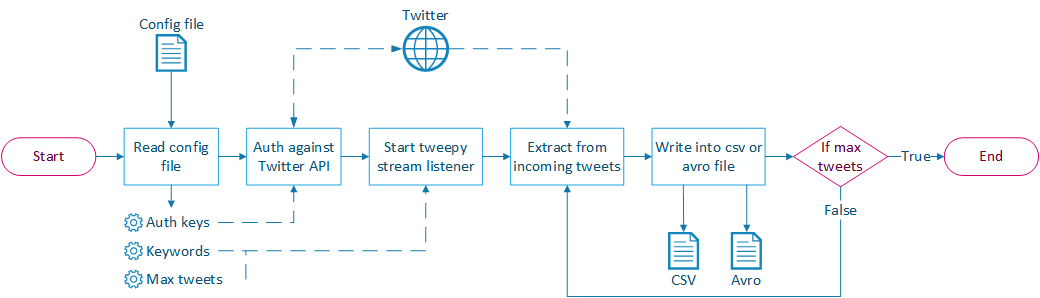 Implements a stream listener based on the tweepy library. A configuration file is read to determine:
- Keywords that should be watched.
- Number of tweets to extract. If no amount is specified the listener will print all incoming tweets until the user stops the process.
- Format to persist the data. It is possible to store as CSV or AVRO file.
- The AVRO Schema to encode the tweets. Right now a basic Schema called "tweet.avsc" is used to store the Username and the cleaned tweet text.
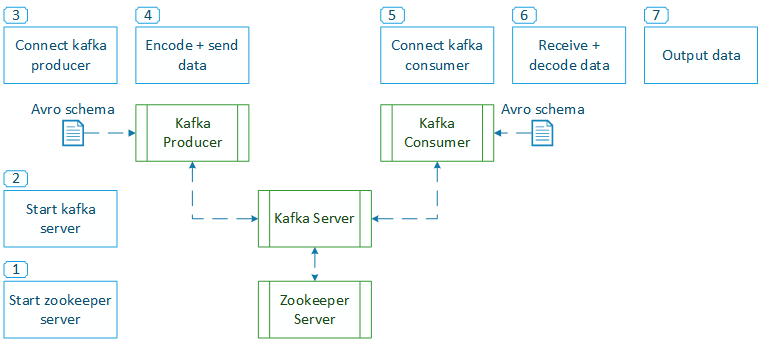
Tests the possibilities of Kafka to decouple producing and consuming of messages. To do this Kafka differentiates producers, brokers and consumers:
- Producers generate an output and send messages to a "topic".
- Broker store those messages into a specified amount of partitions. Brokers are stateless and need Zookeeper to manage state and coordinate between different brokers.
- Consumers access and process the messages and acknowledge a new offset afterwards. By providing a different offset older messages can be read again in case of failure. Several consumers can work on the same topic by sharing a "group_id". Different consumers can process the same topics as the brokers will keep the messages until the specified duration of retention is reached.
To execute this example it is required to start instances of Zookeeper and Kafka. Zookeeper is used by Kafka to orchestrate and synchronize the work between different nodes of producers or consumers. This example uses just one producer and one consumer. Whenever the simple producer is started it connects to Kafka on port 9092, encodes the message with the Avro Schema "user.avsc" and publishes it to the "user" topic. If the consumer is already running it will display the new message as soon as it arrives. Consumers can be configured to start at the current offset or process all retained messages again.
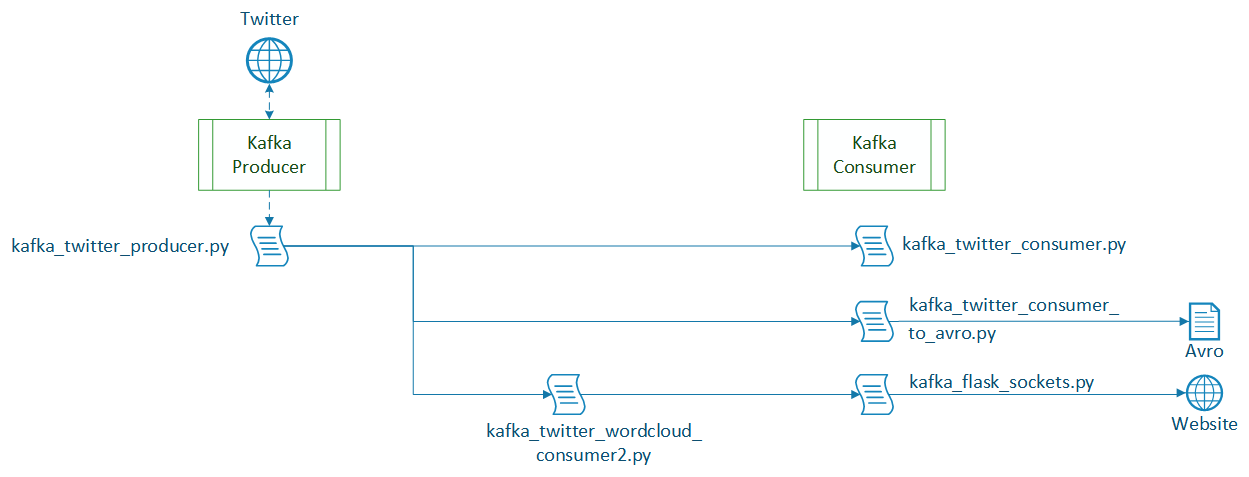
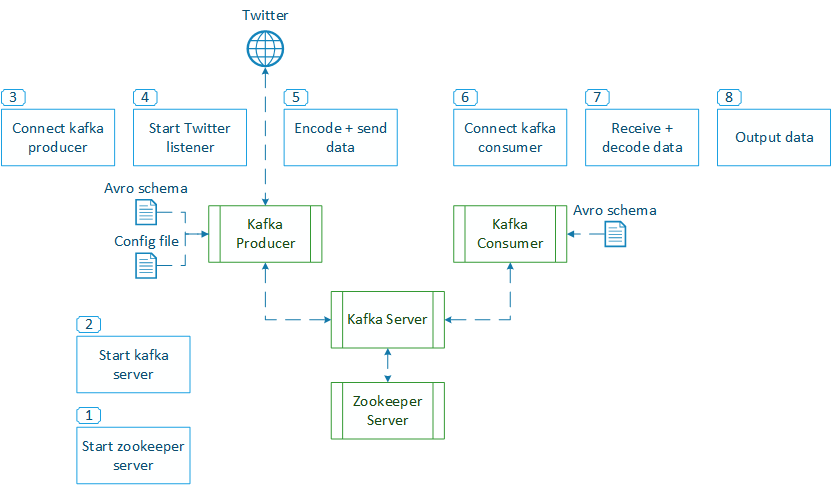
The stream listener from "get_tweets_with_listener.py" is now implemented in a Kafka producer. It uses the same configuration file to establish a connection to the Twitter stream and listen for given keywords. New tweets are encoded in Avro format as specified in "tweet_full.avsc" and published to the topic "tweets". The twitter consumer then receives the rich tweet object and is able to process it. The first implementation just prints all contained fields. Please find further information regarding all the fields and their meaning in the Twitter API Documentation for Tweet and User objects.
This consumer implements the same functionality that was tested in "get_tweets_with_listener.py". Incoming tweets are stored in an Avro file. It is assumed that the process of storing a tweet will be slower than receiving a new tweet. So the process is decoupled from the producer and even if the new messages can no longer be stored in realtime no incoming messages will be lost.
This is a bit of a special case. A producer and a consumer are combined to connect to the producer that publishes incoming tweets (topic "tweets"), process those tweets and publish the resulting wordcloud again (topic "wordcloud_output").
The consumer subscribes the topic "wordcloud_output" and displays incoming results via websockets in realtime on a flask website. The websockets establish a lasting connection between client and server so updates are transferred without any refreshing by the user.
tweet
- t.id
- t.created_at
- t.timestamp_ms
- t.text
- t.favourite_count
- t.favorited
- t.in_reply_to_screen_name
- t.in_reply_to_status_id
- t.in_reply_to_user_id
- t.is_quote_status
- t.retweeted
- tweet user
- t.u.id
- t.u.name
- t.u.screen_name
- t.u.description
- t.u.lang
- t.u.location
- t.u.statuses_count
- t.u.followers_count
- t.u.favourites_count
- t.u.friends_count
- t.u.created_at
quoted status
- q.id
- q.created_at
- q.text
- q.in_reply_to_screen_name
- q.in_reply_to_status_id
- q.in_reply_to_user_id
- quoted status user
- q.u.id
- q.u.name
- q.u.screen_name
- q.u.description
- q.u.lang
- q.u.location
- q.u.statuses_count
- q.u.followers_count
- q.u.favourites_count
- q.u.friends_count
- q.u.created_at
retweeted status
- r.id
- r.created_at
- r.text
- r.in_reply_to_screen_name
- r.in_reply_to_status_id
- r.in_reply_to_user_id
- retweet user
- r.u.id
- r.u.name
- r.u.screen_name
- r.u.description
- r.u.lang
- r.u.location
- r.u.statuses_count
- r.u.followers_count
- r.u.favourites_count
- r.u.friends_count
- r.u.created_at
- kafka 2.11-0.10.1.1
- zookeeper 3.4.9
- avro-python3 1.8.1
- kafka-python 1.3.2
- oauthlib 2.0.1
- requests 2.13.0
- requests-oauthlib 0.8.0
- tweepy 3.5.0
- Download the current version of Zookeeper from the Apache Project Page.
- Create a new directory for Zookeeper. Extract the files into a subdirectory ("C:\zookeeper\zookeeper-3.4.9" in my case).
- Enter the "conf"-folder.
- Make a copy of "zoo-sample.cfg", name it "zoo.cfg" and open the new file.
- Search for the "dataDir" entry and change the path to your folder:
"dataDir=C:\zookeeper\zookeeper-3.4.9\data" - Change your directory to "C:\zookeeper\zookeeper-3.4.9\bin".
- Open a Powershell here and start the Zookeeper server with:
.\zkServer
- Download the current Kafka version from the Project Page
- Create a new directory for Apache Kafka and extract the files into a subdirectory. ("C:\kafka\kafka_2.11-0.10.1.1")
- Enter the "config"-folder
- Edit server.properties and search for the "log.dirs" entry. Change the path to your Kafka directory:
log.dirs=C:\kafka\kafka_2.11-0.10.1.1\kafka-logs - Enter the "bin"- and the "windows"-folder, then start a Powershell.
- Start the Kafka server with the following command:
.\kafka-server-start.bat .\config\server.properties
- Open a Powershell console at C:\kafka\kafka_2.11-0.10.1.1\bin\windows\
- Create a new topic:
.\kafka-topics.bat --create --zookeeper localhost:2181 --replication-factor 1 --partitions 1 --topic test - Create a producer:
.\kafka-console-producer.bat --broker-list localhost:9092 --topic test - Create a consumer (add parameter
--from-beginningto retrieve all retained messages again):.\kafka-console-consumer.bat --zookeeper localhost:2181 --topic test