A fully resonsive bootstrap based Ghost Theme for personal blogs. The theme has a clean layout and is easy to use with a lot of build in features.





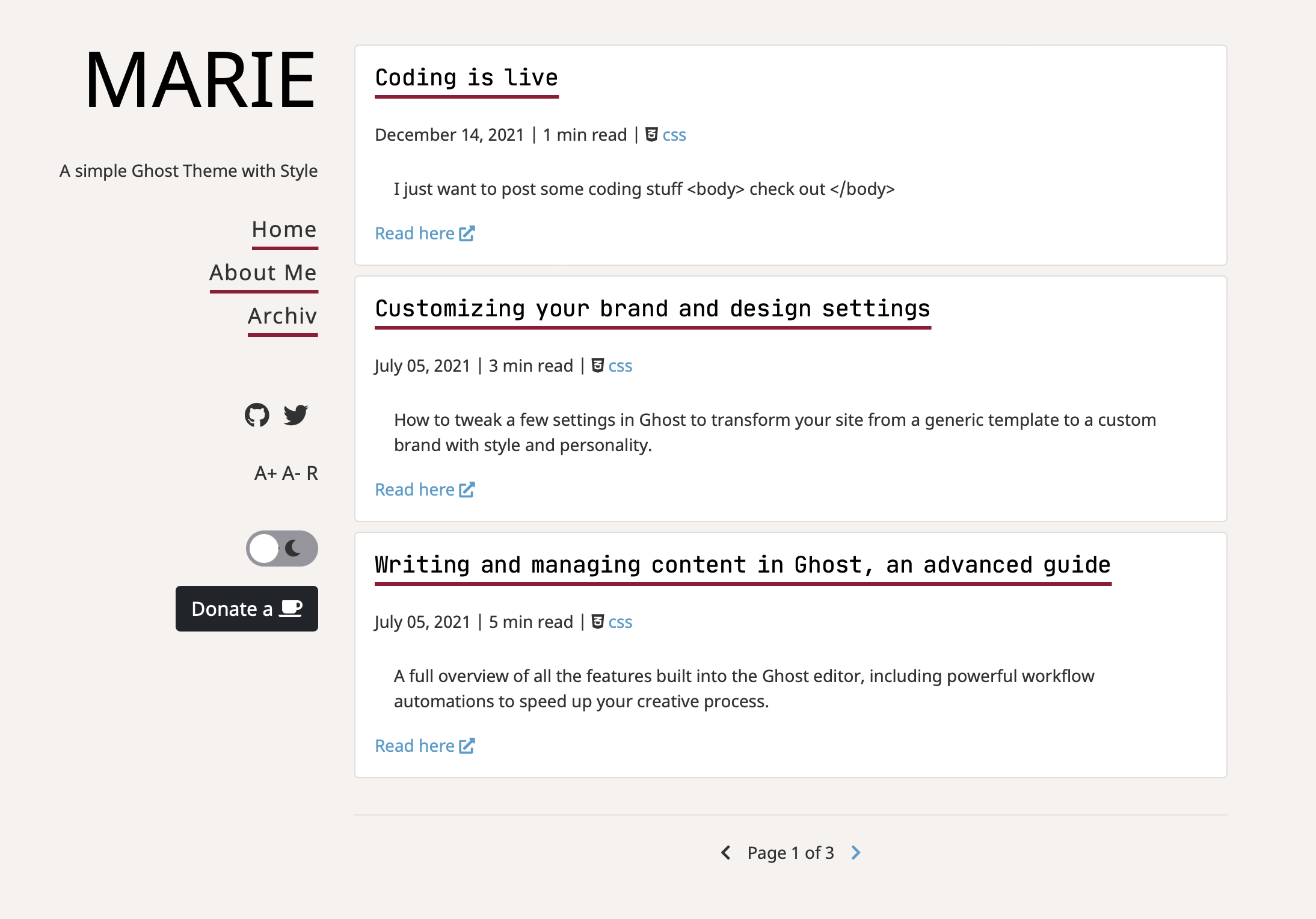
MARIE includes many features build in the theme and ready for use. Some highlights are the barrier-free reading with text-size adjustments, build-in syntax highlighter with Prism.JS including all languages, line numbers and clipboard function as well as newsletter support and build-in utterances comments.
- Responsive Bootstrap v5 Design
- Dark Mode
- Sticky Table of Content on Pages
- Local Font Awesome Icons
- Code Highlighter and Clipboard with PRISM JS
- Ko-Fi Implementation
- Barrier-free reading by adjusting the text size
- Matomo and Google Analytics Support
- Easy to customize SASS
Download the latest release on Github, download the zip, extract the folder, and paste it into your theme folder (content/themes) of your Ghost installation or upload the zip file via the Ghost theme uploader (easy option).
You can also enter the content/themes folder on your server and enter the following command:
git clone https://github.com/jgeisslinger/ghost-marieChange your theme to MARIE in your ghost admin panel.
For a quick demo you can visit my personal blog under https://macn.tech
The theme has been build to support a no-code customization by just editing most of the customizations directly within your Ghost Site Injection. This makes it easy to fit your needs without entering the deep code. Please find below some main config that you may tackle.
Marie supports two main themes from the scratch. This is a light theme mainly white/grey and a dark theme. The default is the light theme. The user can always switch between light and dark through the theme switcher. You can change the default theme by setting the theme in your code injection
var theme = "dark";The theme includes a basic pagination on the index and archive pages. You can select the number of posts visible on the start page by just setting the posts per page variable in the package.json. This automatically controls the pagination pages that are generated.
"config": {
    "posts_per_page": 3
}You can enable social media links below the main navigation. The links are based on the secondary navigation of your Ghost site. Each secondary navigation element will be transferred to a social link including icon. The label of the navigation item must match the FontAwesome name. Examples:
Github: github
Twitter: twitter
Facebook: facebook
More to check out here https://fontawesome.com/v5/search?m=free&s=brands
You can also activate custom CSS to make some own changes to the theme. You have both options, use SASS (which will be compiled into the main css file) or via extra CSS file. The files you can edit are placed under assets/css or assets/sass. Custom CASS will be imported last so you can edit all variables without changing the original theme.
If you use SCSS you need to compile the final css after your work with just a simple bash command (you need to have SASS installed on your machine):
sass assets/sass/import.scss assets/css/marie.cssIf you need special scripts for your personal usage you can inject your JS in the ghost admin panel. It will be published to the header of the site.
If you use cookies in your theme (like with Matomo, theme switcher etc.) you may want to inform your visitors about this. MARIE uses the famous cookieconsent javascript plugin to manage your cookie banner. The banner is enabled by default but you can disable it in your Ghost code injection.
var cookies = true;You can edit the details of the banner by editing the script file:
➡️ partials/scripts.hbs
You can enable a Ko-fi Donation Button below the navigation. Just enable it via Site Header Code injection on your Ghost admin panel and specify your Ko-fi link
var kofi = 1;
var kofiurl = 'https://ko-fi.com/johannes';You can activate a comment section based on Utterances or Cusdis. For Utterances follow their how-to (https://utteranc.es) to setup your GitHub issues for collecting your comments. For Cusdis you need to host your own comment system and connect with your details. Afterwards configure the plugin under
➡️ partials/comments.hbs
Afterwards you need to enable comment section in the ➡️ /post.hbs
You can use Matomo as alternative for Google Analytics to track your visitors with your own server instance (or use a hosted service). Just enable and configure the parameters in the Code Injection Header
var matomo = true;
var matomoserver = "";
var matomoid = 123;Finally some credits for the good work on the resources used in this theme:
If you like the theme I would be very happy to reveive your feedback here in Github or a coffee to stay awake and continue coding nice things

Still need a server to spin up your own ghost installation? Check out my refer link for your Hetzner cloud server and get 20 EUR on top: Click Here
Follow me on Twitter for any news