Open-source .NET library to generate Swiss QR bills (jointly developed with the Java version).
Try it yourself and create a QR bill. The code for this demonstration (React UI and RESTful service) can be found on GitHub as well.
This library implements version 2.2 and 2.3 of the Swiss Implementation Guidelines QR-bill from November 20, 2023, and Swico Syntax Definition (S1) from November 23, 2018.
Release 3.4 of ths library changes the default character set from Latin-1 Subset to Extended Latin. See the section Swiss Payment Standards 2025 for details.
The Swiss QR bill is the QR code based payment format that started on 30 June, 2020. The payment slip is sent electronically or presented online in most cases. It can still be printed at the bottom of an invoice or added to the invoice on a separate sheet. The payer scans the QR code with his/her mobile banking app to initiate the payment and then just needs to confirm it.
If the invoicing party adds structured bill information (VAT rates, payment conditions etc.) to the QR bill, the payer can automate the booking in accounts payable. The invoicing party can also automate the accounts receivable processing as the payment includes all relevant data including a reference number. The Swiss QR bill is convenient for the payer and payee.
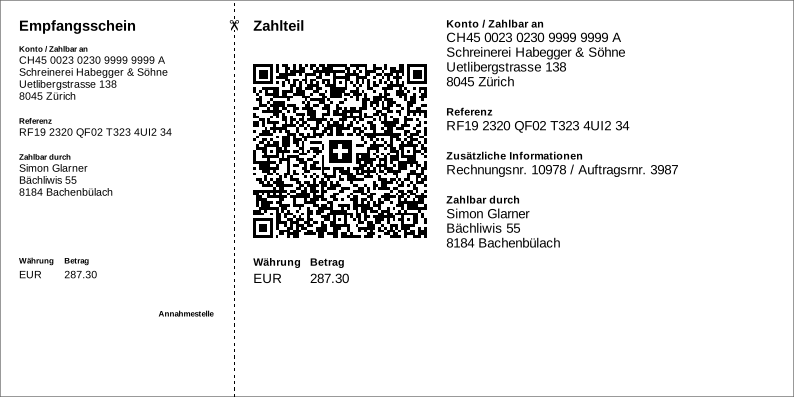
More examples can be found in the Wiki
The Swiss QR bill library:
- generates QR bills as PDF, SVG, PNG and EMF files
- generates payment slips (210mm by 105mm), payment part (148mm by 105mm), A4 sheets or QR code only
- is multilingual: German, French, Italian, English, Romansh
- validates the invoice data and provides detailed validation information
- adds or retrieves structured bill information (according to Swico S1)
- parses the invoice data embedded in the QR code
- is easy to use (see example below)
- is small and fast
- is free – even for commercial use (MIT License)
- is built for .NET Standard 2.0, i.e. it runs with .NET Core 2.0 or higher, .NET Framework 4.6.1 or higher, Mono 5.4 or higher, Universal Windows Platform 10.0.16299 or higher, Xamarin etc.
- core library is light-weight and has a single dependency: Net.Codecrete.QrCodeGenerator
- enhanced version uses SkiaSharp for PNG file generation
- Windows version uses
System.Drawingfor generating PNG and EMF files - available as a NuGet packages (see below)
-
Create a new Visual Studio project for .NET Core 3.x (File > New > Project... / Visual C# > .NET Core > Console App (.NET Core))
-
Add the library via NuGet:
Either via Project > Manage NuGet Packages... / Browse / search for qrbill / Install
Or by running a command in the Package Manager Console
Install-Package Codecrete.SwissQRBill.Generator -Version 3.4.0
- Add the code:
using Codecrete.SwissQRBill.Generator;
using System;
using System.IO;

namespace Codecrete.SwissQRBill.Examples.Basic
{
    class Program
    {
        static void Main(string[] args)
        {
            // Setup bill data
            Bill bill = new Bill
            {
                // creditor data
                Account = "CH4431999123000889012",
                Creditor = new Address
                {
                    Name = "Robert Schneider AG",
                    Street = "Rue du Lac",
                    HouseNo = "1268/2/22",
                    PostalCode = "2501",
                    Town = "Biel",
                    CountryCode = "CH"
                },

                // payment data
                Amount = 199.95m,
                Currency = "CHF",

                // debtor data
                Debtor = new Address
                {
                    Name = "Pia-Maria Rutschmann-Schnyder",
                    Street = "Grosse Marktgasse",
                    HouseNo = "28",
                    PostalCode = "9400",
                    Town = "Rorschach",
                    CountryCode = "CH"
                },

                // more payment data
                Reference = "210000000003139471430009017",
                UnstructuredMessage = "Abonnement für 2020",

                // output format
                Format = new BillFormat
                {
                    Language = Language.DE,
                    GraphicsFormat = GraphicsFormat.SVG,
                    OutputSize = OutputSize.QrBillOnly
                }
            };

            // Generate QR bill
            byte[] svg = QRBill.Generate(bill);

            // Save generated SVG file
            const string path = "qrbill.svg";
            File.WriteAllBytes(path, svg);
            Console.WriteLine($"QR bill saved at { Path.GetFullPath(path) }");
        }
    }
}- Run it
See DocFX API Documentation
Swiss QR Bill generation is available as three different NuGet packages. They all include the basic QR bill generation for PDF and SVG and only differ with regards to the PNG and EMF generation.
| NuGet packages | SVG | PNG | EMF | Platform neutral | Recommendation | |
|---|---|---|---|---|---|---|
| Codecrete.SwissQRBill.Core | ✓ | ✓ | – | – | ✓ | Platform-independent core without PNG and EMF generation. |
| Codecrete.SwissQRBill.Generator | ✓ | ✓ | ✓ | – | ✓ | Core plus platform-independent PNG generation (based on SkiaSharp). |
| Codecrete.SwissQRBill.Windows | ✓ | ✓ | ✓ | ✓ | – | Windows specific package including core plus PNG and EMF generation based on System.Drawing.Common |
On November 21, 2025, the Swiss Payment Standards 2025 and the associated QR bill specification introduced two changes relevant for QR bills:
-
Payments may no longer use combined address elements (aka unstructured addresses). Banks will only accept bill with structured addresses. In the library, the related methods have been marked as deprecated but still work. They will be removed in release 4.0.
-
QR bills now support an extended character set (Extended Latin instead of a subset of Latin-1). As of version 3.4 of the library, this is the default. To switch back to the more limited character set, use
bill.setCharacterSet(SPSCharacterSet.LATIN_1_SUBSET).
If the extended character set is used, it is no longer possible to use the PDF standard font Helvectica for the text as it is restricted to the smaller WinANSI character set. This library will automatically switch to the Liberation Sans font and embed a subset of the font (also see section PDF generation below). SVG and PNG ouput can continue to use other fonts.
PNG generation requires a raster graphics library. Starting with .NET 6, the System.Drawing classes have become a Windows-only technology and standard .NET no longer supports raster graphics out-of-the-box. With this library, you have several options:
- If you do not need PNG generation, you can use the light-weight core library: Codecrete.SwissQRBill.Core.
- If you need PNG generation, you can use the enhanced version: Codecrete.SwissQRBill.Generator. It uses SkiaSharp as a platform independent raster graphics library. Note that on Linux, SkiaSharp depends on native libraries that might not be installed on your machine. The easiest solution is to add the NuGet package SkiaSharp.NativeAssets.Linux.NoDependencies to your project.
- If you creating a Windows-only software, use the Codecrete.SwissQRBill.Windows package. It uses the System.Drawing classes for PNG generation and adds EMF generation on top.
Note: If you receive the error message "Graphics format PNG not available (are you missing the NuGet package Codecrete.SwissQRBill.Generator?)" and you are already using Codecrete.SwissQRBill.Generator or Codecrete.SwissQRBill.Windows, add this code to your project:
CanvasCreator.Register(new PNGCanvasFactory());
It prevents Visual Studio from removing the Codecrete.SwissQRBill.Generator or Codecrete.SwissQRBill.Windows library from the final application (and only including the Codecrete.SwissQRBill.Core library). Visual Studio likely behaves like this because the PNG generation code is not statically referenced, but discovered and loaded at run-time. So it might think the library is not needed. This problem has only been observed with .NET Framework 4.x and only if the application does not reference Codecrete.SwissQRBill.Generator or Codecrete.SwissQRBill.Windows directly but indirectly through a class library project.
To generate QR bills as PDF files, this library uses its own, minimal PDF generator that requires no further dependencies and comes with the same permissive license as the rest of this library.
The built-in PDF generator can either create PDF files with the standard 14 PDF fonts without embedding the font itself, or it can generate PDFs with the Liberation Sans font, which will be embedded in the file. The font embedding uses a simplified approach: it will embed a fixed subset of characters sufficient for QR bills. It cannot embed additional characters, and it will not omit unused characters from the subset.
With the library's default values, the extended Latin character set of the Swiss Payment Standards 2025 is used, and the PDF canvas
will embed the Liberation Sans font subset. If the limited Latin-1 subset is used instead (see bill.setCharacterSet(SPSCharacterSet.LATIN_1_SUBSET),
the library will use the standard PDF font Helvetica without embedding the font.
If this font embedding approach is not sufficient, use one of the below options.
The libary can be integrated with iText or PDFsharp. See the example projects for more information:
- iText: https://github.com/manuelbl/SwissQRBill.NET/tree/master/Examples/iText
- PDFsharp: https://github.com/manuelbl/SwissQRBill.NET/tree/master/Examples/PDFsharp
These examples also support adding a QR bill to an existing PDF document.
This library comes with multiple code examples:
-
Basic: A basic example showing how to generate a QR bill.
-
WindowsForms: An extensive example showing how to use this library in a Windows Forms application (display of QR bills on the screen, printing, working with the clipboard).
-
WindowsPresentationFoundation: An example for Windows Presentation Foundation (WPF) applications. It shows how to display and print QR bills.
-
WinUI: An example for WinUI applications. It shows how to display and print QR bills.
-
MicrosoftWordAddIn: Implements an add-in for Microsoft Word capable of inserting a QR bill as a resolution independent EMF graphics. As C# add-ins use the Microsoft Word Interop interface, this example is also relevant for other software interacting with Microsoft Word.
-
iText: Example showing how to generate PDFs using the iText library, including how to add a QR bill to an existing PDF document.
-
PDFsharp: Example showing how to generate PDFs using the PDFsharp library, including how to add a QR bill to an existing PDF document.
The library includes a subset of the Liberation Sans font (regular and bold face). It is made available free of charge by Goolge and Red Hat under the SIL Open Font License, Version 1.1. You will likely need to add their copyright and license information to your product. See the license for details.
This library is the .NET version of Swiss QR Bill. There is also a Java version with the same features. More information about both libraries can be found in the Wiki.
If you are looking for a library for yet another programming language or for a library with professional services, you might want to check out Services & Tools on MoneyToday.ch.