13. Challenge
In the lab files there is some dummy text for four web pages, a home page, qualifications page, skill set and work experience page.
This is to allow you to build a small resume type web page, so feel free to change the text to your own if you like.
Try creating four HTML pages one for each of the above. Link the pages together by placing a <ul> list of links in each page.
At this stage do not worry about the ‘design’ and/or layout of the pages but concentrate on good HTML structure.
You should aim to achieve the following.
- Save each file following a sensible naming convention, such as avoiding the use of whitespace.
- Used
index.htmlas your homepage. - Have placed HTML in the correct structural parts of the
<head>and<body>and do not have multiple<head>and<body> elements. - The HTML is well-formed, elements been opened and closed in the correct sequence.
- Added a unique
<title>to each page. - Placed all text in
<p>or appropriate heading tags. - Added a different image for each page.
- Tested all the links between pages.
With HTML there a range of elements designed to give meaning, semantic richness, to your HTML. Some useful elements are <header>, <nav>, <main>, <section> and <footer>.
We would like you to give ‘structure’ to the pages you created above. To help, below is a wireframe for the desktop design of the pages.
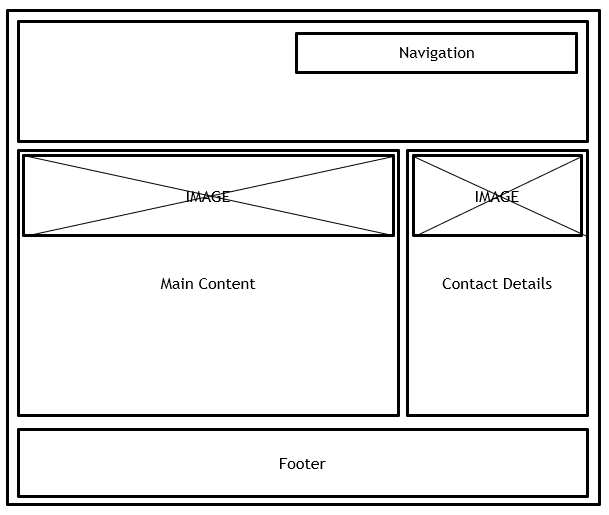
For now do not attempt to layout the content exactly as above, as that would require CSS, but consider what underlying HTML structure might help in the eventual design.
Where would you add the likes of <header>, <nav>, <main>, <section> and <footer> to the code of your original pages to achieve this structure.