
We're in the era where music is everywhere. While walking to work, cleaning the house, or just simply lying in bed. But do you feel that sometimes you can do more than just listen? What if you can both enjoy and learn at the same time? What if you can test your knowledge (about music)?
The world is obsessed with the word guessing game, Wordle, but if vocabulary is not your thing and music is more of your speed, may we suggest..... RANKIFY!
An app that tests your knowledge on music based on your choice of artist(s). Given a short preview of a song, you will need to correctly guess the song. This app will bring out your listening abilities and your competitiveness all while vibing to jams.
- As an unregistered user, I would like to sign up with name, username, email and password
- As a registered user, I would like to sign in with username OR email and password
- As a signed in user, I would like to be able to change/update my password
- As a signed in user, I would like to be able to sign out
- As a signed in user, I would like to navigate to the game page
- As a signed in user, I would like to navigate to my profile page
- As a signed in user, I would like to be able to search for an artist
- As a signed in user, I would like to be able to play the game based on the artist clicked
- As a signed in user, I would like to see which artist I have selected to play
- As a signed in user playing the game, I would like to see my score
- As a signed in user, I can see my game history/scores on my profile page
- Fork and clone this repo
- In the terminal, run npm i to install all needed packages
- User is required to have a Spotify account
- User is recommended to have a Spotify Premium account in order to access a larger variety of songs
- Go to link: https://developer.spotify.com/
- Navigate to the dashboard (in the navigation bar)
- Log in to your Spotify account and "Create an App"
- Client ID will be provided on the dashboard homepage
- Need to create a REDIRECT_URI
- EX: http://localhost:3000
** this must match the REDIRECT URI exactly how it is in the Search Component (as a string) **
- EX: http://localhost:3000
- Open client file in desired code editor
- Create a
.env.localfile- Assign a Server Url and also assign the Client ID (provided by the Spotify API), like so:
REACT_APP_SERVER_URL=http://localhost:<whateverPortYouWant>
REACT_APP_SPOTIFY_CLIENT_ID=<clientIdProvidedBySpotify>
- Move
.env.localfile intonode_modules
- Open server file in desired code editor
- Create a
.envfile- Assign a port, URI for mongoDB, and JWT secret (for tokens), like so:
PORT=<thisPortShouldBeTheSamePortAssignedInTheServerUrl>
MONGODB_URI=mongodb://localhost/rankify
JWT_SECRET="whateverYouWant"
- Move
.envfile intonode_modules
- Spotify API
- React
- MongoDB
- Express
- Node.js
- Bootstrap
- React Icons
- Bootswatch
- HTML/CSS
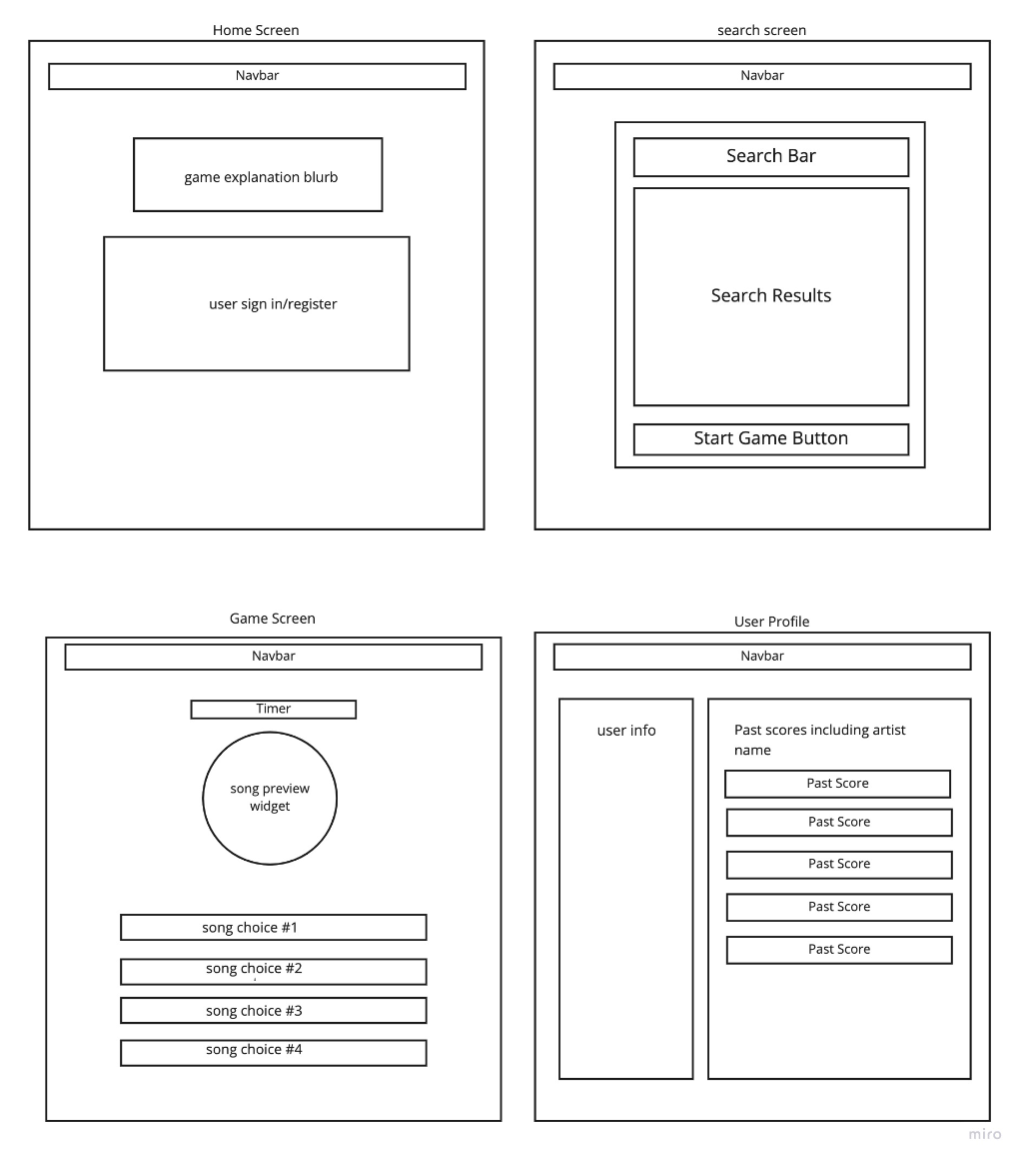
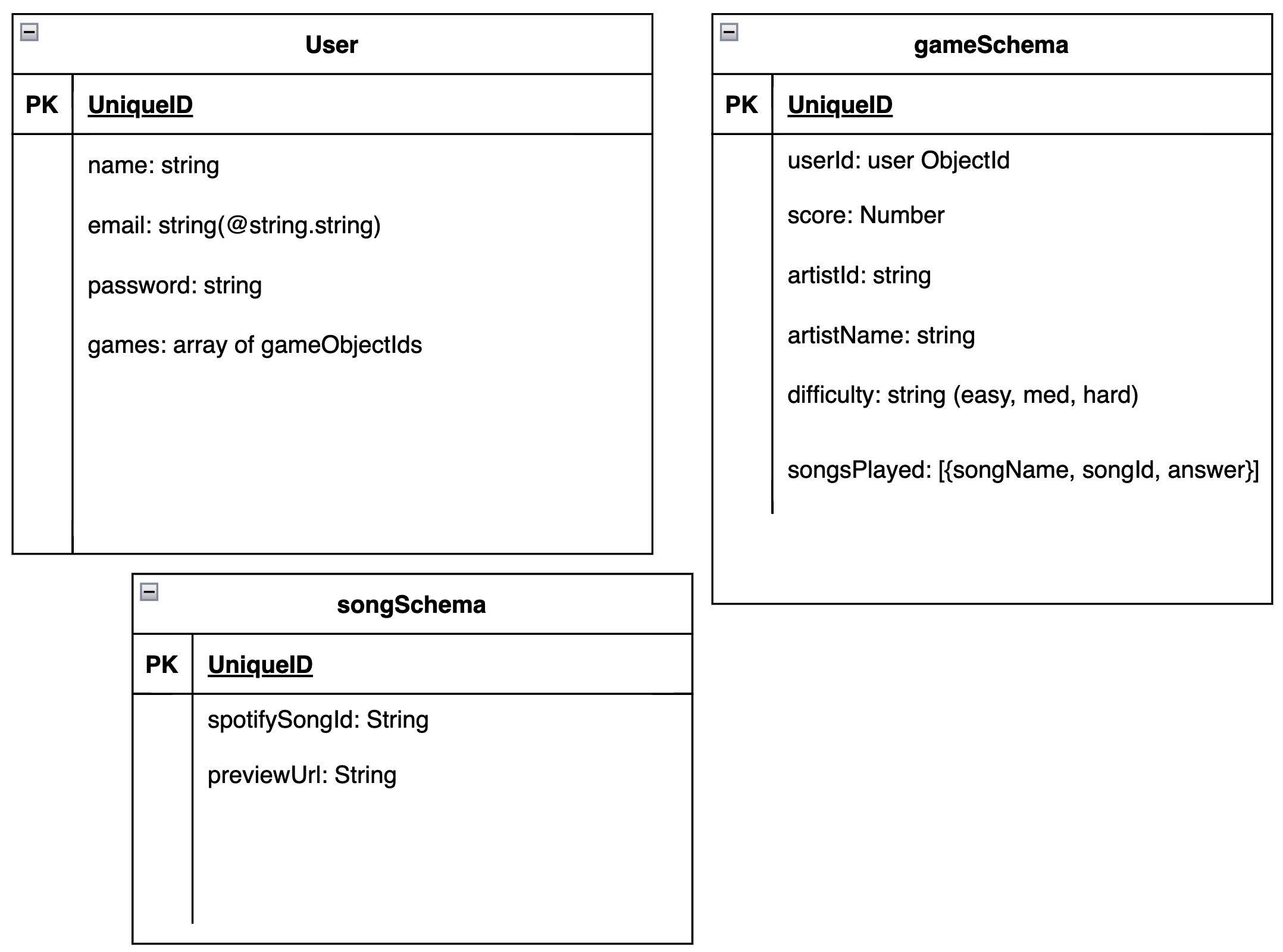
| VERB | URL PATTERN | ACTION (CRUD) | DESCRIPTION |
|---|---|---|---|
| GET | / | Index (Read) | Home page |
| POST | /register | Create (Create) | Register a new user |
| GET | /login | Index (Read) | Check if user exists, if true, log in user |
| GET | /auth-locked | Index (Read) | Authorization |
| PUT | /changepassword | Update (Update) | User can change/update their password |
| GET | /profile | Show (Read) | Display logged in user's profile (can also view game history here) |
| GET | /game | Show (Read) | Display game screen |
| POST | /game/:id | Create (Create) | Create game result for user |
| DELETE | /game/:id | Delete (Destroy) | User can delete a game |
- Create a registration page
- Create a login page
- Create a welcome/home page
- Create a navbar
- Create a search screen (user can search for an artist)
- Create a game play screen
- Create a user profile page
- Create a score counter system
- Have different game levels
- Modal that shows the score
- Create a leaderboard showing the top scores of ALL users
- User able to compete with other users (see other user scores)
Our group's biggest hurdle was getting the Spotify API to work. Other than that, we think we communicated and worked together well.