cypress-display provides a display controller designed to work alongside the Cedar™ telescope control system.
cypress-display drives a hardware OLED display, consuming data from Cedar™ server to display its PushTo guidance.

This software is intended to run on Linux-based embedded hardware, specifically the Raspberry Pi, as it utilizes hardware-specific HALs (e.g. rppal, linux-embedded-hal).
cypress-display is built for use with an SSD1351-based OLED RGB display with a resolution of 128x128. It has been tested with the Waveshare 1.5 RGB OLED display module.
- Interface: SPI (must be enabled via raspi-config)
- Wiring: Refer to Waveshare's wiring diagram
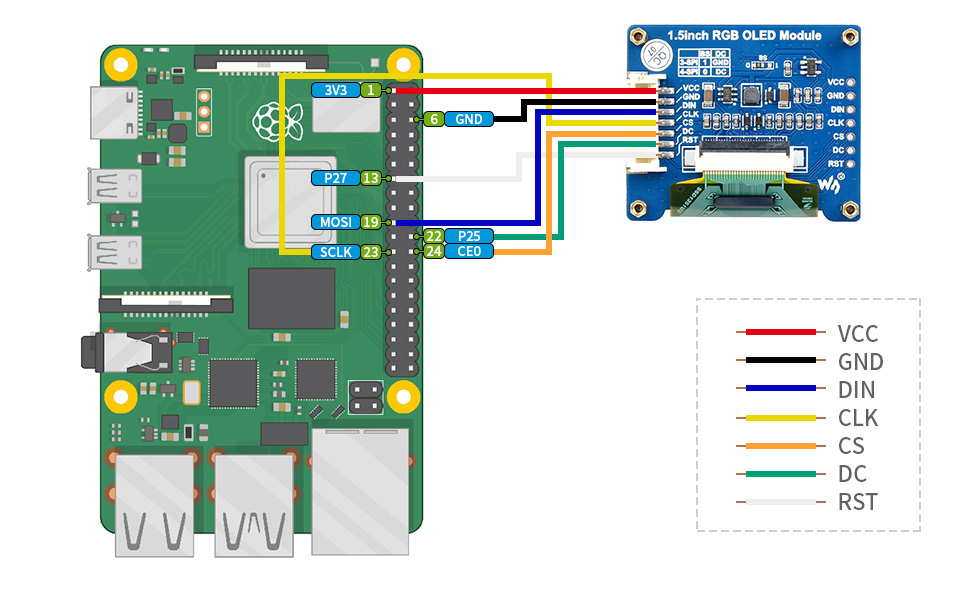
- Rust: Stable toolchain (edition 2024).
- Cedar™ Server: This application expects
cedar-serverto be running onlocalhost:80.
You can build the project using the provided build script.
./build.shThis will place the binary and the web content into the directory out/cypress/bin.
The display driver daemon. It connects to the hardware display and queries Cedar™ server to render the UI.
cd out/cypress/bin
./cypress-display --brightness 128--brightness: (Optional) Set physical display brightness (1-255). Default is 128 (50%).--rotate: (Optional) Set physical display clockwise rotation (0, 90, 180, or 270). Default is 0.--mirror: (Optional) Mirror the physical display to the web UI.
The brightness and rotation can be updated in the field by connecting to the e-finder's WiFi network and accessing cypress-display's control page at https://192.168.4.1:6030.

cypress-display includes the ability to mirror the displayed output to the web UI.
./cypress-display.sh --mirrorThe mirrored display is available at https://192.168.4.1:6030/mirror. The mirrored display can be used without the presence of a physical screen as long as SPI is enabled on the e-finder device.
A distribution zipfile is provided here.
If your Cedar™ e-finder device has internet access the distribution archive can be downloaded directly:
wget https://github.com/oakamil/cypress-display/raw/refs/heads/main/dist/cypress-display.zipOtherwise you can download the file to a computer and use scp to transfer it to the e-finder device after connecting to its WiFi network:
scp ~/Downloads/cypress-display.zip cedar@192.168.4.1:.SPI must be enabled on the e-finder device.
sudo raspi-config- Select
3 Interface Options - Select
I4 SPI - Respond
<Yes>to enable SPI - Continue by selecting
<OK> - Select
<Finish>to exit
The provided distribution archive includes a script to install cypress-display as a service to automatically start when the e-finder boots.
unzip cypress-display.zip
./install.shThis project is licensed under the Functional Source License, Version 1.1, MIT Future License (FSL-1.1-MIT).
See LICENSE.md for full details.
All product names, trademarks and registered trademarks are property of their respective owners. All company, product and service names used in this website are for identification purposes only. Use of these names, trademarks and brands does not imply endorsement.
cypress-display is not affiliated with, endorsed by, or sponsored by Clear Skies Astro.
Cedar™ is a trademark of Clear Skies Astro, registered in the U.S. and other countries.