easyAPI is skeleton REST API application and integrated with swagger to generate documentation API. With easyAPI you can generate REST API less than 5 minutes.
- clone this repository
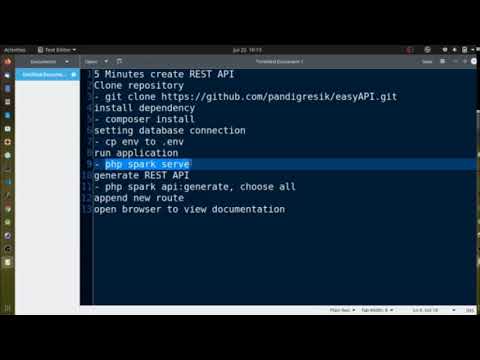
git clone https://github.com/pandigresik/easyAPI.git cd easyAPIcomposer installto install dependency this application- change your
secretkey inapp/Config/Services.phpon line 22 php spark serveto run this application, default you can open this address http://localhost:8080 on your browser- Copy
envto.envand tailor for your app, specifically the baseURL and any database settings.
php spark api:generateafter that, system will ask you table name will generate that REST API. We can choose one table or all, if we want generate all writeallor write one table name exist in your database If there is no error, system will generate for you controller, model and entity file.- Last you must add new route will display in last command to
app/Config/Routes.php. - Generate api.yaml using command
./vendor/bin/openapi -o ./public/assets/api.yaml ./appto show API docs using swagger using datasource format yaml (default) - Generate api.json using command
./vendor/bin/openapi -o ./public/assets/api.json ./appto show API docs using swagger using datasource format json (optional) - Open API documentation in http://localhost:8080/swagger
- join with other table, you can look at ArtikelKategoriModel.php
- example parameter in swagger for order data {"order":[{"id":"desc"},{"tgl_upload":"asc"}]}
- example parameter in swagger for search data {"search":[{"id_kategori":1}]}
- example parameter in swagger for search range data {"search":[{"tgl_upload":{"start":"2016-01-01", "end":"2020-01-01"} }]}
- example parameter in swagger for search using like {"search":[{"judul":"membangun%25"}]} or {"search":[{"judul":"%25membangun%25"}]} use
%25not%you can place%25on before, after and combination before and after as your keyword to search data - search data based on column name {base_url}/artikels?search[id_kategori]=1
- order data based on column name {base_url}/artikels?order[id]=desc&order[tgl_upload]=asc
- search and order data based on column name {base_url}/artikels?search[id_kategori]=1&order[id]=desc&order[tgl_upload]=asc
- search with pagination {base_url}/artikels?page=1&limit=10
- search and order with pagination {base_url}/artikels?search[id_kategori]=1&order[id]=desc&order[tgl_upload]=asc&page=1&limit=10
- search using between operator if we want filter data based range of date or etc {base_url}/artikels?search[tgl_upload][start]=2016-01-01&search[tgl_upload][end]=2020-01-01
- search using keyword {base_url}/artikels?search[judul]=membangun%25 or {base_url}/artikels?search[judul]=%25membangun%25 will produce like operator on query
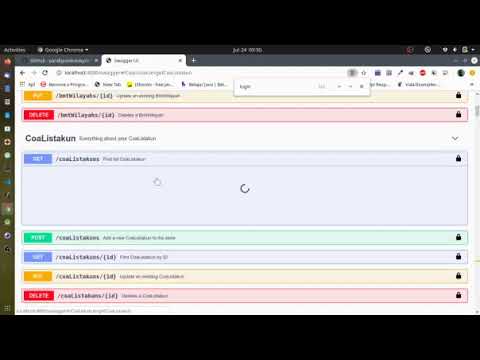

- create example using this application
easyApi dikembangkan dan dimaintain oleh asligresik
Lisensi dari easyApi adalah MIT License namun proyek yang dibangun menyeseuaikan dengan kebijakan masing-masing