Each key's codes are above page.
xx(code) adds modifier key to the code.
They can be comined. &kp LC(RA(B)) = Ctrl+Alt+b.
Modifier functions
LS(code): Left ShiftRS(code): Right ShiftLC(code): Left ControlRC(code): Right ControlLA(code): Left AltRA(code): Right AltLG(code): Left GUI (Windows / Command / Meta)RG(code): Right GUI (Windows / Command / Meta)
&kp keypress the key.
&mo layermomentary activate specified layer.
&to layerEnable the layer and the default layer, and disable all other layers. (maybe it for &trans behavior).
&tog layerEnable the layer until the layer is disabled.
&kt keytoggle the key hold or released.
&sk keyStick the key till next key pressed.
&sl layerStick the layer till next key pressed.
The devicetree document is here.
&transPass down to the next active layer in the stack.
&noneNo behavior.
&caps_wordCapitalize till stop key pressed. stop key is not alphabet and continue-list.
The devicetree document is here.
&key_repeatRepeats the last key.
The devicetree document is here.
    conditional_layers {
        compatible = "zmk,conditional-layers";
        tri_layer {
            if-layers = <1 2>;
            then-layer = <3>;
        };
    };
If some multiple layers are enabled (in above example, 1 and 2), the then-layer (3) will be enabled.
Advanced Mod-Tap and Layer-Tap.
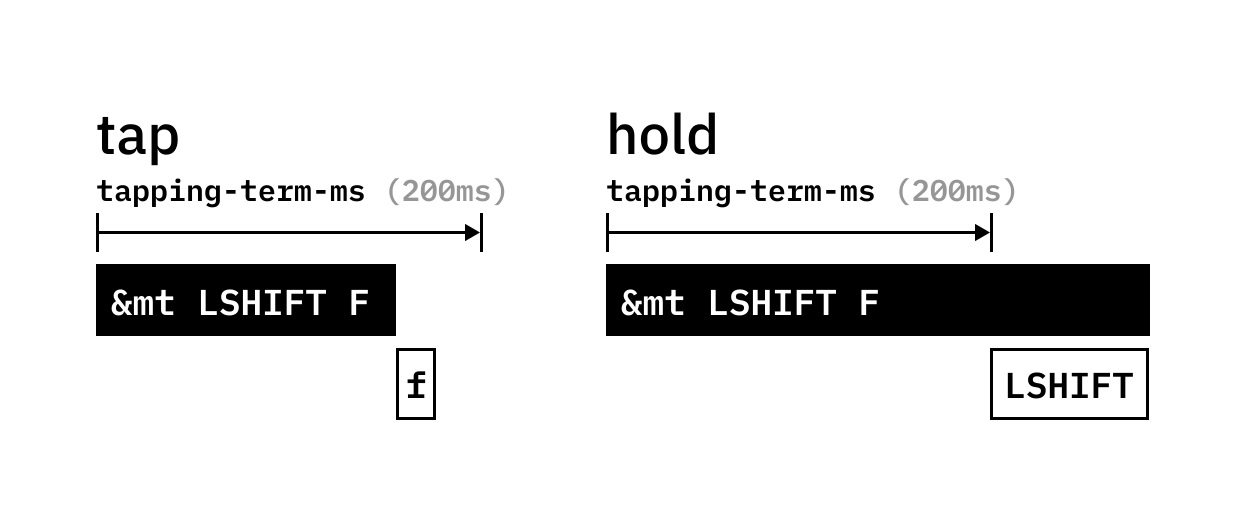
released within tapping-term-ms, sends tap key. hold after the time, sends (holds) the hold key.
    behaviors {
        key: name {
            compatible = "zmk,behavior-hold-tap";
            label = "LABEL";
            #binding-cells = <2>;
            tapping-term-ms = <200>;
            quick-tap-ms = <0>;
            flavor = "flavor";
            bindings = <hold>, <tap>;
        };
    };
flavor in (hold-preferred, balanced, tap-preferred, tap-unless-interrupted)
<hold>, <tap> is behavior like <&kp>, <&mo>.
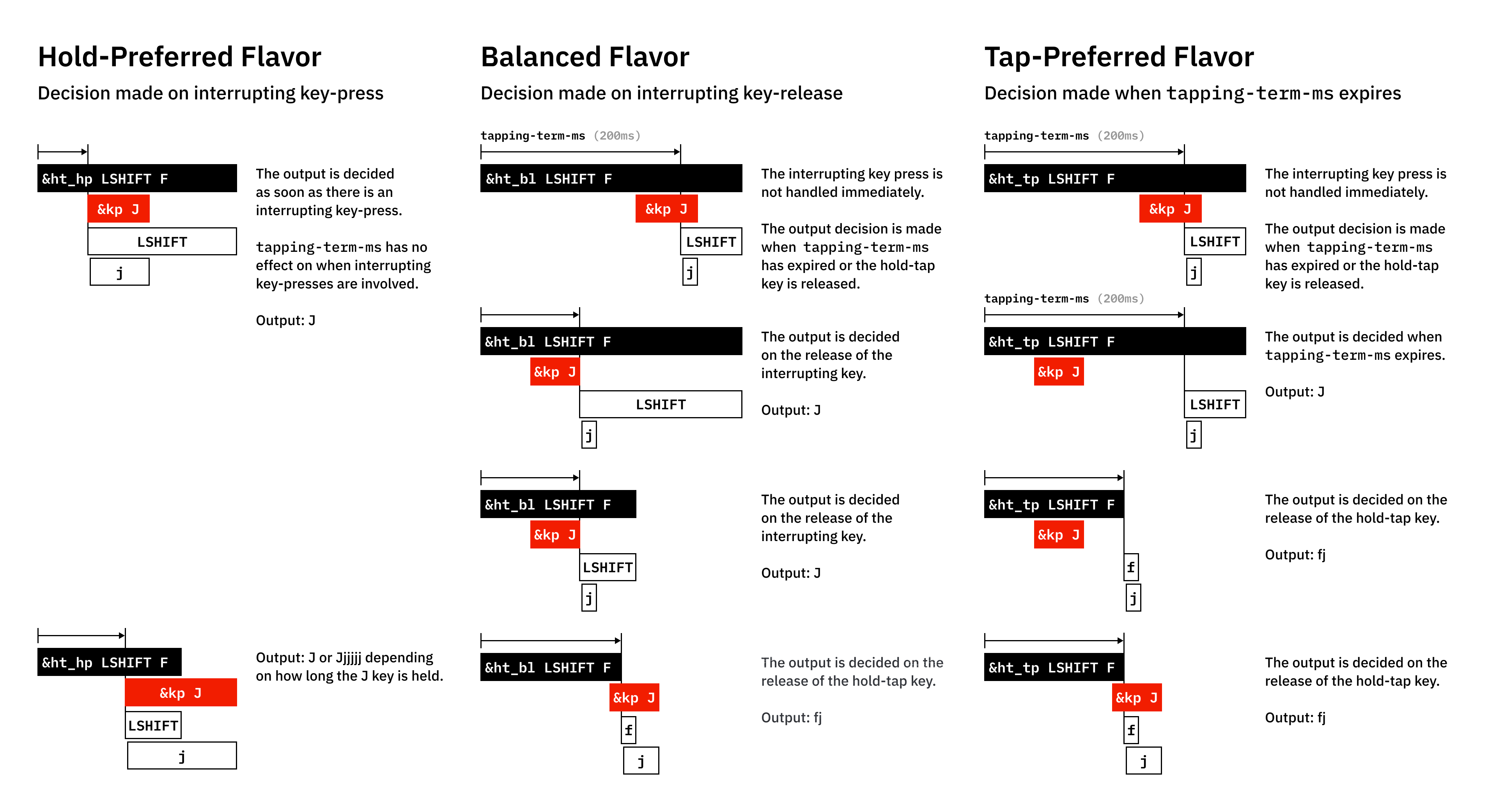
The devicetree document is here.
&mt modkey tapkeyhold to send modkey, tap to send tapkey.
This behavior equals the Hold-tap "hold-preferred" with (hold = key press(&kp), tap = key press(&kp)).
    behaviors {
        mt_impl: mod-tap-by-hold-tap {
            compatible = "zmk,behavior-hold-tap";
            label = "MOD_TAP_BY_HOLD_TAP";
            #binding-cells = <2>;
            tapping-term-ms = <200>;
            quick-tap-ms = <0>;
            flavor = "hold-preferred";
            bindings = <&kp>, <&kp>;
        };
    };

// &mt modkey tapkey = &mt_impl modkey tapkey< layer keytap sends the key, holds activate the layer.
This behavior equals the Hold-tap "tap-preferred" with (hold = momentary layer(&mo), tap = key press(&kp)).
behaviors {
lt_impl: layer-tap-by-hold-tap {
compatible = "zmk,behavior-hold-tap";
label = "LAYER_TAP_BY_HOLD_TAP";
#binding-cells = <2>;
tapping-term-ms = <200>;
quick-tap-ms = <0>;
flavor = "tap-preferred";
bindings = <&mo>, <&kp>;
};
};
// < layer key = <_impl layer key behaviors {
key: name {
compatible = "zmk,behavior-mod-morph";
label = "LABEL";
#binding-cells = <0>;
bindings = <without mod behavior>, <with mod behavior>;
mods = <(MOD_LGUI|MOD_LSFT|MOD_RGUI|MOD_RSFT)>;
keep-mods = <(MOD_LSFT)>;
};
};with MOD_* sends with mod behavior, without MOD_* sends the without mod behavior.
Available mods: MOD_LSFT, MOD_RSFT, MOD_LCTL, MOD_RCTL, MOD_LALT, MOD_RALT, MOD_LGUI, MOD_RGUI.
keep-mods' MOD_* will be keep holding with behavior.
The devicetree document is here.
    behaviors {
        td0: tap_dance_0 {
            compatible = "zmk,behavior-tap-dance";
            label = "TAP_DANCE_0";
            #binding-cells = <0>;
            tapping-term-ms = <200>;
            bindings = <&kp N1>, <&kp N2>, <&kp N3>;
        };
    };
Change behavior by the count of tap.
The devicetree document is here.
macros {
zed_em_kay: zed_em_kay {
label = "ZM_zed_em_kay";
compatible = "zmk,behavior-macro";
#binding-cells = <0>;
bindings
= <¯o_press &kp LSHFT>
, <¯o_tap &kp Z &kp M &kp K>
, <¯o_release &kp LSHFT>
;
};
};WIP.
The devicetree document is here.
&resetReset with current flashed firmware. (like restart)
&bootloaderReset to flash new firmware.
&bt BT_*- BT_CLR : clear current connection info
- BT_NXT : switch to the next profile
- BT_PRV : switch to the previous profile
- BT_SEL number : switch to the 0-index number profile
&out OUT_*- OUT_USB : prefer use usb
- OUT_BLE : prefer use bluetooth low energy
- OUT_TOG : toggle above
&rgb_ug RGB_*WIP
&bl BL_*WIP
&ext_power EP_*WIP
{% include_relative footer.html %}