

Universal runtime that turns single-file TypeScript into MCP server, CLI, and more.
Photon TS files are Single file. Zero boilerplate. Pure business logic.
The Problem with MCPs Today:
- Popular MCPs don't exactly match your specific requirements
- Security risk: Malicious MCPs can steal your data through prompt injection—not just credentials
- Scattered across 4-6 files, making security audits impractical
- Too complex to fork and customize safely
Photon's Solution: Single-file TypeScript format. Pure business logic, zero boilerplate. Fork-first design where every .photon.ts is trivial to audit and customize.
Think of it like NPM and Node, but for MCP.
The same .photon.ts file automatically becomes:
- 🤖 MCP Server - Tools for Claude Desktop, Cursor, and AI assistants
- 💻 CLI Tool - Beautiful command-line interface for humans
- 🔌 Platform Integrations - NCP, Lumina, and future runtimes
# Same file, multiple interfaces:
photon mcp analytics              # Run as MCP server for AI
photon cli analytics revenue      # Use as CLI tool for humans
Zero extra code. Pure business logic. Infinite deployment targets.
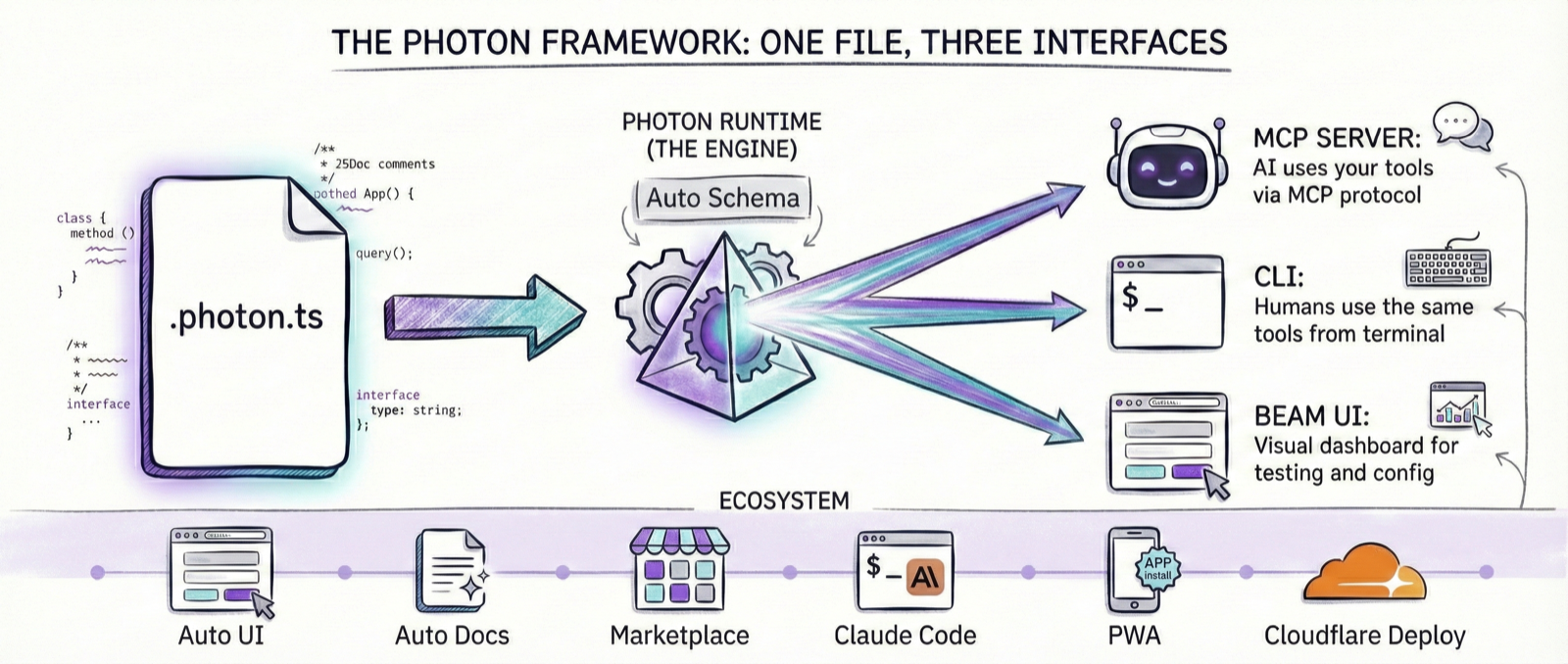
The ecosystem creates a virtuous cycle: AI generates photons → Runtime executes them → Community shares → AI gets smarter.
Traditional MCP servers scatter your logic across 4-6 files:
traditional-mcp/
├── server.ts         (50 lines of boilerplate)
├── transport.ts      (40 lines of setup)
├── schemas.ts        (40 lines of type definitions)
├── types.ts          (30 lines more types)
├── package.json      (dependencies)
└── business.ts       (20 lines of YOUR CODE)
This creates real problems:
- ❌ For AI agents: Scattered context across files makes understanding difficult
- ❌ For humans: Jump between files to understand one feature
- ❌ For teams: 200+ lines before you write business logic
- ❌ For maintenance: Changes require updating multiple files and configs
Photon puts everything in one file:
/**
 * Analytics - Query company analytics database
 * @dependencies pg@^8.11.0
 */
import { Client } from 'pg';

export default class Analytics {
  private db: Client;

  constructor(
    private host: string,
    private database: string,
    private password: string
  ) {}

  async onInitialize() {
    this.db = new Client({
      host: this.host,
      database: this.database,
      password: this.password
    });
    await this.db.connect();
  }

  /**
   * Get revenue by date range
   * @param startDate Start date (YYYY-MM-DD)
   * @param endDate End date (YYYY-MM-DD)
   */
  async revenue(params: { startDate: string; endDate: string }) {
    const result = await this.db.query(
      'SELECT date, SUM(amount) FROM orders WHERE date BETWEEN $1 AND $2 GROUP BY date',
      [params.startDate, params.endDate]
    );
    return result.rows;
  }
}
40 lines. One file. Production-ready.
That single file now works as both an MCP server and a CLI tool:
# As an MCP server (for AI assistants)
photon mcp analytics
# → Claude Desktop can now call revenue() as a tool

# As a CLI (for humans)
photon cli analytics revenue --startDate 2024-01-01 --endDate 2024-12-31
# → Beautiful formatted output:
# ┌────────────┬──────────┐
# │ Date       │ Revenue  │
# ├────────────┼──────────┤
# │ 2024-01-01 │ $12,450  │
# │ 2024-01-02 │ $15,320  │
# └────────────┴──────────┘
Same code. Same logic. Two interfaces. Zero duplication.
AI agents can now understand your entire MCP in one context:
# AI can read, understand, and suggest improvements
"Read my analytics.photon.ts and explain how it works"
"Review this photon for security issues"
"Add error handling to this photon"
Traditional MCPs require AI to piece together scattered files — Photons give complete context.
- Understand: Read one file, understand the whole system
- Review: Code reviews are one file, one story
- Debug: All logic in one place, no jumping around
- Learn: New team members read one file
Every photon is designed to be customized:
# Copy, modify, done — no build configs to update
cp ~/.photon/jira.photon.ts ~/.photon/my-jira.photon.ts
# Edit my-jira.photon.ts however you want
photon mcp my-jira  # Works immediately
Use cases:
- Add company-specific authentication
- Customize business logic
- Merge multiple photons
- Experiment without breaking originals
Prompt injection attacks are the new supply-chain threat. A malicious MCP can manipulate AI responses to exfiltrate your entire conversation history—not just credentials.
One file = one audit:
- Read 40 lines, understand everything
- No hidden code scattered across imports
- Fork and verify in minutes, not hours
- Trust through transparency, not reputation
When you can't trust a photon, you can safely fork and audit it. Traditional MCPs with scattered logic? Nearly impossible to verify.
Dependencies are auto-installed via JSDoc (like npx or uv):
/**
 * @dependencies axios@^1.6.0, lodash@^4.17.21
 */
No manual npm install. No package.json. Photon handles it.
npm install -g @portel/photonThe official Photon marketplace comes pre-configured with 16+ production-ready photons:
# Browse all photons
photon info

# Install any photon (filesystem, git, postgres, mongodb, slack, etc.)
photon add filesystem

# or else copy your own .photon.ts file to
# .photon folder in your user folder

# Call info command with mcp option
photon info filesystem --mcp
# Get client config json
{
  "filesystem": {
    "command": "photon",
    "args": [
      "mcp",
      "filesystem"
    ],
    "env": {
      "FILESYSTEM_WORKDIR": "/Users/arul/Documents",
      "FILESYSTEM_MAX_FILE_SIZE": "10485760",
      "FILESYSTEM_ALLOW_HIDDEN": "false"
    }
  }
}
# Add to your client Use the photon-skill for Claude Desktop or Claude Code to generate .photon.ts files:
- Single TypeScript files with metadata
- AI understands complete context in one file
- Zero boilerplate, just business logic
# Add custom marketplace from GitHub
photon marketplace add your-org/your-photons

# Install from your marketplace
photon add your-custom-tool| Metric | Traditional MCP | Photon |
|---|---|---|
| Setup Time | 40 minutes | 5 minutes |
| Lines of Code | 200+ | ~40 |
| Files Needed | 4-6 files | 1 file |
| Boilerplate | Manual | Auto-handled |
| Schema Generation | Manual | Automatic from TypeScript |
| Dependencies | Manual npm install | Auto-installed from @dependencies |
| Hot Reload | Configure yourself | Built-in with --dev |
| AI Context | Scattered | Single file |
| CLI Interface | Write separate code | Automatic from same code |
| Deployment Targets | MCP only | MCP, CLI, NCP, Lumina, APIs... |
Every photon automatically provides a beautiful CLI interface with zero additional code. The same business logic that powers your MCP tools becomes instantly available from the terminal.
# List all methods
photon cli lg-remote

# Call methods with natural syntax
photon cli lg-remote volume 50
photon cli lg-remote volume +5
photon cli lg-remote channel 7
photon cli lg-remote app netflix

# Get method help
photon cli lg-remote volume --helpPhoton automatically formats output based on data structure:
Tables - Key-value pairs and flat objects:
$ photon cli lg-remote volume
┌─────────┬────┐
│ volume  │ 45 │
├─────────┼────┤
│ muted   │ no │
├─────────┼────┤
│ maxVol  │ 100│
└─────────┴────┘
Lists - Arrays of items:
$ photon cli lg-remote apps
• Netflix (netflix)
• YouTube (youtube.leanback.v4)
• HDMI1 (com.webos.app.hdmi1)
• Disney+ (disney)
Trees - Hierarchical data (shown as formatted JSON) Primitives - Simple values displayed directly
Photon uses a smart format system with 5 standard types:
primitive- String, number, booleantable- Flat object or array of flat objectstree- Nested/hierarchical datalist- Array of simple itemsnone- No return value (void operations)
Hint the format (optional):
/**
 * Get current volume
 * @format table
 */
async volume() {
  return this._request('ssap://audio/getVolume');
}Auto-detection: If no @format tag is provided, Photon automatically detects the best format based on the return value structure.
List all methods:
photon cli lg-remoteCall a method:
# No parameters
photon cli lg-remote status

# Single parameter
photon cli lg-remote volume 50

# Multiple parameters
photon cli lg-remote search query "breaking bad" limit 10

# Relative adjustments
photon cli lg-remote volume +5
photon cli lg-remote channel +1
Get method help:
photon cli lg-remote volume --helpRaw JSON output:
photon cli lg-remote volume --jsonThe beauty of Photon's design: improvements to business logic automatically work across all interfaces.
Write your logic once:
async volume(params?: { level?: number | string } | number | string) {
  // Handle relative adjustments
  if (typeof level === 'string' && level.startsWith('+')) {
    const delta = parseInt(level);
    const current = await this._getCurrentVolume();
    const newVolume = current + delta;
    await this._setVolume(newVolume);
  }
  // ... rest of logic
  return this._getCurrentVolume(); // Always return current state
}
Works everywhere:
- ✅ MCP: Claude Desktop, Cursor, etc.
- ✅ CLI:
photon cli lg-remote volume +5 - ✅ Future interfaces: HTTP, WebSocket, etc.
Photons can provide helpful, context-aware errors:
$ photon cli lg-remote channels
❌ Error: TV channels not available. Currently on HDMI1.
   Switch to a TV tuner input to access channels.
The same error quality appears in MCP tools—because it's the same code.
The CLI properly returns exit codes for automation:
- 0: Success
- 1: Error (tool execution failed, invalid parameters, etc.)
Perfect for shell scripts and CI/CD:
if photon cli lg-remote volume 50; then
  echo "Volume set successfully"
else
  echo "Failed to set volume"
  exit 1
fiFile Name → MCP Name
// analytics.photon.ts → "analytics" MCPClass Methods → Tools
async revenue() {}      // → "revenue" tool
async topCustomers() {} // → "topCustomers" tool
TypeScript Types → JSON Schemas
async create(params: { title: string; priority: number }) {}
// Photon auto-generates JSON schema from TypeScript types
JSDoc → Tool Descriptions
/**
 * Get revenue by date range
 * @param startDate Start date (YYYY-MM-DD)
 */
// Photon extracts descriptions automatically
Constructor Parameters → Environment Variables
constructor(private host: string, private database: string) {}
// Maps to: ANALYTICS_HOST, ANALYTICS_DATABASE
JSDoc @dependencies → Auto-Install
/**
 * @dependencies pg@^8.11.0, lodash@^4.17.21
 */
// Photon auto-installs on first run (like npx or uv)Production-ready photons from portel-dev/photons:
| Category | Photons | Total Tools |
|---|---|---|
| Databases | PostgreSQL (7), MongoDB (13), Redis (18), SQLite (9) | 47 |
| Infrastructure | AWS S3 (11), Docker (10), Filesystem (13) | 34 |
| Development | Git (11), GitHub Issues (7) | 18 |
| Communication | Email (8), Slack (7) | 15 |
| Productivity | Google Calendar (9), Jira (10) | 19 |
| Utilities | Fetch (2), Time (3), Memory (10) | 15 |
Total: 16 photons, 148 focused tools
Browse and install:
photon info            # See all available photons
photon add postgres   # Install any photon
photon search git # Search by keywordphoton init analyticsCreates analytics.photon.ts in ~/.photon/ (accessible from anywhere).
Custom directory:
photon --working-dir ./my-photons init analytics/**
* Analytics - Query company analytics database
* @dependencies pg@^8.11.0
*/
import { Client } from 'pg';
export default class Analytics {
private db: Client;
constructor(
private host: string,
private database: string,
private password: string
) {}
async onInitialize() {
this.db = new Client({
host: this.host,
database: this.database,
password: this.password
});
await this.db.connect();
}
/**
* Get revenue by date range
* @param startDate Start date (YYYY-MM-DD)
* @param endDate End date (YYYY-MM-DD)
*/
async revenue(params: { startDate: string; endDate: string }) {
const result = await this.db.query(
'SELECT date, SUM(amount) FROM orders WHERE date BETWEEN $1 AND $2 GROUP BY date',
[params.startDate, params.endDate]
);
return result.rows;
}
async onShutdown() {
await this.db.end();
}
}# Development mode (hot reload)
photon mcp analytics --dev
# Production mode
photon mcp analyticsThat's it! Photon handles:
- ✅ TypeScript compilation (via esbuild)
- ✅ Schema generation from types
- ✅ MCP protocol implementation
- ✅ Environment variable mapping
- ✅ Dependency installation (@dependencies)
- ✅ Hot reload in dev mode
You focus on: Your business logic Photon handles: Everything else
--working-dir <dir>   # Use custom directory instead of ~/.photon
-V, --version         # Show version number
-h, --help # Show helpCreate a new .photon.ts file from template.
# Create in default directory (~/.photon)
photon init calculator

# Create in custom directory
photon --working-dir ./my-photons init calculatorValidate syntax and extract schemas without running.
photon validate calculatorUseful for:
- Checking syntax errors
- Testing schema generation
- CI/CD validation
Run a photon as an MCP server.
# Production mode
photon mcp calculator

# Development mode (hot reload on file changes)
photon mcp calculator --dev

# Validate configuration without running
photon mcp calculator --validate

# Show MCP configuration template
photon mcp calculator --config
Options:
--dev- Enable hot reload for development--validate- Validate configuration without running server--config- Show configuration template and exit
Run photon methods directly from the command line.
# List all available methods
photon cli calculator

# Call a method with arguments
photon cli calculator add 5 10

# Get method-specific help
photon cli calculator add --help

# Output raw JSON instead of formatted output
photon cli calculator add 5 10 --json
Arguments:
- Arguments are automatically coerced to expected types (string, number, boolean)
- Strings starting with
+or-are preserved for relative adjustments - Arrays and objects can be passed as JSON strings
Options:
--help- Show help for the photon or specific method--json- Output raw JSON instead of formatted output
Exit Codes:
0- Success1- Error (invalid arguments, execution failure, etc.)
Examples:
# Smart home control
photon cli lg-remote volume 50
photon cli lg-remote volume +5      # Relative adjustment
photon cli lg-remote channel 7
photon cli lg-remote app netflix

# Database queries
photon cli postgres query "SELECT * FROM users LIMIT 10"

# File operations
photon cli filesystem read-file path "/home/user/document.txt"

# Git operations
photon cli git commit message "feat: add new feature"List all photons or show details for a specific one.
# List all installed photons
photon info

# Show details for one photon
photon info calculator

# Get MCP client configuration
photon info calculator --mcp
Options:
--mcp- Output MCP server configuration for your client
Install a photon from a marketplace.
# Install from any enabled marketplace
photon add filesystem

# Install from specific marketplace
photon add filesystem --marketplace portel-dev/photons
Options:
--marketplace <name>- Specify which marketplace to use
Search for photons across all enabled marketplaces.
photon search database
photon search gitShow detailed information about a photon from marketplaces.
photon info postgresShows:
- Description
- Available tools
- Configuration requirements
- Marketplace source
Upgrade photons from marketplaces.
# Upgrade all photons
photon upgrade

# Upgrade specific photon
photon upgrade filesystem

# Check for updates without upgrading
photon upgrade --check
Options:
--check- Only check for updates, don't install
Show photons available in multiple marketplaces.
photon conflictsUseful when same photon name exists in different marketplaces.
List all configured marketplaces.
photon marketplace listAdd a new marketplace.
# GitHub shorthand
photon marketplace add username/repo

# Full HTTPS URL
photon marketplace add https://github.com/username/repo

# SSH URL
photon marketplace add git@github.com:username/repo.git

# Direct URL
photon marketplace add https://example.com/marketplace

# Local path
photon marketplace add ./my-local-marketplaceRemove a marketplace.
photon marketplace remove my-marketplaceEnable a previously disabled marketplace.
photon marketplace enable my-marketplaceDisable a marketplace without removing it.
photon marketplace disable my-marketplaceUpdate marketplace metadata from remote.
# Update all marketplaces
photon marketplace update

# Update specific marketplace
photon marketplace update portel-dev/photonsGenerate marketplace manifest and documentation.
# Sync current directory
photon sync marketplace

# Sync specific directory
photon sync marketplace ./my-marketplace

# Generate Claude Code plugin files too
photon sync marketplace --claude-code
Options:
--claude-code- Also generate Claude Code plugin files (.claude-plugin/)--name <name>- Override marketplace name--description <desc>- Set marketplace description--owner <owner>- Set owner name
Used when creating your own marketplace. See Marketplace System and Claude Code Plugins.
Security audit of photon dependencies.
# Audit all photons
photon audit

# Audit specific photon
photon audit postgres
Checks for:
- Vulnerable dependencies
- Outdated packages
- Security advisories
# Install from official marketplace (portel-dev/photons)
photon add github-issues
photon add sqlite
photon add memory

# Search for photons
photon search slackBuild an internal marketplace for your organization:
# 1. Organize your photons
mkdir company-photons && cd company-photons
cp ~/.photon/*.photon.ts .

# 2. Generate marketplace manifest (and optionally Claude Code plugin)
photon sync marketplace --claude-code

# 3. Push to GitHub/Git
git init
git add .
git commit -m "Initial marketplace"
git push origin main

# 4. Team members install (via CLI or Claude Code)
photon marketplace add company/photons
photon add internal-crm
photon add analytics-db
Benefits:
- 🔒 Secure: Your code, your infrastructure, your control
- 📦 Easy: Single-file photons are trivial to maintain
- 🎯 Focused: Build exact tools for your workflows
- 📊 Traceable: Git-based versioning and attribution
- 🔌 Dual Distribution: With
--claude-code, also works as Claude Code plugin
Tip: Use
--claude-codeflag to enable installation via both Photon CLI and Claude Code plugin manager. See Claude Code Plugins for details.
# List all marketplaces
photon marketplace list

# Add marketplace (multiple formats supported)
photon marketplace add username/repo              # GitHub shorthand
photon marketplace add https://github.com/u/repo  # HTTPS
photon marketplace add git@github.com:u/repo.git  # SSH
photon marketplace add https://example.com/mkt    # Direct URL
photon marketplace add ./local-photons            # Local path

# Remove marketplace
photon marketplace remove <name>

# Search across all marketplaces
photon search <keyword>Photon marketplaces can be automatically published as Claude Code plugins, enabling users to install individual photons directly from Claude Code's plugin manager.
One marketplace, two distribution channels:
Via Photon CLI:
photon add filesystem
photon add git
Via Claude Code Plugin:
/plugin marketplace add your-org/your-marketplace
/plugin install filesystem@your-marketplace
/plugin install git@your-marketplace
Benefits:
- 🎯 Granular Installation: Claude Code users can install only the photons they need
- 🔄 Auto-Sync: Plugin stays in sync with your marketplace
- ⚡ Zero Config: Photon CLI auto-installs on first use
- 🛡️ Secure: Credentials never shared with AI (interactive setup available)
- 📦 Same Source: One marketplace serves both CLI and plugin users
When creating your marketplace, add the --claude-code flag:
# In your marketplace directory
photon sync marketplace --claude-code
This generates:
.claude-plugin/marketplace.json- Plugin manifest with individual photon entries.claude-plugin/hooks.json- SessionStart hook to auto-install Photon CLI.claude-plugin/scripts/check-photon.sh- Auto-installer script.claude-plugin/scripts/setup-photon.sh- Interactive credential setup tool
Individual Plugins: Each photon becomes a separate installable plugin in Claude Code:
{
  "name": "your-marketplace",
  "plugins": [
    {
      "name": "filesystem",
      "description": "Filesystem - File and directory operations",
      "mcpServers": {
        "filesystem": {
          "command": "photon",
          "args": ["mcp", "filesystem"]
        }
      }
    }
    // ... one entry per photon
  ]
}
Auto-Install Hook: When users install your plugin, Claude Code automatically:
- Checks if
photonCLI is installed - Installs it globally via npm if missing
- Makes all photon tools available immediately
The official photons marketplace uses this approach:
# In the photons repo
photon sync marketplace --claude-code
git commit -m "chore: update marketplace"
git push
Users can then install via Claude Code:
/plugin marketplace add portel-dev/photons
/plugin install knowledge-graph@photons-marketplace
/plugin install git@photons-marketplaceAdd this to your .git/hooks/pre-commit to auto-sync:
#!/bin/bash
photon sync marketplace --claude-code
git add .marketplace/ .claude-plugin/ README.md *.md
Now your marketplace AND plugin files stay in sync automatically.
Recommended approach:
- Commit both
.marketplace/and.claude-plugin/to your repo - Single command keeps them in sync
- Users choose their preferred installation method
- Same photons, whether via CLI or Claude Code
Result: Maximum reach with minimal maintenance.
Photons can call external MCPs using the @mcp declaration syntax. Dependencies are auto-injected as instance properties:
/**
 * Project Manager - Combines GitHub and Jira
 * @mcp github anthropics/mcp-server-github
 * @mcp jira npm:@anthropic/mcp-server-jira
 */
export default class ProjectManager {
  /**
   * Sync GitHub issues to Jira
   */
  async syncIssues(params: { repo: string; project: string }) {
    // this.github and this.jira are auto-injected!
    const issues = await this.github.list_issues({ repo: params.repo });

    for (const issue of issues) {
      await this.jira.create_issue({
        project: params.project,
        summary: issue.title,
        description: issue.body
      });
    }

    return { synced: issues.length };
  }
}
Source Formats (Marketplace-style):
| Format | Example | Description |
|---|---|---|
| GitHub shorthand | anthropics/mcp-server-github |
Runs via npx -y @anthropics/mcp-server-github |
| npm package | npm:@scope/package |
Runs via npx -y @scope/package |
| HTTP URL | http://localhost:3000/mcp |
Connects via SSE transport |
| WebSocket | ws://localhost:8080/mcp |
Connects via WebSocket transport |
| Local path | ./my-local-mcp |
Runs via node ./my-local-mcp |
Multiple Transports:
/**
 * @mcp github anthropics/mcp-server-github       // stdio (local process)
 * @mcp api http://api.example.com/mcp            // SSE (HTTP)
 * @mcp realtime ws://realtime.example.com/mcp    // WebSocket
 */
The injected MCP clients support all official SDK transports: stdio, SSE, streamable-http, and websocket.
export default class MyPhoton {
  async onInitialize() {
    // Called when photon loads
    console.error('Photon initialized');
  }

  async onShutdown() {
    // Called on shutdown
    console.error('Photon shutting down');
  }

  async myTool(params: { input: string }) {
    return `Processed: ${params.input}`;
  }
}import { Template, asTemplate } from '@portel/photon';
export default class MyPhoton {
/**
* Generate a code review prompt
* @Template
* @param language Programming language
* @param code Code to review
*/
async codeReview(params: { language: string; code: string }): Promise<Template> {
const prompt = `Review this ${params.language} code:\n\`\`\`\n${params.code}\n\`\`\``;
return asTemplate(prompt);
}
}import { Static, asStatic } from '@portel/photon';
export default class MyPhoton {
/**
* Get API documentation
* @Static api://docs
* @mimeType text/markdown
*/
async apiDocs(params: {}): Promise<Static> {
const docs = `# API Documentation\n\n...`;
return asStatic(docs);
}
}Methods starting with _ are private (not exposed as tools):
export default class MyPhoton {
  // Public tool
  async publicTool(params: {}) {
    return this._helperMethod();
  }

  // Private helper (NOT exposed)
  async _helperMethod() {
    return "Internal logic only";
  }
}The repository includes example photons in examples/:
npx photon --working-dir examples mcp content --devDemonstrates Templates (MCP Prompts) and Static resources.
npx photon --working-dir examples mcp math --devBasic arithmetic operations.
npx photon --working-dir examples mcp text --devText manipulation tools.
npx photon --working-dir examples mcp workflow --devTask management system.
┌─────────────────────┐
│  .photon.ts file    │  ← Your single TypeScript file
└──────────┬──────────┘
           │
           ↓
   ┌───────────────┐
   │ Auto-Install  │  ← Reads @dependencies, installs packages
   └───────┬───────┘
           │
           ↓
   ┌───────────────┐
   │    Loader     │  ← Compiles TypeScript with esbuild
   └───────┬───────┘    Loads class dynamically
           │
           ↓
 ┌─────────────────────┐
 │  Schema Extractor   │  ← Parses JSDoc + TypeScript types
 └──────────┬──────────┘    Generates JSON schemas
            │
            ↓
    ┌──────────────┐
    │  MCP Server  │  ← Implements MCP protocol
    └──────┬───────┘    Using @modelcontextprotocol/sdk
           │
           ↓
   ┌─────────────-─┐
   │ stdio/JSON-RPC│  ← Communicates with MCP clients
   └─────────────-─┘    (Claude Desktop, Cursor, Zed, etc.)
"Singular focus. Precise target."
A photon is the smallest unit of light, delivering singular focus to a precise target.
Each Photon module embodies this principle:
- Singular focus - One responsibility, executed flawlessly
- Precise target - Clear purpose, clean API
- Universal design - Pure TypeScript, ready for future possibilities
No! Just export any class with async methods. Photon handles the rest.
Photon extracts JSON schemas from your TypeScript types. MCP clients validate parameters before calling your tools.
Yes! Dependencies are auto-installed from JSDoc @dependencies tags (like npx or uv).
In --dev mode, Photon watches your .photon.ts file and recompiles on save.
~/.cache/photon-mcp/compiled/
Default: ~/.photon/
Custom: Use --working-dir flag
Absolutely! That's the design. Copy any .photon.ts file, edit it, run it. No build config changes needed.
photon upgrade        # Update all
photon upgrade <name> # Update specific photonMCP Servers: Build and run photons as MCP servers for AI assistants. Works with Claude Desktop, Cursor, Zed, Continue, Cline, and any MCP-compatible client.
CLI Interface: Run photon methods directly from the command line with beautiful formatted output. Every photon automatically becomes a CLI tool with zero additional code.
Write once, deploy everywhere: The same business logic powers both your MCP tools and CLI commands.
Photon files are first-class citizens across multiple platforms:
NCP runs as an MCP client hosting many MCPs intelligently, while acting as an MCP server for any client. Photon files integrate seamlessly as context providers.
# Photons work natively with NCP
ncp add analytics.photon.ts
NCP enables sophisticated MCP orchestration patterns, and .photon.ts files are designed to work seamlessly in this environment.
Turn any photon into a production API endpoint with zero configuration.
# Same photon, now an HTTP API
lumina serve analytics.photon.ts
# → POST /revenue with JSON params
# → GET /status
# → Full REST API from your photon methods
Lumina will make photons available as HTTP/WebSocket endpoints, enabling web apps, mobile clients, and traditional API consumers to use the same business logic.
The .photon.ts format is designed to be consumed by any runtime:
- WebSocket servers
- Serverless functions (AWS Lambda, Cloudflare Workers)
- Native desktop applications
- Browser extensions
- GraphQL servers
One file. Many platforms. Pure business logic.
Photon's framework-agnostic design enables future deployment targets. More on the way.
- GUIDE.md - Complete tutorial for creating photons
- ADVANCED.md - Lifecycle hooks, performance, production deployment
- COMPARISON.md - Detailed comparison vs traditional MCP
- TROUBLESHOOTING.md - Common issues and solutions
- CHANGELOG.md - Version history
Contributions welcome! Please open issues and PRs at github.com/portel-dev/photon-mcp.
- photons - Official marketplace with 16+ production-ready photons
- @modelcontextprotocol/sdk - Official MCP TypeScript SDK
MIT © Portel
Built with singular focus. Deployed with precise targeting.
Made with ⚛️ by Portel