
CLI program and a Go package to convert Obsidian files in multiple ways. You can use the program both for exporting Obsidian files to static site generators (e.g., Hugo), and for modifying front matters.
Obsdconv enables you to
- remove tags from text,
- copy tags in text to front matter
tagsfield, - set H1 content to front matter
titleandaliasesfield, - convert internal links
[[file]], embeds![[image]], and external links with Obsidian URI[text](obsidian://open?vault=notes&file=filename)to the standard format, - and etc.
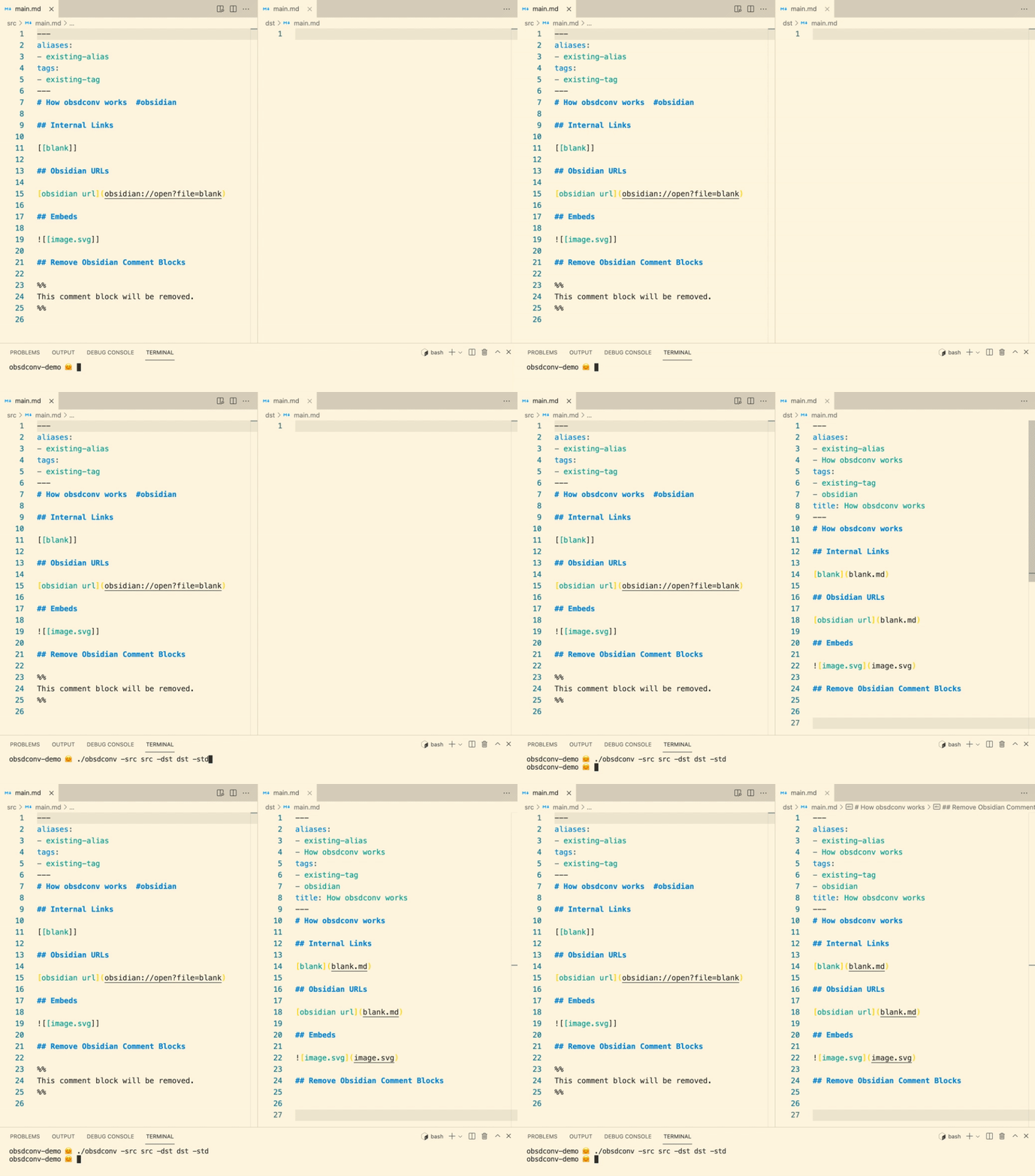
We provide binaries for multiple platforms.
Please download the one suitable to your environment.
Or if you have a go runtime, you can build a binary by running
go mod tidy && go build, to get obsdconv.
Run
obsdconv -src src -dst dst -stdwhere src is a directory with Obsidian files or an Obsidian file, dst is a directory to which processed files will be exported.
With std flag, obsdconv exports Obsidian files in the standard format.
That is, obsdconv
- removes tags from text,
- copy tags in text to front matter,
- copy H1 content to
titleandaliasesfields, - remove comment blocks,
- convert internal links, embeds, and Obsidian URI's,
See sample directory.
We can get sample/std/dst from sample/std/src by running obsdconv -src sample/std/src -dst sample/std/dst -std at the root directory.
We also provide other sample directories, each directory name corresponds to specified flags:
sample/obs:-obssample/std_rmh1:-std -rmh1sample/std_pub:-std -pub
Available options are as follows:
| flag | meaning | * |
|---|---|---|
src |
a markdown file or a directory containing Obsidian files. | required |
dst |
destination to which generated files located. | required |
tgt |
the path to be processed. It can be a file or a directory. The default value of tgt = the path specified by src. Set this flag when you want to process only a subset of a vault but resolve refs by using the entire vault. |
optional |
rmtag |
remove tags from text. | optional |
cptag |
copy tags from text to tags field in front matter. |
optional |
synctag |
remove all tags in front matter and then copy tags from text. |
optional |
title |
set H1 content to title field in front matter. |
optional |
alias |
set H1 content to aliases field in front matter. |
optional |
synctlal |
remove an alias appearing also in title field and then set H1 content to title and aliases fields. |
optional |
link |
convert internal links, embeds, and Obsidian URI in the standart format. | optional |
cmmt |
remove comment blocks. | optional |
pub |
process only files with publish: true or draft: false. For files with publish: true, add draft: false. |
optional |
rmh1 |
remove H1. | optional |
remapkey |
remap keys in front matter. Use like -remapkey=old1:new1,old2:new2,to-be-removed:. |
optional |
filter |
process only files with specified conditions. Example: -filter="(key1||!key2)&&key3". Each field must be boolean and each key must match /[0-9a-zA-Z-_]+/. |
optional |
remapPathPrefix |
remap prefixes in paths in links. Example (-remapPrefix=static/>images/|notes/>posts/):  -> , [[sample]] -> [sample](posts/sample.md), where sample.md lies in directory notes. Note that the output directory structure will not change. |
optional |
formatLink |
trim suffix .md and complete links. Example: [example](#section) -> [example](path/to/sample#section), where the targe file is path/to/sample.md. |
optional |
formatAnchor |
anchor formatting style. Available styles: hugo, markdownit. |
optional |
strictref |
return error when ref target is not found. available only when link is on. |
optional |
obs |
= -cptag -title -alias |
optional |
std |
= -cptag -title -alias -rmtag -link -cmmt -strictref |
optional |
verion |
display the version currently installed. | optional |
debug |
display error messages for developers. | optional |
Note that
- individual flag overrides
obsandstd. That is, if you specify-title=0and-obs,-title=0wins andtitlefield will not copied from H1 content. - if
src=dst, then original files will be overwritten. Be careful!!
You can ignore paths by specifying them in a file named .obsdconvignore.
Put .obsdconvignore in src directory and write a path in each line like this:
.obsdconvignore
static/private/
notes/private/
notes/mycredential.md
- By default, non-markdown files will be copied to
dstdirectory.