Year ~> Spring 2020 - Fall 2020
- Jack Stoetzel (Team Leader) Github Link
- Sam Disharoon (Me)
- Jordan Welch Github Link
- Declan Sheehan Github Link
- Java
- XML
- Various APIs
Our team updated the Android app for the Guerrieri Academic Commons at Salisbury University. Our client, Chris Woodall, developed the iOS version of the app, and offered our Software Engineering class an opportunity to fix and redesign the Android version, which hadn't been updated since 2017. We needed to first fix the current app because there were several applications that caused the app to crash, most of the information was out of date, and some of the social media accounts displayed were no longer used. Once that was done, we were tasked with redesigning the app and making it more efficent and easier for our client to use. I have all three versions of the app above, Version 1.0 being the original, Version 1.1 being the "fixed" app, and Version 2.0.2 being the final version uploaded to Play Store
As stated before, Version 1.0 had many flaws including but not limited to:
- Outdated information
- Numerous crashes
- Outdated social media
- Features that did crash the app, but didn't work properly
Therefore, our team took the first semester to fix the current crashes of the app, update the information, and learn the file structure and how to use android studio. I personally have not had any experience with it, so it was a pretty big learning curve for the first month or so.
Version 1.1 was released and although it implemented many quick fixes, it was still very trival and looked out of date. So our team's goal for the fall was to create a fresh design, add a new page for the SU Maker Lab (3-D printing area), and host in-app functionality rather than just redirecting to webpages. Down below is what the revamp consisted of.
The new design got rid of the "hamburger" bar on the side and instead displays a Grid directly on the homepage with pictures corresponding with the tab it is located on. This is not only pleasing to the eye, but it makes navigation much nicer. Also added was a new Alert that displays over the logo in case the library staff decides to send an alert out. It does not hinder the usablity of the app, just displays a message. There is also a Search Bar that allows the user to search the library's resources. It will also display a pop-up box if there are any search suggestions for even more assitance if desired. The current day's library hours are also displayed, as well as updated social media icons. An image of the homepage is shown below.
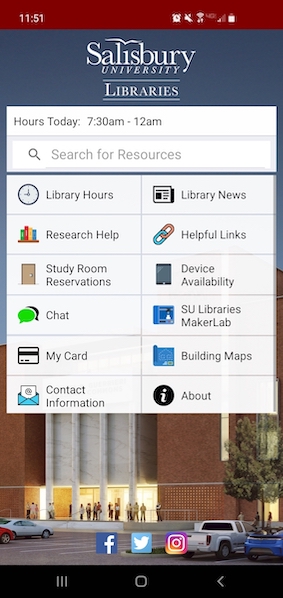
There are also many new features implemented to increase the longevity, usability, and accessability of the app. A few major features are:
- Uses library's API to update contact information and many other resources rather than have it hardcoded
- Updated HD images used for staff pictures and subject lists
- Allows the user to reserve study rooms straight from the app instead of being directed to the library's website This was the most important feature!
- Allows you to save your gullcard on your phone in case you need to scan it
- Added the Maker Lab page on the homescreen grid which displays useful information regarding the Maker Lab
Over the past year, we have developed many different applicable skills that will help us in our future careers. Skills such as time management, reading and editing other's code, through documentation, and communication with each other, our client, and instructor.