This library is in alpha and still under development. First usable version will be v1.0.1.


Fast Execution Graph consisting of Execution Nodes
Be able to design and run such input/output graphs, such as this one used in [http://gabyx.github.io/GRSFramework/#videos] :
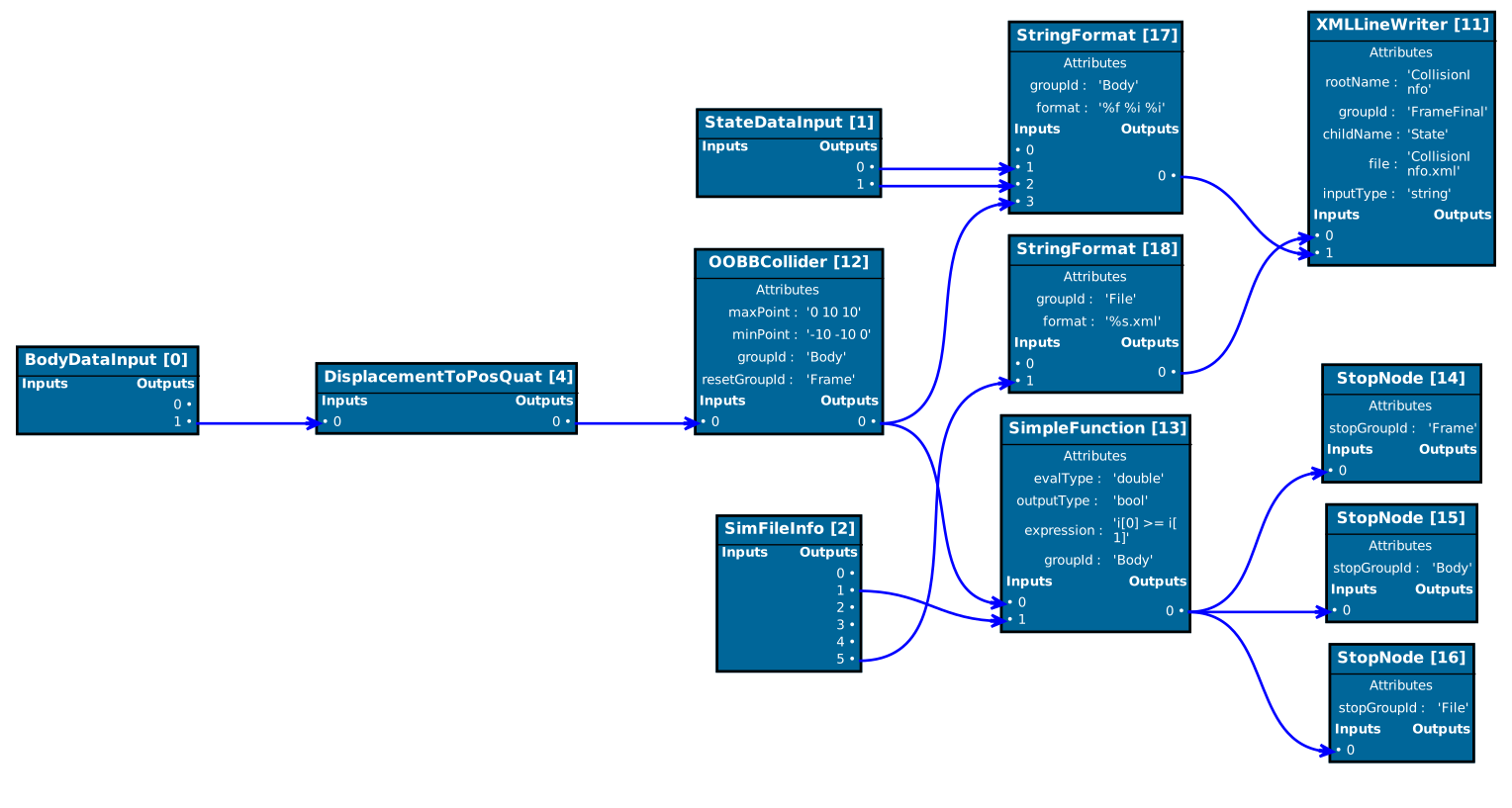
To build the library, the tests and the example you need the build tool cmake. This library has these dependencies:
- Eigen at least version 3,
- meta
- googletest
The library Eigen needs to be installed, meta and googletest are installed as external projects when configuring this library!
brew install eigenIf you start developing, install the pre-commit hook with:
cp tools/pre-commit .git/hooks/Install XCode and the CommandLine Tools from Apple
Install Visual Studio Code
Install clang with homebrew by
brew install clangInstall the following extensions for VS Code:
Note: Dont use the multi-root workspaces feature in VS Code since the C++ Extension does not yet support this and code completion won't work properly.
The execution graph implemented in ExecutionTree is a directed acyclic graph consisting of several connected logic nodes derived from LogicNode which define a simple input/output control flow.
Each logic node in the execution graph contains several input/output sockets (LogicSocket) with a certain type out of the predefined types defined in LogicSocketTypes.
An execution graph works in the way that each logic node contains a specific compute routine which provides values for the output sockets by using the values from the input sockets.
Each output of a logic node can be linked to an input of the same type of another logic node. This means an output socket of the arithmetic type double cannot be linked to an input socket of integral type int for example.
Each logic node can be assigned to one or more execution groups which are collections of logic nodes and form directed acyclic subgraphs.
For each execution group, an execution order is computed such that the data flow defined by the input/output links in the group is respected.
An execution order of an execution group is called a topological ordering in computer science, and such an ordering always exists for a directed acyclic graph, despite being non-unique. A topological ordering of an execution group is an ordering of all logic nodes such that for all connections from a logic node A to B, A precedes B in the ordering. Each execution graph network consists of several input logic nodes whose output sockets are initialized before executing the network.
The implementation in LogicSocket allows two types of directed links between an input and output socket, namely a get and a write connection.
A write link is a link from an output socket i of a node A to an input socket j of some node B, denoted as {A,i} -> {j,B}.
A write link basically duplicates a write request to the output socket i of A also to an additional write request to the input socket j of B.
A get link is the exact opposite and is a link from an input socket j of a node B to an output socket i of a node A, denoted as
{A,i} <- {j,B}.
A get link basically forwards any read access on the input socket j of B to a read access on the input socket i of A.
Most of the time only get links are necessary but as soon as the execution graph becomes more complex and certain switching behavior should be reproduced, the additional write links are a convenient tool to realize this.
Cyclic paths between logic nodes are detected and result in an error when building the execution network.
The write and read access to input and output sockets is implemented using a fast static type dispatch system in LogicSocket.
Static type dispatching avoids the use of virtual calls when using polymorphic objects in object-oriented programming languages.
Source: examples/libraryUsage
Let us build the simple directed graph below:
Node 1a,0
+-------+
|i0     |
|     o0+------+   Node 3a,4
|i1     |      |   +-------+
+-------+      +--->i0     |
Node 1b,1          |     o0+-----+
+-------+      +--->i1     |     |
|i0     |      |   +-------+     |
|     o0+------+                 |
|i1     |                        |   Node 4a,6
+-------+                        |   +-------+
                                 +--->i0     |
                                     |     o0|
Node 2a,2                        +--->i1     |
+-------+                        |   +-------+
|i0     |                        |
|     o0+------+   Node 3b,5     |
|i1     |      |   +-------+     |
+-------+      +--->i0     |     |
Node 2b,3          |     o0+-----+
+-------+      +--->i1     |
|i0     |      |   +-------+
|     o0+------+
|i1     |
+-------+
This execution tree consists of 4 input nodes, e.g. Node 1a, 1b, 2a, 2b, and 1 output node 4a.
Each node has 2 input sockets, e.g. denoted as i0 and i1, and one output socket o0.
The type of the input and output sockets in this example is simply int.
Each node computes the sum of both input sockets i0 and i1 and stores it in the output socket i1 (of course this is kind of stupid, it is only an example =).
First, we define our node type called IntegerNode<...>:
template<typename TConfig>
class IntegerNode : public typename TConfig::NodeBaseType
{
public:
    using Config = TConfig;
    using NodeBaseType = typename Config::NodeBaseType;
    enum Ins
    {
        Value1,
        Value2
    };
    enum Outs
    {
        Result1,
    };
We start of by deriving our IntegerNode from TConfig::NodeBaseType. The template parameter TConfig lets us configure our execution graph (especially the socket type list).
The type TConfig::NodeBaseType is the basis class for all logic nodes (resulting in LogicNode<Config>).
The two enumerations Ins and Outs let us define some handy abbreviations for our input sockets (Value1 and Value2) and our output socket (Result1). The sequential ordering of the enumerations in Ins and Outs does not matter at all! So far so good. Now we use some macro for letting us specify the input/output ordering:
private:
    EXECGRAPH_DEFINE_SOCKET_TRAITS(Ins, Outs);
    // Define the input socket decleration list:
    using InSockets  = InSocketDeclList<InSocketDecl<Value1, int>,
                                        InSocketDecl<Value2, int>>;
    // Define the input socket decleration list:
    using OutSockets = OutSocketDeclList<OutSocketDecl<Result1, int>>;
What we are specifying here is the following:
The type InSockets is a socket declaration list which says that the input socket with enumeration value Value1 is of type int and is the first input i0. The second entry defines the second input socket with enumeration value Value2 which is of type int too.
The same is done for our output by defining OutSockets.
Now we define two other handy macros:
    EXECGRAPH_DEFINE_LOGIC_NODE_GET_TYPENAME();
    EXECGRAPH_DEFINE_LOGIC_NODE_VALUE_GETTERS(Ins, InSockets, Outs, OutSockets);
The first one is not so important. It only defines some virtual std::string getTypeName() function which demangles the type of this node at runtime (for debugging purposes).
The second one defines some handy value-getters and setters for easy access (by means of the enumerations Ins and Outs) to the sockets values (more later).
Let us define the constructor of our IntegerNode<...>:
template<typename... Args>
    IntegerNode(Args&&... args)
        : NodeBaseType(std::forward<Args>(args)...)
    {
        this->template addSockets<InSockets>(std::make_tuple(2,2));
        this->template addSockets<OutSockets>(std::make_tuple(0));
    }
In the constructor, we create (add) the input and output sockets to the logic node. The parameter std::tuple<...> contains the default (constructor) values for the values stored in the sockets. So in the above snippet, we set the input sockets both to the value 2 and the output socket to the value 0.
Next we define the actual computation which is performed when this node is executed:
    void compute() override {
        getOutVal<Result1>() = getInVal<Value1>() + getInVal<Value2>();
    }
}; // end of class declaration
Here we simply add both input values ( getInVal<...>() return a reference) and store the result in the output socket.
Now, let us build the main ingredient of this example: the execution tree. First we allocate the 7 nodes by
using namespace executionGraph;
int main(){
    using Config = GeneralConfig<>; // we use the default configuration

    auto node1a = std::make_unique<IntegerNode<Config>>(0);
    auto node1b = std::make_unique<IntegerNode<Config>>(1);
    auto node2a = std::make_unique<IntegerNode<Config>>(2);
    auto node2b = std::make_unique<IntegerNode<Config>>(3);
    auto node3a = std::make_unique<IntegerNode<Config>>(4);
    auto node3b = std::make_unique<IntegerNode<Config>>(5);
    auto node4a = std::make_unique<IntegerNode<Config>>(6);
    auto resultNode = node4a.get();
Each node is given a unique id [0,...,6], which enables us to identify the nodes easier.
Next we create the get links which connect the in- and outputs.
    int i0 = 0; int i1 = 1; int o0 = 0;
    node4a->setGetLink(*node3a,o0,i0);
    node4a->setGetLink(*node3b,o0,i1);

    node3a->setGetLink(*node1a,o0,i0);
    node3a->setGetLink(*node1b,o0,i1);

    node3b->setGetLink(*node2a,o0,i0);
    node3b->setGetLink(*node2b,o0,i1);
The syntax node4a->setGetLink(*node3a,o0,i0); denotes that the output node node4a gets its first input value i0 = 0 from the single output o0 = 0 of node node3a. The above snippet builds the execution tree given at the begining.
Finally we create the ExecutionTree ExecutionTreeInOut, add all nodes to it, set the proper node classfication (if its an input or output node, setup the graph (which computes the execution order) and execute the default execution group 0 as
    // Make the execution tree and add all nodes
    ExecutionTreeInOut<Config> execTree;
    execTree.addNode(std::move(node1a)); // The execution tree owns the nodes!
    execTree.addNode(std::move(node1b));
    execTree.addNode(std::move(node2a));
    execTree.addNode(std::move(node2b));
    execTree.addNode(std::move(node3a));
    execTree.addNode(std::move(node3b));
    execTree.addNode(std::move(node4a));

    // Set all node classifications
    execTree.setNodeClass(0, ExecutionTreeInOut<Config>::NodeClassification::InputNode);
    execTree.setNodeClass(1, ExecutionTreeInOut<Config>::NodeClassification::InputNode);
    execTree.setNodeClass(2, ExecutionTreeInOut<Config>::NodeClassification::InputNode);
    execTree.setNodeClass(3, ExecutionTreeInOut<Config>::NodeClassification::InputNode);
    execTree.setNodeClass(6, ExecutionTreeInOut<Config>::NodeClassification::OutputNode);

    // Setup the execution tree
    execTree.setup();
    EXECGRAPH_LOG_INFO(execTree.getExecutionOrderInfo());
    execTree.execute(0); // execute the default execution group (=0)
    EXECGRAPH_LOG_INFO("Result : "<< resultNode->getOutVal<IntegerNode<Config>::Result1>());
This outputs the following execution order:
Execution order for group id: 0
    NodeId  |  Priority  |  NodeType
    ------  |  --------  |  --------
         0  |         2  |  IntegerNode<executionGraph::GeneralConfig<...> >*
         1  |         2  |  IntegerNode<executionGraph::GeneralConfig<...> >*
         2  |         2  |  IntegerNode<executionGraph::GeneralConfig<...> >*
         3  |         2  |  IntegerNode<executionGraph::GeneralConfig<...> >*
         5  |         1  |  IntegerNode<executionGraph::GeneralConfig<...> >*
         4  |         1  |  IntegerNode<executionGraph::GeneralConfig<...> >*
         6  |         0  |  IntegerNode<executionGraph::GeneralConfig<...> >*
    ------  |  --------  |  --------