This is an app that aids the user to take snaps using the camera, save them as encrypted files and view those encrypted pics in a grid.
Android.Emulator.-.Pixel_5_API_30_5556.2022-10-31.03-32-33.mp4
It is developed using MVVM architecture. It uses Kotlin, Coroutines, RoomDB, Jetpack Compose, ViewModel, Paging3, Hilt, Coil, Navigation.
Overall App architecture and the UX can be seen here:
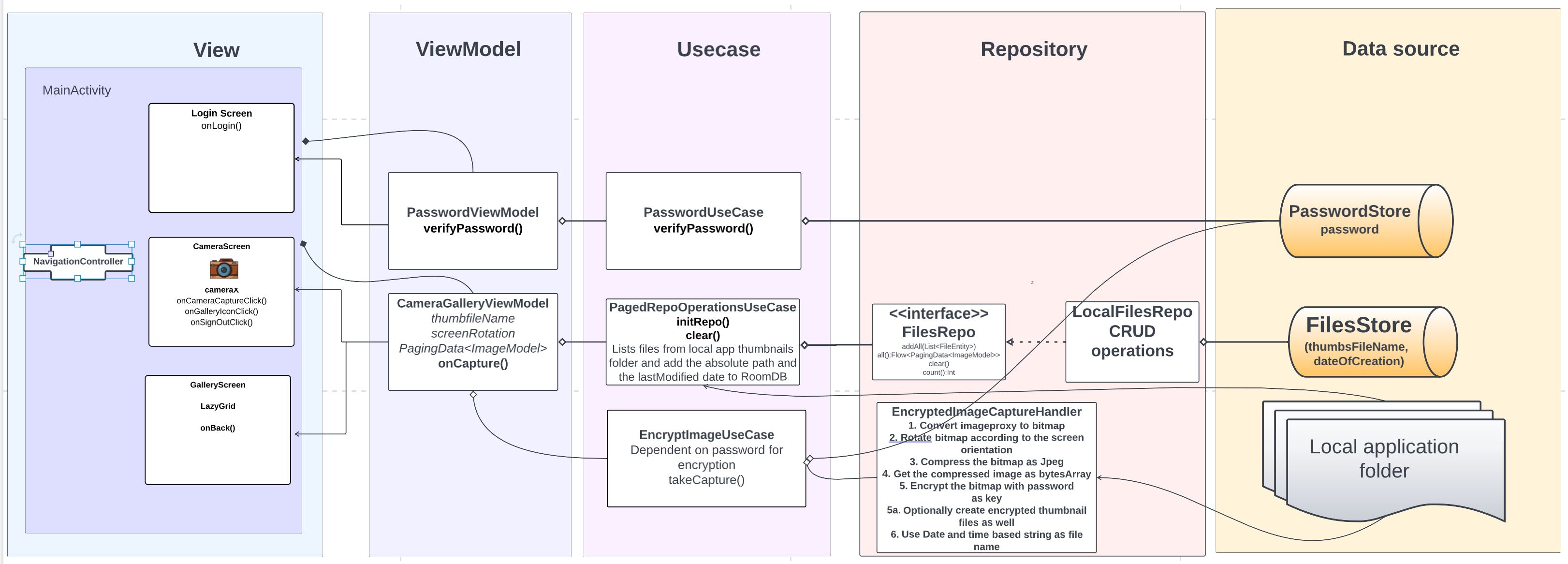
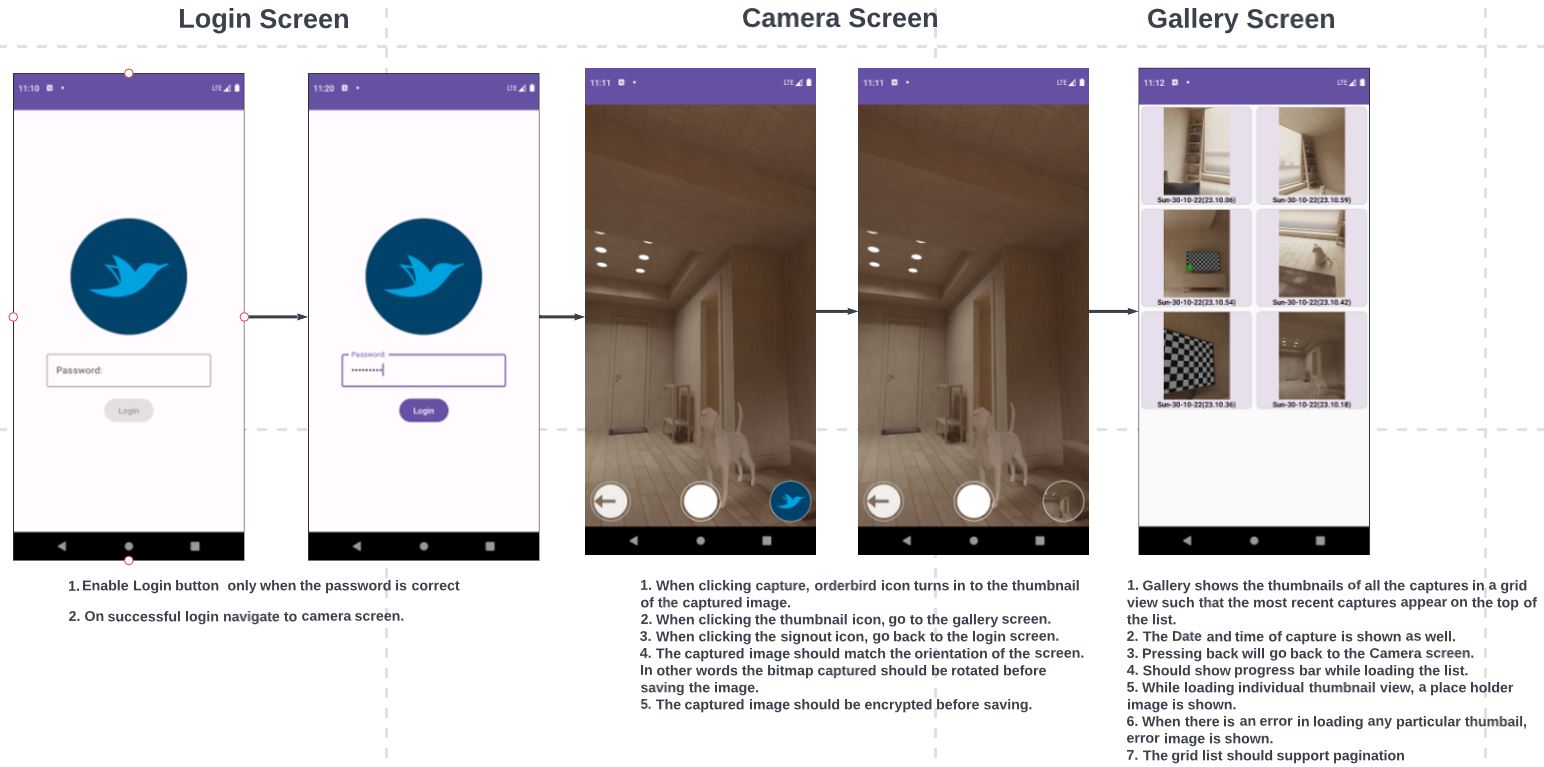
The only permission required by this app is the camera permission. View part is achieved via jetpack compose. Camera uses the camerax API.
It has 3 screens:
LoginScreen
CameraScreen
GalleryScreen
The password to enter the app is configured as BuildConfig defined in the gradle.properties, which is Abcd@1234
It is provided via the PasswordStore class which is used by the encrypt and the decrypt methods.
The captured image is converted to a bitmap and is rotated based on the screen's orientation.
    private fun imageProxyToBitmap(image: ImageProxy): Bitmap {
        val planeProxy = image.planes[0]
        val buffer: ByteBuffer = planeProxy.buffer
        val bytes = ByteArray(buffer.remaining())
        buffer.get(bytes)
        return BitmapFactory.decodeByteArray(bytes, 0, bytes.size)
    }
private fun Bitmap.updateTransformation(rotate: Int): Bitmap {
val matrix = Matrix()
val centerX = width / 2f
val centerY = height / 2f
matrix.postRotate(rotate.toFloat(), centerX, centerY)
return createBitmap(this, 0, 0, width, height, matrix, true)
}Thanks to viewModel, the app survives configuration changes and works well in all orientations(portrait and landscape).
 private val orientationEventListener by lazy {
        object : OrientationEventListener(this) {
            override fun onOrientationChanged(orientation: Int) {
                if (orientation == ORIENTATION_UNKNOWN) return
                val rotation = when (orientation) {
                    in 45 until 135 -> ROTATION_270
                    in 135 until 225 -> ROTATION_180
                    in 225 until 315 -> ROTATION_90
                    else -> ROTATION_0
                }
                viewModel.updateRotation(rotation)
            }
        }
    }
The rotated bitmap is converted in to Jpeg images of two sizes, a big image and a small thumnail image and then both are encrypted using the password.
// Make sure the path exists before calling this method
fun encryptBmpAndSaveAsCJpeg(
    bmp: Bitmap,
    password: CharArray,
    path: String,
    fileName: String
): String {
    var absoluteFileName = ""
    val byteArray: ByteArray = ByteArrayOutputStream().use { stream ->
        bmp.compress(Bitmap.CompressFormat.JPEG, 85, stream)
        stream.toByteArray()
    }
    absoluteFileName = "$path/$fileName.cjpg"
    ObjectOutputStream(FileOutputStream(absoluteFileName)).use {
        it.writeObject(Cryptor.encrypt(byteArray, password))
    }
    return absoluteFileName
}
For displaying in the Gallery and the Camera screens only the thumnail version of 120dp is used.
The encrypted large image is stored in the local application folder with the "cjpg" file extension, which requires no special permission to read/write.
The encrypted thumnail version is stored in the subfolder named "thumbs with the "cjpg" file extension under the application folder.
When launching the Gallery screen, the files in the "thumbs" folder are listed and the name and date of each file are entreed in to the DB.
// Add image files(file path from the application directory) along with the date of creation in the local database
    suspend fun init() {
        try {
            val appFolder = applicationContext.filesDir.absolutePath
            val thumbsFolder = File("$appFolder/$THUMBS_FOLDER_NAME")
            val files = thumbsFolder.listFiles()
            if (files?.isNotEmpty() == true) {
                val thumbnails = files.mapNotNull {
                    FileEntity(
                        uri = it.toURI().toString(),
                        date = it.lastModified()
                    )
                }
                repo.addAll(thumbnails)
            }
        } catch (e: Exception) {
            Log.e(javaClass.simpleName, "Could not fetch files")
        }
    }
Then the DB returns the list as a PagingSource<Int, ImageModel>.
@Dao
interface FilesDao {
    @Query("SELECT * FROM files ORDER BY date DESC")
    fun getAllPaged(): PagingSource<Int, ImageModel>

    @Insert(onConflict = OnConflictStrategy.REPLACE)
    fun insertAll(imageFiles: List<FileEntity>)

    @Query("DELETE FROM files")
    fun deleteAll()

    @Query("SELECT COUNT(*) FROM files")
    fun count(): Int
}
The local repo is configured to return a page of 15 ImageModels at a time.
 override fun all(): Flow<PagingData<ImageModel>> = Pager(PagingConfig(pageSize = 15)) {
        filesDb.filesDao().getAllPaged()
    }.flow
So that only a manageable number of files has to be decrypted and displayed at a time in the grid cells.
GalleryScreen has 3 states Loading, Error and the data arrives from the DB.
Till the DB is ready,i.e. Loading state, a progress bar is shown in the Gallery screen.
If there is an error an error drawable is displayed.
Once the data arrives in the collected flow of the ImageModels, the decrypting of each image starts using the decode factory.
CryptoBitmapFactoryDecoder.Factory(password = viewModel.password)val model = ImageRequest.Builder(LocalContext.current)
.listener(object : ImageRequest.Listener {
override fun onError(request: ImageRequest, result: ErrorResult) {
Log.e(javaClass.simpleName, result.throwable.message.toString())
}
})
.placeholder(R.drawable.orderbird)
.error(R.drawable.ic_error)
.data(data.uri)
.crossfade(true)
.decoderFactory(decoderFactory)
.build()
AsyncImage(
model = model,
contentDescription = Date(data.date).formatted(),
modifier = Modifier
.size(dimensionResource(id = R.dimen.gallery_thumbnail_size))
.align(CenterHorizontally)
)