

Real-time, local-first state management for Swift apps using InstantDB and Point-Free's Sharing library.
v0.1 Demo
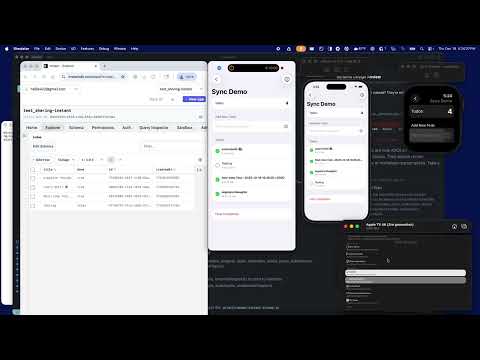
Note: This library depends on instant-ios-sdk PR #6 which adds presence support and threading fixes.
⚠️ Demo Status (December 19, 2025 1:00 PM EST): The demos are a little flaky right now. I'm actively working on fixing them.
- Overview
- Quick example
- Getting started
- Modeling data
- Permissions
- Sync
- Presence
- Schema codegen
- Demos
- Documentation
- Debugging & troubleshooting
- Testing
- Installation
- License
sharing-instant brings InstantDB's real-time sync to Swift using the familiar @Shared property
wrapper from Point-Free's Sharing library. It provides:
@Shared(.instantSync(...))– Bidirectional sync with optimistic updates@Shared(.instantPresence(...))– Real-time presence (who's online, typing indicators, cursors)- Schema codegen – Generate type-safe Swift structs from your TypeScript schema
- Offline support – Works offline, syncs when back online
- Full type safety – No
[String: Any], everything is generic andCodable
Get started in seconds with the sample command. This generates a sample schema and Swift types you can use immediately:
# Generate sample schema and Swift types
swift run instant-schema sample --to Sources/Generated/
This creates:
instant.schema.ts– A sample TypeScript schema with atodosentitySources/Generated/– Swift types (Todo,Schema.todos, etc.)
Then copy this into your app. Run on multiple simulators or devices to watch changes sync instantly!
// TodoApp.swift
import SharingInstant
import SwiftUI

@main
struct TodoApp: App {
  init() {
    // Get your App ID at: https://instantdb.com/dash/new
    // Then push the schema: npx instant-cli@latest push schema --app YOUR_APP_ID
    prepareDependencies {
      $0.defaultInstant = InstantClient(appId: "YOUR_APP_ID")
    }
  }

  var body: some Scene {
    WindowGroup {
      TodoListView()
    }
  }
}
// TodoListView.swift
import IdentifiedCollections
import SharingInstant
import SwiftUI
struct TodoListView: View {
// Uses generated Schema.todos and Todo types
@Shared(.instantSync(Schema.todos))
private var todos: IdentifiedArrayOf<Todo> = []
@State private var newTitle = ""
var body: some View {
NavigationStack {
List {
// Add new todo
HStack {
TextField("What needs to be done?", text: $newTitle)
.onSubmit { addTodo() }
Button(action: addTodo) {
Image(systemName: "plus.circle.fill")
}
.disabled(newTitle.trimmingCharacters(in: .whitespaces).isEmpty)
}
// Todo list
ForEach(todos) { todo in
HStack {
Image(systemName: todo.done ? "checkmark.circle.fill" : "circle")
.foregroundStyle(todo.done ? .green : .secondary)
.onTapGesture { toggleTodo(todo) }
Text(todo.title)
.strikethrough(todo.done)
Spacer()
}
}
.onDelete { indexSet in
$todos.withLock { $0.remove(atOffsets: indexSet) }
}
}
.navigationTitle("Todos (\(todos.count))")
}
}
private func addTodo() {
let title = newTitle.trimmingCharacters(in: .whitespaces)
guard !title.isEmpty else { return }
let todo = Todo(
title: title,
done: false,
createdAt: Date().timeIntervalSince1970 * 1_000
)
$todos.withLock { $0.append(todo) }
newTitle = ""
}
private func toggleTodo(_ todo: Todo) {
$todos.withLock { $0[id: todo.id]?.done.toggle() }
}
}When you call $todos.withLock { ... }, the change is applied locally immediately (optimistic UI),
sent to InstantDB, and synced to all other devices in real-time.
This guide walks you through creating an InstantDB project, defining your schema, generating Swift types, and building your first synced view.
Go to instantdb.com/dash/new and create a new project. Copy your App ID – you'll need it to configure the client.
Create an instant.schema.ts file in your project. This TypeScript file defines your data model
and is the source of truth for both your backend and Swift types.
See Modeling Data for the full schema reference.
// instant.schema.ts
import { i } from "@instantdb/core";

const _schema = i.schema({
  entities: {
    todos: i.entity({
      title: i.string(),
      done: i.boolean(),
      createdAt: i.number().indexed(),
    }),
  },

  // Optional: Define rooms for presence features
  // See: https://instantdb.com/docs/presence-and-topics
  rooms: {
    chat: {
      presence: i.entity({
        name: i.string(),
        color: i.string(),
        isTyping: i.boolean(),
      }),
    },
  },
});

type _AppSchema = typeof _schema;
interface AppSchema extends _AppSchema {}
const schema: AppSchema = _schema;

export type { AppSchema };
export default schema;Use the Instant CLI to push your schema to the server:
# Login to InstantDB (first time only)
npx instant-cli@latest login

# Push your schema
npx instant-cli@latest push schema --app YOUR_APP_IDsharing-instant includes a schema codegen tool that generates type-safe Swift structs from your
TypeScript schema.
Important: The generator requires the input schema file to be committed and the output directory to be clean so that generated changes can be traced back to a specific version of the schema.
# Generate Swift types
swift run instant-schema generate \
  --from instant.schema.ts \
  --to Sources/Generated
This generates:
Entities.swift– Swift structs for each entity (Todo, etc.)Schema.swift– Type-safeEntityKeyinstances (Schema.todos, etc.)Rooms.swift– Presence types for rooms (ChatPresence,Schema.Rooms.chat, etc.)Links.swift– Link metadata for relationships
In your app's entry point, configure the default InstantDB client with your App ID:
import SharingInstant
import SwiftUI

@main
struct MyApp: App {
  init() {
    prepareDependencies {
      $0.defaultInstant = InstantClient(appId: "YOUR_APP_ID")
    }
  }

  var body: some Scene {
    WindowGroup {
      ContentView()
    }
  }
}Now you can use @Shared(.instantSync(...)) in any SwiftUI view with the generated types:
import SharingInstant

struct TodoListView: View {
  // Type-safe sync using generated Schema and Todo types
  @Shared(.instantSync(Schema.todos.orderBy(\.createdAt, .desc)))
  private var todos: IdentifiedArrayOf<Todo> = []

  // ... your view code
}InstantDB uses a schema-first approach. Your instant.schema.ts file defines:
- Entities – Your data types (like tables)
- Links – Relationships between entities
- Rooms – Real-time presence channels
entities: {
  todos: i.entity({
    title: i.string(),
    done: i.boolean(),
    createdAt: i.number().indexed(),  // .indexed() for faster queries
    priority: i.string().optional(),   // .optional() for nullable fields
  }),

  users: i.entity({
    email: i.string().unique().indexed(),  // .unique() for uniqueness constraint
    displayName: i.string(),
  }),
}links: {
// One user has many todos
userTodos: {
forward: { on: "todos", has: "one", label: "owner" },
reverse: { on: "users", has: "many", label: "todos" },
},
}rooms: {
chat: {
presence: i.entity({
name: i.string(),
isTyping: i.boolean(),
}),
},
}📚 Learn more: Modeling Data
InstantDB uses a CEL-based rule language to secure your data. Define permissions in
instant.perms.ts:
// instant.perms.ts
import type { InstantRules } from "@instantdb/react";
const rules = {
todos: {
allow: {
// Anyone can view todos
view: "true",
// Only the owner can create/update/delete
create: "isOwner",
update: "isOwner",
delete: "isOwner",
},
bind: [
"isOwner", "auth.id != null && auth.id == data.ownerId"
]
},
// Lock down creating new attributes in production
attrs: {
allow: {
create: "false"
}
}
} satisfies InstantRules;
export default rules;Push permissions with the CLI:
npx instant-cli@latest push perms --app YOUR_APP_IDauth– The authenticated user (auth.id,auth.email)data– The entity being accessednewData– The entity after an update (forupdaterules)ref()– Traverse relationships:data.ref('owner.id')bind– Reusable rule aliases
📚 Learn more: Permissions
The @Shared(.instantSync(...)) property wrapper provides bidirectional sync with InstantDB.
// Sync all todos
@Shared(.instantSync(Schema.todos))
private var todos: IdentifiedArrayOf<Todo> = []
// With ordering
@Shared(.instantSync(Schema.todos.orderBy(\.createdAt, .desc)))
private var todos: IdentifiedArrayOf<Todo> = []
// With filtering
@Shared(.instantSync(Schema.todos.where(\.done, .eq(false))))
private var activeTodos: IdentifiedArrayOf<Todo> = []
// With limit
@Shared(.instantSync(Schema.todos.limit(10)))
private var recentTodos: IdentifiedArrayOf<Todo> = []All mutations go through $todos.withLock { ... }, which:
- Applies the change locally immediately (optimistic UI)
- Sends the change to InstantDB
- Receives confirmation or rollback from the server
// Create
$todos.withLock { todos in
todos.append(Todo(title: "New todo", done: false, createdAt: Date().timeIntervalSince1970 * 1_000))
}
// Update
$todos.withLock { todos in
todos[id: todo.id]?.done = true
}
// Delete
$todos.withLock { todos in
todos.remove(id: todo.id)
}
// Batch operations
$todos.withLock { todos in
for index in todos.indices {
todos[index].done = true
}
}Chain modifiers for complex queries:
Schema.todos
.where(\.done, .eq(false)) // Filter: only incomplete todos
.orderBy(\.createdAt, .desc) // Sort: newest first
.limit(20) // Limit: first 20 results📚 Learn more: Reading Data | Writing Data
The @Shared(.instantPresence(...)) property wrapper provides real-time presence – know who's
online and share ephemeral state like typing indicators and cursor positions.
The generic type T in RoomPresence<T> is inferred from your schema's room definition. When you
define a room in instant.schema.ts:
rooms: {
chat: {
presence: i.entity({
name: i.string(),
color: i.string(),
isTyping: i.boolean(),
}),
},
}The codegen produces ChatPresence and Schema.Rooms.chat, which you use with @Shared:
@Shared(.instantPresence(
Schema.Rooms.chat, // RoomKey<ChatPresence> - determines the generic T
roomId: "room-123",
initialPresence: ChatPresence(name: "", color: "", isTyping: false)
))
private var presence: RoomPresence<ChatPresence> // T = ChatPresence, inferred from RoomKeystruct ChatView: View {
@Shared(.instantPresence(
Schema.Rooms.chat,
roomId: "room-123",
initialPresence: ChatPresence(name: "", color: "", isTyping: false)
))
private var presence: RoomPresence<ChatPresence>
var body: some View {
VStack {
// Show who's online
Text("Online: \(presence.totalCount)")
// Your presence
Text("You: \(presence.user.name)")
// Other users
ForEach(presence.peers) { peer in
HStack {
Text(peer.data.name)
if peer.data.isTyping {
Text("typing...")
}
}
}
}
}
}// Update a single field
$presence.withLock { state in
state.user.isTyping = true
}
// Update multiple fields
$presence.withLock { state in
state.user = ChatPresence(
name: "Alice",
color: "#FF0000",
isTyping: false
)
}The RoomPresence<T> type provides:
user: T– Your current presence datapeers: [Peer<T>]– Other users in the roomtotalCount: Int– Total users including youisLoading: Bool– Whether the connection is being establishederror: Error?– Any connection error
📚 Learn more: Presence, Cursors, and Activity
sharing-instant includes a powerful schema codegen tool that generates type-safe Swift code from
your InstantDB TypeScript schema.
The fastest way to get started is the sample command:
# Generate sample schema and Swift types (no git requirements)
swift run instant-schema sample --to Sources/Generated/This creates a sample instant.schema.ts and generates Swift types you can use immediately.
# Generate Swift types from a schema file (schema must be committed, output dir must be clean)
swift run instant-schema generate \
--from path/to/instant.schema.ts \
--to Sources/Generated
# Pull schema from InstantDB and generate
swift run instant-schema generate \
--app YOUR_APP_ID \
--to Sources/GeneratedNote: The
generatecommand requires the input schema file to be committed and the output directory to be clean for traceability. Thesamplecommand has no git requirements – use it for quick experimentation.
For a schema like:
const _schema = i.schema({
entities: {
todos: i.entity({
title: i.string(),
done: i.boolean(),
createdAt: i.number().indexed(),
}),
},
rooms: {
  chat: {
    presence: i.entity({
      name: i.string(),
      isTyping: i.boolean(),
    }),
  },
},
});The codegen produces:
Entities.swift:
public struct Todo: EntityIdentifiable, Codable, Sendable {
  public static var namespace: String { "todos" }

  public var id: String
  public var title: String
  public var done: Bool
  public var createdAt: Double

  public init(
    id: String = UUID().uuidString.lowercased(),
    title: String,
    done: Bool,
    createdAt: Double
  ) {
    self.id = id
    self.title = title
    self.done = done
    self.createdAt = createdAt
  }
}
Schema.swift:
public enum Schema {
  public static let todos = EntityKey<Todo>(namespace: "todos")
}
Rooms.swift:
public struct ChatPresence: Codable, Sendable, Equatable {
  public var name: String
  public var isTyping: Bool
}

extension Schema {
  public enum Rooms {
    public static let chat = RoomKey<ChatPresence>(type: "chat")
  }
}For automatic codegen on every build, add the plugin to your target:
.target(
  name: "MyApp",
  dependencies: ["SharingInstant"],
  plugins: [
    .plugin(name: "InstantSchemaPlugin", package: "sharing-instant")
  ]
)The plugin looks for instant.schema.ts in your target's source directory. Here are example
project structures:
Single-target app:
MyApp/
├── Package.swift
├── Sources/
│   └── MyApp/
│       ├── instant.schema.ts    ← Place schema here
│       ├── MyApp.swift
│       └── ContentView.swift
Multi-target workspace:
MyProject/
├── Package.swift
├── Sources/
│   ├── Shared/                  ← Shared code target
│   │   ├── instant.schema.ts    ← Schema in shared target
│   │   └── Generated/           ← Generated types here
│   ├── iOSApp/
│   │   └── iOSApp.swift
│   └── macOSApp/
│       └── macOSApp.swift
Xcode project with SPM:
MyApp.xcodeproj/
MyApp/
├── instant.schema.ts            ← In your main app folder
├── Generated/
├── AppDelegate.swift
└── ContentView.swift
Note: You only need the schema in one target. Other targets can import the generated types from that target. You don't need to duplicate the schema for each platform.
This repo includes several demos showing real-world usage patterns:
- Sync Demo – Basic todo list with bidirectional sync
- Typing Indicator – Real-time typing indicators using presence
- Avatar Stack – Show who's online with animated avatars
- Cursors – Real-time cursor positions
- Tile Game – Collaborative sliding puzzle game
Run the demos:
# Open the workspace in Xcode
open SharingInstant.xcworkspace

# Or build from command line
xcodebuild -workspace SharingInstant.xcworkspace \
  -scheme CaseStudies \
-destination 'platform=iOS Simulator,name=iPhone 16'- Getting Started – Official InstantDB documentation
- Modeling Data – Schema design guide
- Permissions – CEL-based rule language
- Instant CLI – Push schema and permissions
- Presence & Topics – Real-time presence
- Patterns – Common recipes
- Swift Sharing – Point-Free's Sharing library docs
- Schema Codegen – Schema codegen documentation
SharingInstant is intentionally “boring” in the best way: your models update locally immediately, and then reconcile with the server. When something looks correct optimistically but later “flips” after a refresh, it’s almost always because the server and client disagree about schema or link metadata — not because SwiftUI is doing something mysterious.
This section documents the debugging tools and failure modes we’ve hit in real apps, in the spirit of Point-Free’s libraries: explain the why, keep the defaults safe, and make the sharp tools opt-in.
- Quiet by default: Real-time systems generate a lot of state changes. Unbounded
print(...)output makes logs unusable and slows tests down. - Opt-in verbosity: When you need to debug a tricky ordering issue, you should be able to turn on the firehose without changing source code.
- Prefer structured sinks: Use
os.Logger/Console.app for high-volume diagnostics, and keep stdout for human-facing “something is wrong” signals.
The upstream Swift SDK defaults to error-only stdout logging. Enable more output with:
INSTANTDB_LOG_LEVEL:off,error,info,debug(default:error)INSTANTDB_DEBUG=1: forcesdebug
Examples:
# High-signal connection events
INSTANTDB_LOG_LEVEL=info swift test --package-path sharing-instant

# Verbose protocol + query tracing
INSTANTDB_LOG_LEVEL=debug swift test --package-path sharing-instant
SharingInstant keeps a few internal diagnostics (like TripleStore decoding failures) behind
an os.Logger gate so they don’t spam stdout.
SHARINGINSTANT_LOG_LEVEL:off,error,info,debug(default:error)SHARINGINSTANT_DEBUG=1: forcesdebug
For convenience, the internal logger also respects INSTANTDB_LOG_LEVEL / INSTANTDB_DEBUG
when you want to flip both layers at once.
To tail logs from Terminal:
log stream --level debug --predicate 'subsystem == "SharingInstant"'SharingInstant includes InstantLogger for application-level logging (optionally syncable to
InstantDB). By default it prints to stdout, but you can tune it at app launch:
InstantLoggerConfig.printToStdout = false
InstantLoggerConfig.logToOSLog = trueIf a linked entity appears correctly in the optimistic UI but later resolves to nil after a
server refresh, the most common cause is server-side schema corruption for the link attribute:
- The attribute exists but has
value-type: blobinstead ofref, or - The attribute is a
refbut is missingreverse-identitymetadata.
SharingInstant (and the underlying Swift SDK) rely on InstantDB schema metadata to perform
client-side joins. reverse-identity is the piece that tells the client which namespace + label
represent “the other side” of a link. Without it, the client can’t safely resolve the relationship
after a refresh, and your UI falls back to nil.
- Prefer fixing the schema at the source: push a correct schema (TypeScript or Swift DSL)
so the server stores the link as a real
refwith forward + reverse identities. - Lazy repair exists as a safety net: the Swift SDK can piggyback an attribute update when it
detects a broken
refduring a link operation, and then it applies refreshed schema fromrefresh-okbefore recomputing query results.
SharingInstant includes both deterministic unit tests and end-to-end integration tests.
Tests that create real apps / data on the InstantDB backend are inherently “louder”:
- They require network access and backend credentials.
- They need isolation to avoid flaking due to shared state.
- They can be slow compared to local-only tests.
For that reason, ephemeral backend round-trip tests are skipped by default and enabled only when explicitly requested.
INSTANT_RUN_EPHEMERAL_INTEGRATION_TESTS=1 \
swift test --package-path sharing-instant --filter EphemeralMicroblogRoundTripTestsYou can add sharing-instant to your project using either Swift Package Manager or Xcode's
package manager UI. Choose whichever method you prefer – you only need to do one.
Add sharing-instant to your Package.swift:
dependencies: [
  .package(url: "https://github.com/instantdb/sharing-instant", from: "0.1.0")
]
Then add the product to your target:
.target(
  name: "MyApp",
  dependencies: [
    .product(name: "SharingInstant", package: "sharing-instant"),
  ]
)- File → Add Package Dependencies...
- Enter:
https://github.com/instantdb/sharing-instant - Add
SharingInstantto your target
- iOS 15+ / macOS 12+ / tvOS 15+ / watchOS 8+
- Swift 6.0+
- Xcode 16+
MIT License – see LICENSE for details.
- InstantDB – The real-time database
- Swift Sharing – The reactive state library
- Point-Free – For the amazing Swift libraries