Releases: wiredopposite/OGX-Mini
v1.0.0-alpha3

Changes
- Fixed RP2040-Zero and AdaFruit Feather boards not mounting gamepads properly when hot-plugged.
- Fixed an issue where the OGX-Mini would hang sometimes when trying to reboot.
- Improved consistency in detecting when a device is unplugged and resolved a hang issue when certain devices were unplugged (changes to Pico-PIO-USB).
- Added Pico 2 W support.
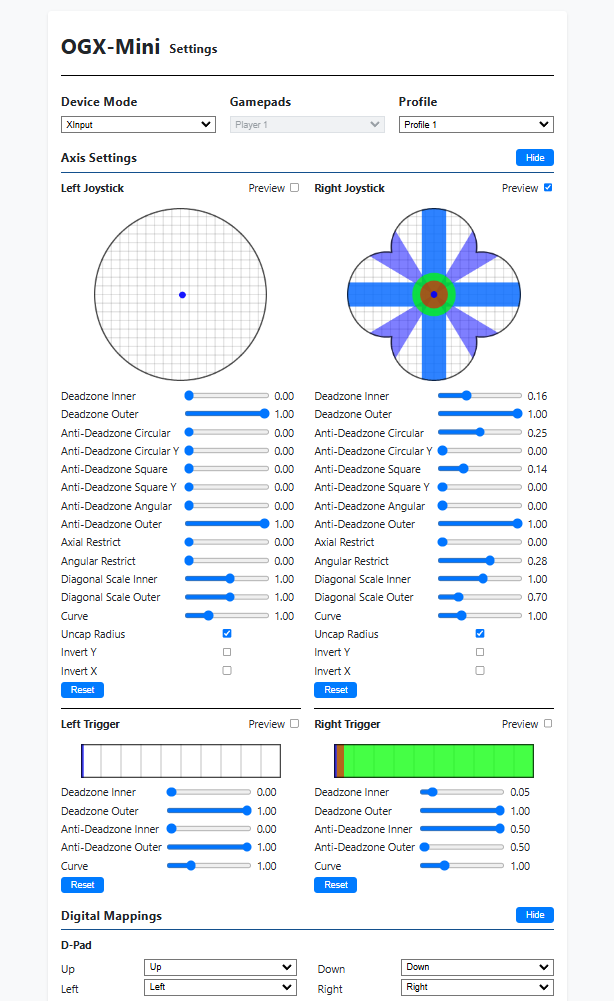
- Added comprehensive deadzone/anti-deadzone settings, using fixed point math so input latency is not greatly impacted. All settings are editable in the web app, the default settings have no impact on latency, but changing them from the defaults will add about 1ms (it's a lot of math).
- Added joystick and trigger input previews to the web app, you can see how your new deadzone settings will effect them.
- Added Bluetooth connectivity to the web app for Pico W, Pico 2 W, and Pico+ESP32.
- No longer requires a controller being plugged in to mount USB in web app mode.
Notes
- Due to the new settings being added in this verison, all old settings will be overwritten with defaults, including the device mode setting. The first time your OGX-Mini boots after upgrading your firmware, it will be in OG Xbox mode.
- The new version of the web app is not compatible with v1.0.0-alpha2 and below, so you must update to alpha3 to use it, I will look into possibly hosting the webapp on the OGX-Mini itself so that this won't become a consistent problem.
- The Pico+ESP32 setup can no longer connect to the web app via USB (may change at a later date), all settings are stored on the ESP32.
New web app interface
v1.0.0-alpha2
v1.0.0 Alpha 2
- Fixed XInput driver bug
- Added Horipad Switch controller support
- Added binaries for a Pico+ESP32 configuration (W_ESP32 file suffix), along with a diagram in the Hardware folder of this repo. For the ESP32, flash bootloader.bin to 0x1000, partition-table.bin to 0x8000, and OGX-Mini-ESP32.bin to 0x10000.
- Added CMake script to make sure all git submodules (and their submodules) are downloaded when configuring the project.
v1.0.0-alpha1
Features new to v1.0.0-alpha release
- Bluetooth functionality for the Pico W
- Web application for configuring deadzones and buttons mappings, supports up to 8 saved profiles.
- Pi Pico 2 (RP2350) support.
- Reduced latency by about 3-4 ms, graphs showing comparisons are coming
- Delayed USB mount until a controller is plugged in, useful for internal installation (non-Pico W only).
- Generic HID controller support (fallback for unknown HID controllers).
- Dualshock 3 emulation (minus gyros), PS3 rumble now works.
- Steel Battalion controller emulation with a wireless Xbox 360 chatpad, same mappings as OGX360.
- Analog button support on OG Xbox, PS3, and DInput.
- RGB LED support for RP2040-Zero and Adafruit Feather boards.
Fixes
- Fixed Xbox 360 USB descriptor issue causing some inputs to not work.
- More consistent setting of Xbox 360 LEDs on connect.
- Fixed wrong RP240-Zero LED pin in source, though the RGB LED can be used now.
New to source
- Updated license, wired firmware is still all MIT, Bluetooth has a mixed license for Bluepad32 and BTStack
- ESP32 firmware to pair with the RP2040, hardware diagrams and binaries will be coming shortly
- 4 channel i2c, hook up 4 RP2040-Zero boards via i2c and use one Xbox 360 wireless adapter to control all 4.
- Xbox DVD dongle emulation, dump your firmware (see Tools directory) and compile to use this feature.
- New, clearer hardware diagrams in the hardware folder.
v0.4.0
Changes
- Added Dualshock 3 controller support (press the PS button after you plug it in)
- Added generic DInput controller support
- Fixed wireless Xbox 360 right rumble motor not working
- Fixed wireless Xbox 360 controller LEDs not being set properly
- Added LED indication for USB device being mounted/unmounted
- Added PCB files for a custom board using the Waveshare RP2040-Zero
- Refactored a bunch of things, made the usbd folder its own repo for easier integration into other projects
v0.3.0
Input modes
Added on-the-fly input mode switching with button combos, by default it's set to OG Xbox but once you set a new input mode it will persist after powering off the device.
Hold one of these combos for 3 seconds, the new mode will be stored in the flash and the device will restart:
XInput
Start + Dpad Up
Original Xbox
Start + Dpad Right
Switch
Start + Dpad Down
PlayStation 3
Start + Dpad Left
PlayStation Classic
Start + A (Cross for PS, B for Switch gamepads)
The Start button is Plus on Switch gamepads and Options on PS4/5 gamepads.
Other changes
-
Added MPOW Wired Gamepad to the list of allowed PS4 devices.
-
Fixed submodule links so that
git clone --recursivewill properly download linked repositories, woops
v0.2.0
Changes:
- Added PlayStation 3 and PlayStation Classic (mini console) support
- Added support for Switch Pro, Switch wired, PS Classic, and N64 USB gamepads
- Added a USB CDC input mode, so debugging USB host functionality is easier
- Some refactoring, added classes for each supported gamepad
v0.1.0
Initial release