A firmware repository with additional key assignments based on the default keymap.
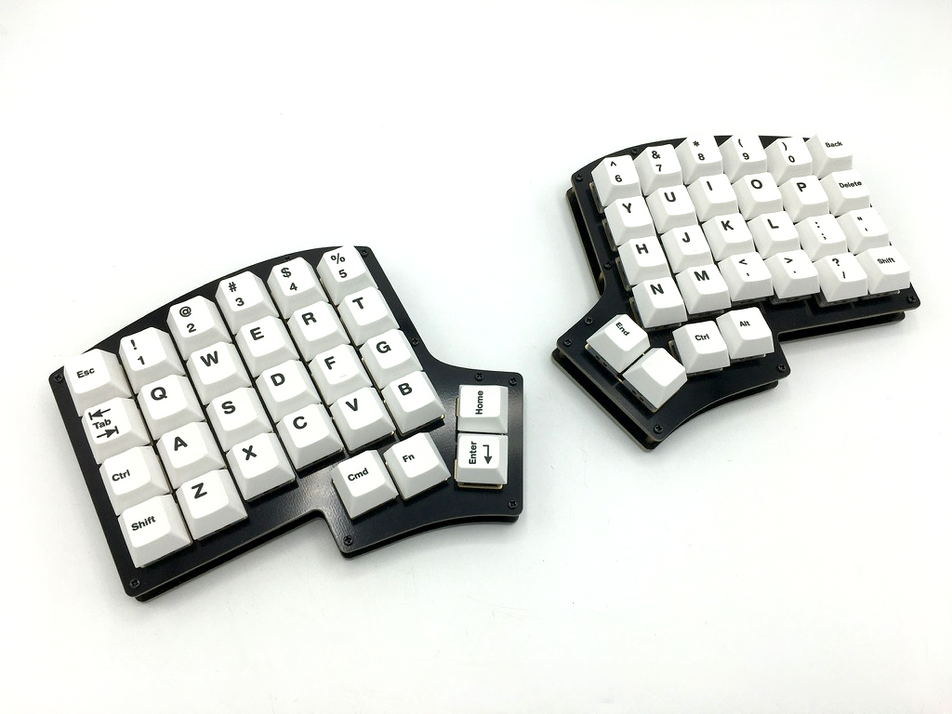
You can purchase parts including the board, keycaps, and plates from KEEB.IO. Since customs duties may apply for purchases over $150, it's recommended to buy only the essential parts (board and plates) from KEEB.IO and purchase keycaps and switches from AliExpress or other sources.
- PCB board
- Aluminum top/bottom plates (plate kit)
- Middle layer (optional)
- Keycaps
- Switches
- Anti-slip rubber pads
- Keyboard link cable (C to C)
Simple keyboard settings can be configured using the QMK Configurator.
The default rules.mk file installed on the PCB board has the VIA_ENABLE option set to FALSE. Therefore, to use VIA, you need to download and install the appropriate firmware from VIA Firmware to enable key configuration using VIA.
The QMK Firmware repository explains how to configure keymaps and build QMK Firmware. You can change key assignments by modifying the keymap.c file and change settings by modifying the rule.mk file. The firmware installed on the PCB board by default does not have options such as MOUSEKEY_ENABLE for using mouse keys or VIA_ENABLE for using VIA. Therefore, to customize the keyboard to better suit your needs, it's recommended to learn how to build firmware using QMK Firmware.
This firmware supports macOS, Windows, Linux, and iOS with automatic keyboard shortcut adaptation. The firmware automatically detects your operating system and applies the appropriate shortcuts for screenshot capture, language switching, and mouse wheel direction.
The firmware follows the basic keymap installed on the PCB board and includes additional shortcut key assignments:
- FN3 key assigned instead of HOME
- CMD+OPT(ALT) keys assigned instead of END
- Mission Control executed with FN1 + FN2 + 6
- Launchpad executed with FN1 + FN2 + 7
- Mouse cursor movement with FN3 + H,J,K,L
- Mouse wheel scrolling with FN3 + N,M,<,>
- Mouse button clicks with FN3 + Y,U,I,O
- Navigate to previous/next page in CHROME with FN3 + P, DEL
- Navigate to parent/child folder in FINDER with FN3 + ;, '
- OS-agnostic screenshot shortcuts (adapts to your OS):
- SC_FULL (FN3+8): Full screen capture
- SC_AREA (FN3+6): Area selection capture
- SC_MENU (FN3+9): Screenshot menu/options
- SC_CLIP_FULL (FN3+Shift+8): Full screen to clipboard
- SC_CLIP_AREA (FN3+7): Area selection to clipboard
- Language switching with LANG_SW (FN1 + bottom-right): Adapts to OS input method
- Mouse wheel direction (MW_RIGHT/UP/DOWN/LEFT) automatically adjusted per OS
This firmware implements OS-aware keyboard shortcuts that automatically adapt to the detected operating system (macOS, Windows, Linux, iOS).
| Feature | macOS/iOS | Windows | Linux |
|---|---|---|---|
| Screenshot shortcuts | ✅ Full support (Cmd+Shift+3/4/5) | ✅ Snipping Tool (Win+Shift+S) | ✅ PrtScn variants |
| Language switching | ✅ Ctrl+Space / Caps Lock | ✅ Right Alt | ✅ Shift+Space |
| Mouse wheel direction | ✅ Natural scrolling | ✅ Reversed scrolling | ✅ Reversed scrolling |
| Mouse control | ✅ Full support | ✅ Full support | ✅ Full support |
-
SC_FULL: Full screen capture
- macOS: Cmd+Shift+3
- Windows: Win+Shift+S (Snipping Tool)
- Linux: PrtScn
-
SC_AREA: Area selection
- macOS: Cmd+Shift+4
- Windows: Win+Shift+S
- Linux: Shift+PrtScn
-
SC_MENU: Screenshot menu/options
- macOS: Cmd+Shift+5 (Screenshot menu)
- Windows: Win+Shift+S
- Linux: PrtScn
-
SC_CLIP_FULL: Full screen to clipboard
- macOS: Cmd+Ctrl+Shift+3
- Windows: Win+Shift+S (saves to clipboard)
- Linux: Ctrl+PrtScn
-
SC_CLIP_AREA: Area selection to clipboard
- macOS: Cmd+Ctrl+Shift+4
- Windows: Win+Shift+S
- Linux: Ctrl+Shift+PrtScn
- LANG_SW: OS-aware language/input switching
- macOS: Ctrl+Space
- iOS: Caps Lock
- Windows: Right Alt (Language bar)
- Linux: Shift+Space (IBus/Fcitx)
- MW_RIGHT/UP/DOWN/LEFT: Automatically adapts to OS scrolling conventions
- macOS/iOS: Natural scrolling (wheel right = scroll right)
- Windows/Linux: Reversed scrolling (wheel right = scroll left)
The firmware uses OS detection to automatically apply the correct shortcuts when you plug in the keyboard. If OS detection is not available, the firmware defaults to macOS shortcuts. All shortcuts provide continuous key press support - holding down a key will repeat the action (useful for mouse wheel scrolling with acceleration).
This firmware includes stability enhancements for split keyboard communication:
| Setting | Value | Purpose |
|---|---|---|
RGB_MATRIX_MAXIMUM_BRIGHTNESS |
100 (default: 120) | Reduce power consumption to stabilize communication |
SPLIT_WATCHDOG_ENABLE |
yes | Auto-recovery when communication is lost |
SPLIT_WATCHDOG_TIMEOUT |
3000ms | Automatic recovery after 3 seconds of communication loss |
- Symptom: Slave keyboard stops responding during LED effect switching
- Cause: Power overconsumption + communication overload from multiple RM_NEXT keys
- Solution: Brightness limit + watchdog + removed duplicate RM_NEXT keys (3→1)
This firmware has been optimized for size while maintaining full functionality:
- Firmware Size: 26,918 / 28,672 bytes (93%, 1,754 bytes free)
- Supported Boards: Iris Rev7 (HEX), Iris CE Rev1 (UF2)
| Optimization | Impact |
|---|---|
CONSOLE_ENABLE = no |
~1,000-1,500 bytes saved |
const → #define conversion |
Minor savings |
| Selective RGB Matrix effects | Reduced from 45 to 30 effects |
SPLIT_WATCHDOG_ENABLE = yes |
Split communication stability |
- Basic (5): Solid Color, Alpha Mods, Gradient Up/Down, Gradient Left/Right, Breathing
- Cycle (8): All, Left/Right, Up/Down, Out/In, Out/In Dual, Pinwheel, Spiral, Rainbow Moving Chevron
- Hue (3): Breathing, Pendulum, Wave
- Special (7): Raindrops, Jellybean Raindrops, Pixel Rain, Pixel Flow, Pixel Fractal, Typing Heatmap, Digital Rain
- Reactive (7): Simple, Standard, Wide, Cross, Nexus, Splash, Solid Splash
# Rev7 (ATmega32u4 - HEX file)
qmk compile -kb keebio/iris/rev7 -km zerodice0

# CE Rev1 (RP2040 - UF2 file)
qmk compile -kb keebio/iris_ce/rev1 -km zerodice0# Rev7
qmk flash -kb keebio/iris/rev7 -km zerodice0
# CE Rev1 - Copy UF2 to RPI-RP2 driveFor detailed build instructions, please check the QMK Documentation.
This project is licensed under the MIT License - see the LICENSE file for details.
For Korean documentation, please refer to README-KR.md.